Text to Speech
Your reading list keeps growing, but your free time does not. Articles pile up in open tabs, documents wait for review, and that ebook you bought months ago sits untouched. Meanwhile, you spend hours commuting, cooking, exercising, or doing chores, time when your eyes are busy but your ears are free.
Text to speech solves this beautifully. It converts any written text into spoken audio, so you can listen to articles, documents, and books instead of reading them. Our free online text to speech tool turns your pasted text into natural sounding speech in seconds, right in your browser.
The uses go far beyond convenience. Students with dyslexia absorb material better by listening. Language learners improve pronunciation by hearing sentences spoken aloud. Writers catch typos and awkward phrasing by listening to their drafts, because the ear notices what the eye skips. People with low vision access written content independently. Commuters turn travel time into learning time. If you have ever wished you could read with your ears, this guide will show you exactly how to get started, which features matter most, and how to get the best listening experience.
A small habit makes the biggest difference: start with short texts while you find a voice and speed you enjoy. Once the settings feel right, longer sessions become effortless. In the sections below, you will find the mistakes that ruin the listening experience, advanced workflows from regular users, and answers to the most common questions.
How to Use Text to Speech
You do not need to install anything or create an account. The tool works in your browser and starts speaking within seconds. Here is the complete process.
- Open the text to speech tool. Load the tool page in Chrome, Safari, Firefox, or Edge on your phone, tablet, or computer. The text box and playback controls appear immediately.
- Paste or type the text you want to hear. Drop in an article, a document, your own draft, or anything else written. Short passages work best when you are testing voices, while longer texts are perfect for extended listening sessions.
- Choose a voice and language. Browse the available voices and pick one you enjoy listening to. Many tools offer multiple languages and accents, so select the one that matches your text. A pleasant voice makes a huge difference over a long listening session.
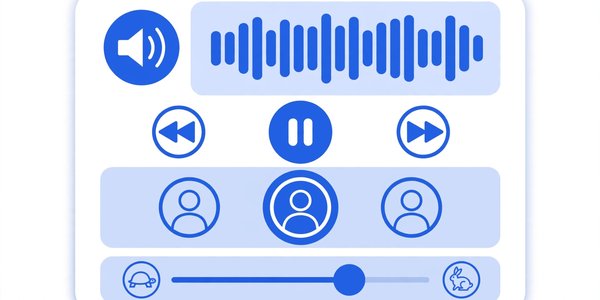
- Adjust the speed and pitch. Set the speaking rate to match your comfort. Beginners and language learners often prefer slightly slower speech, while experienced listeners may enjoy 1.25x or 1.5x speed. Small pitch adjustments can make a voice sound more natural to your ear.
- Press play and listen. Hit the play button and the tool begins reading your text aloud. Use pause when you need a moment to think, and stop to return to the beginning. Many listeners follow along with the highlighted words to stay focused.
- Replay sections or convert new text. Jump back to re hear an important paragraph, or clear the box and paste something new. Your settings are remembered, so the next conversion starts instantly with your preferred voice and speed.
Key Features
- Natural sounding voices: Modern speech synthesis produces smooth, human like voices instead of the robotic tones of the past. Listening feels comfortable even for long texts.
- Multiple languages and accents: Listen in the language of your text, with regional accent options where available. Ideal for multilingual users and language students.
- Adjustable speaking speed: Slow things down to catch every word or speed up to power through long documents. You control the pace completely.
- Word highlighting while reading: Watch each word light up as it is spoken. This keeps your eyes and ears in sync and helps young readers and language learners follow along.
- Completely free: Convert text to speech as often as you like at no cost. No trials, no credits, and no premium voices locked away.
- No signup required: Start listening immediately without creating an account or sharing your email address.
- Works on mobile devices: The responsive design and touch friendly controls make it easy to listen on your phone with earbuds anywhere you go.
- Private by design: Your text is processed in your browser session and never stored. Paste sensitive documents with confidence.
Why Use Our Text to Speech?
Listening is one of the most underused ways to consume information. The average person speaks and hears far faster than they can skim with full comprehension, and audio fits into the gaps of a busy day. A thirty minute commute becomes a thirty minute lecture. A workout becomes a study session. Chores become story time. Text to speech unlocks all of this from any written content you already have.
For accessibility, it is genuinely life changing. People with dyslexia often understand spoken words far better than printed ones. People with low vision or blindness access articles, emails, and documents independently. Older readers with tired eyes keep enjoying long reads without strain. Students who struggle with reading can keep up with coursework by listening instead.
Writers have a secret use for it too: proofreading by ear. When you listen to your draft read aloud, awkward sentences, repeated words, and missing words jump out immediately. Professional editors have used this trick for years, and now anyone can do it in one click. Language learners benefit similarly, hearing correct pronunciation and natural sentence rhythm while they study.
Our tool makes all of this free and instant. There is no software to install, no account to create, and no limit on how much you listen. Whether you want to power through a reading list, study a new language, or simply rest your eyes, the play button is waiting.
Tips for Best Results
- Break text into short paragraphs. Clear paragraph breaks give the voice natural pauses and make it easier to find your place if you pause and resume later.
- Use punctuation to control pacing. Commas create short pauses and periods create longer ones. Adding a well placed comma can fix a sentence that sounds rushed.
- Test several voices before a long session. Spend a minute sampling the available voices. The right voice makes an hour of listening pleasant, while the wrong one becomes tiring.
- Proofread with your ears. Paste your draft and listen all the way through. You will catch typos, clunky phrases, and missing words that silent reading missed.
- Use headphones in noisy places. Good audio isolation helps you focus on the words, especially at higher speeds or in a busy environment.
- Spell out tricky abbreviations. Unusual acronyms and names may be pronounced oddly. Writing them phonetically in a test copy can produce much better sounding results.
Common Mistakes to Avoid
Text to speech is easy to start, but these mistakes can turn a pleasant listen into a frustrating one.
- Pasting one giant block of unformatted text. Without paragraph breaks and punctuation, the voice runs everything together in a monotone rush. Break text into short paragraphs and add commas where a human speaker would pause. The difference in naturalness is dramatic.
- Skipping the voice test before a long session. A voice that sounds fine for thirty seconds can become tiring after an hour. Spend a minute sampling the available voices and speeds before you settle in. Your ears will thank you.
- Leaving abbreviations and acronyms as they are. Speech engines guess at unusual abbreviations, and the guesses are often wrong. Write out tricky terms phonetically in a test copy, or expand abbreviations before converting, for much better pronunciation.
- Listening at a speed you cannot follow. Speeding up to 1.5x feels productive until you realize you retained nothing. Increase speed gradually and only for familiar material. For studying, normal or slightly slower speech with full attention beats fast speech you half hear.
- Using it in noisy places without headphones. Background noise forces you to strain, which defeats the purpose of relaxed listening. A basic pair of earbuds transforms the experience, especially for detailed material.
- Expecting perfect narration of complex documents. Tables, footnotes, and equations do not translate well to speech. Simplify the text first: describe what a table shows in a sentence, and spell out symbols the voice cannot interpret.
Advanced Tips and Real-World Use Cases
Language learners shadow the voice to build fluency. They listen to a sentence, pause, and repeat it aloud, mimicking the pronunciation and rhythm. Doing this for fifteen minutes a day with news articles or textbook passages produces noticeable improvement within weeks.
Writers and editors proofread entire drafts by ear. Listening reveals repeated words, missing words, and clunky sentences that silent reading misses because the brain auto corrects them. Many professionals run every important document through text to speech before it goes out.
Students convert study notes into audio for commute review. Flashcards, summaries, and key definitions become a personal podcast they can replay. Hearing the material in a different format also strengthens memory, since the brain encodes the information through a second channel.
Content creators draft voiceovers with text to speech before recording. They paste the script, listen for awkward phrasing and timing problems, and revise until it flows. This pre check saves rerecording sessions and makes the final recording sound polished from the first take.
Complete List of All Free Online Tools
Browse the full directory of 450+ free tools. Click any tool name to use it instantly - no signup required.
| # | Tool Name | Category |
|---|---|---|
| 1 | A B Test Significance Calculator | Calculators & Converters |
| 2 | Acronym Generator | Utility Tools |
| 3 | Ad Copy Generator | Utility Tools |
| 4 | Add Page Numbers To PDF | PDF Tools |
| 5 | Add Subtitles To Video | Media Tools |
| 6 | Add Subtract Days Calculator | Calculators & Converters |
| 7 | Age Calculator | Calculators & Converters |
| 8 | Angle Converter | Calculators & Converters |
| 9 | API Request Tester | Utility Tools |
| 10 | Area Converter | Calculators & Converters |
| 11 | Article Rewriter | Utility Tools |
| 12 | Audio Converter | Calculators & Converters |
| 13 | Audio Merger | Media Tools |
| 14 | Audio Metadata Editor | Media Tools |
| 15 | Audio Pitch Changer | Media Tools |
| 16 | Audio Speed Changer | Media Tools |
| 17 | Audio To Text Converter | Calculators & Converters |
| 18 | Audio Trimmer | Media Tools |
| 19 | Avatar Maker | Utility Tools |
| 20 | Background Remover | Utility Tools |
| 21 | Backlink Checker | SEO Tools |
| 22 | Banner Maker | Utility Tools |
| 23 | Barcode Generator | Developer Tools |
| 24 | Base64 Encoder Decoder | Developer Tools |
| 25 | Bass Booster | Utility Tools |
| 26 | Bibliography Generator | Utility Tools |
| 27 | Bill Splitter | Utility Tools |
| 28 | Binary Converter | Calculators & Converters |
| 29 | Binary To Text Converter | Calculators & Converters |
| 30 | Birthday Countdown | Date & Time Tools |
| 31 | Bmi Calculator | Calculators & Converters |
| 32 | Bmr Calculator | Calculators & Converters |
| 33 | Body Fat Calculator | Calculators & Converters |
| 34 | Body Surface Area Calculator | Calculators & Converters |
| 35 | Book Title Generator | Utility Tools |
| 36 | Brand Color Finder | Color Tools |
| 37 | Brand Kit Generator | Utility Tools |
| 38 | Break Even Calculator | Calculators & Converters |
| 39 | Broken Link Checker | Utility Tools |
| 40 | Browser Info Checker | Utility Tools |
| 41 | Budget Planner | Utility Tools |
| 42 | Business Card Designer | Utility Tools |
| 43 | Business Card Maker | Utility Tools |
| 44 | Business Days Calculator | Calculators & Converters |
| 45 | Business Name Generator | Utility Tools |
| 46 | Business Proposal Generator | Utility Tools |
| 47 | Button Generator | Utility Tools |
| 48 | Buyer Persona Generator | Utility Tools |
| 49 | Calorie Calculator | Calculators & Converters |
| 50 | Captcha Generator | Utility Tools |
Busy parents and caregivers turn articles and newsletters into audio for hands free moments. While cooking, folding laundry, or waiting at school pickup, they listen to the pieces they never had time to read. It turns scattered pockets of time into a personal briefing, and nothing gets lost in a pile of open tabs.
Frequently Asked Questions
Is the text to speech tool really free?
Yes, completely free with no hidden limits. Convert as much text as you want and listen as often as you like. There is no account to create, no trial period, and no premium tier. We believe listening to text should be available to everyone, including students and people who rely on it for accessibility.
Which languages are supported?
The tool supports many major world languages, with the exact list depending on the voices available in your browser. English, Spanish, French, German, Hindi, Bengali, Arabic, and many more are commonly available. If your browser includes a voice for your language, the tool can use it. Try selecting different voices to see what your device offers.
Can I download the audio as an MP3?
Download options depend on your browser and device. Many users simply listen directly in the browser, which works perfectly for articles and documents. If you need a saved audio file for a project, you can use your device’s built in screen or audio recording while the tool plays. For most everyday listening, the instant playback is all you need.
Is my text kept private?
Yes. Your text is processed within your browser session and is never uploaded, stored, or shared. You can safely convert private emails, confidential work documents, unpublished manuscripts, and personal notes without worrying about who might access them.
How much text can I convert at once?
There is no strict limit, and the tool comfortably handles anything from a single sentence to a full length article or chapter. Extremely long documents may take a moment to start speaking on older devices, but playback itself remains smooth. For very long books, converting one chapter at a time gives the best experience. Shorter chunks also make it easier to jump back to a specific section when you want to rehear something.
Which browsers work best?
The tool works in all modern browsers, including Chrome, Edge, Safari, and Firefox, on both desktop and mobile. Chrome and Edge typically offer the widest selection of natural sounding voices. If a voice you want is missing, check your operating system’s speech settings, since browsers draw many voices from there. If a voice sounds flat, try another browser on the same device, since voice quality can vary between them.
Can I use it offline?
This depends on the voices installed on your device. Some operating systems include offline voices that work without an internet connection, while others stream higher quality voices from the cloud. Once the page is loaded, basic playback often continues offline if your device has local voices available. Travelers often preload the page and confirm a local voice works before a flight, so the listening keeps going without wifi.
Can I use the audio for videos or commercial projects?
For personal listening, studying, and accessibility, you are free to use the tool as much as you like. For commercial voiceovers in videos or products, check the terms of the specific voice engine your browser uses, since licensing varies. Many creators use text to speech for draft narration and then record a final version, which is a great workflow either way.
Table of Contents
What is Text to Speech?
The text to speech is a free online tool that helps you with text to speech tasks quickly and accurately. Our text to speech is designed to be simple, fast, and reliable. Whether you need a text to speech for personal use or professional work, this free text to speech delivers instant results without any signup or download required.
How to Use the Text to Speech
Using our text to speech is easy. Simply open the text to speech tool above, enter your input, and get instant results. The text to speech processes everything in your browser for maximum privacy and speed. No technical knowledge is needed to use this text to speech effectively.
Benefits of Using Our Text to Speech
Our free text to speech offers many advantages. It is completely free to use, requires no registration, works on all devices, and provides accurate results instantly. The text to speech is updated regularly to ensure the best performance. For more information about text to speech, you can Learn more about text to speech on Wikipedia.
Frequently Asked Questions About Text to Speech
Is the text to speech really free? Yes, our text to speech is 100% free with no hidden costs or premium tiers.
Do I need to create an account to use the text to speech? No, the text to speech works instantly without any signup or login required.
