Binary Converter
Binary looks intimidating the first time you see it. A string of ones and zeros like 01001000 feels like secret code, yet it is simply how computers count. Every photo you take, every message you send, and every file you save is stored as binary underneath. Sooner or later, many people need to convert it. Students meet binary in computer science classes and exams. Developers debug data and read memory dumps. Hobbyists program microcontrollers and work with LED patterns. Network engineers read subnet masks. Our free binary converter at A Tool Today makes all of this approachable. Convert binary to decimal, text, or hexadecimal in one step, or go the other way and turn text and numbers into binary. You get exact results instantly, with no math mistakes and no head scratching over place values.

How to Use the Binary Converter
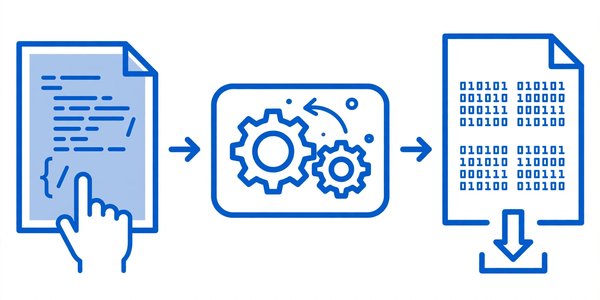
Binary conversion is straightforward once the tool does the arithmetic for you. You only need to provide your value and tell the tool what kind of conversion you want. Here is the full process.
- Choose your conversion direction. Decide what you are converting from and to, such as binary to decimal, decimal to binary, text to binary, or binary to text. Picking the right direction first saves you from converting backwards by accident.
- Enter your value. Type or paste your binary string, like 101101, into the input box. For text conversion, type the plain text instead. The tool accepts common formats, so you can paste values copied from code or documentation.
- Clean up the input if needed. Remove any spaces, prefixes like 0b, or line breaks before converting, unless the tool explicitly accepts them. Clean input is the simplest way to guarantee a correct result on the first attempt.
- Read the instant result. The converted value appears immediately. For example, binary 1010 becomes decimal 10, and the text Hi becomes 01001000 01101001. Check that the output length and format match what you expected.
- Verify with a known value. If you are new to binary, test with a value you know, like converting decimal 65 and confirming you get the binary for the letter A. This quick sanity check builds confidence before you convert real data.
- Copy the result for your project. Select the output and paste it into your code, document, homework, or configuration file. The plain text output drops cleanly into editors and terminals without extra formatting.
Key Features
Our binary converter covers the conversions that students, developers, and hobbyists actually need. These features make it fast and reliable.
- Binary to decimal conversion. Turn any binary string into its decimal value instantly, with exact place value math applied for every bit. Long strings that would take minutes by hand convert in a blink.
- Decimal to binary conversion. Convert regular numbers into binary with correct bit ordering. This is essential for understanding how computers store integers and for low level programming tasks.
- Text to binary encoding. Convert letters, words, and sentences into their binary representation using standard character encoding. Perfect for learning how text is stored or for encoding puzzles and challenges.
- Binary to text decoding. Paste binary and read the hidden message it spells. Great for decoding examples in tutorials, CTF challenges, and classroom exercises.
- Binary to hexadecimal support. Convert binary directly to hex, which developers use constantly for colors, memory addresses, and compact data representation. The tool groups bits correctly into hex digits.
- Input validation. If your binary contains invalid characters, the tool flags the problem instead of silently producing a wrong answer. This saves you from chasing phantom bugs caused by a stray digit.
- Free with no sign up. Every conversion mode is available without an account and without limits. Students can practice all evening and developers can convert all day at no cost.
- Private local processing. Your values are converted inside your browser, so code snippets, keys, and homework answers never leave your device or get stored anywhere.
Why Use Our Binary Converter?
Binary sits at the foundation of everything digital, which means understanding it unlocks a deeper grasp of technology. Students encounter it in computer science courses, where exams ask for conversions between binary, decimal, and hexadecimal under time pressure. Being able to check your manual work against a trusted tool is the fastest way to learn, because instant feedback cements the pattern of how place values double with each bit. Developers meet binary in real work too, reading flags in configuration values, interpreting subnet masks in networking, and debugging data at the bit level. Hobbyists programming Arduino boards or Raspberry Pi projects set pin states and read sensor values in binary. In all these cases, our converter at A Tool Today turns a slow, error prone manual process into a one second check.
The practical value goes beyond study. Imagine you find a binary string in a log file and need to know what it means right now. Doing the conversion by hand means writing out powers of two and adding them up, a process where one slipped digit ruins the answer. Or picture a teacher preparing ten quiz questions, each needing verified conversions. Our tool handles both in moments, with validation that catches bad input before it becomes a bad answer. Because it also converts text both ways, it doubles as a fun way to encode secret messages or solve puzzles. Whether you are learning, teaching, debugging, or just curious, the converter gives you correct answers fast so you can spend your energy on the interesting part of the problem.
Tips for Best Results
- Count your bits for text conversion. Standard text encoding uses 8 bits per character, so a clean binary message usually has a length divisible by 8. If yours does not, check for missing or extra digits.
- Keep leading zeros. In binary, 0010 and 10 have the same value, but the leading zeros matter when you are working with fixed width data like bytes. Preserve them when width is significant.
- Learn the pattern while you convert. Notice how each bit position doubles in value from right to left. Watching this pattern in the tool output is one of the fastest ways to build real binary intuition.
- Use hex as a shortcut for long binary. Every 4 bits equal one hex digit, so long binary strings become much shorter in hex. Our converter handles this grouping for you, which is handy for memory addresses and color codes.
- Double check pasted values. Binary copied from PDFs or web pages sometimes picks up invisible characters or broken line wraps. If a conversion looks wrong, retype the string or paste it into a plain text editor first.
- Practice manual conversion, then verify. If you are studying, work out the answer on paper first, then check it with the tool. This habit builds skill far faster than converting without trying.
Binary Basics: Bits, Bytes, and Place Values
Understanding a little theory makes the converter far more useful. A bit is a single binary digit, either 0 or 1. Eight bits form a byte, the fundamental unit of digital storage. Each position in a binary number represents a power of two, starting from 1 on the far right and doubling as you move left. So the positions from right to left are worth 1, 2, 4, 8, 16, 32, 64, and 128. To read a binary number, you add up the values of every position holding a 1. The binary number 10110100 has ones in the 128, 32, 16, and 4 positions, which add up to 180. Once you see this pattern, binary stops looking like random digits and starts looking like what it is, a tidy counting system.
Computers use binary because their hardware is built from switches with two states, on and off. This simplicity makes circuits reliable and fast, and everything else is built on top of it. Text is stored by assigning each character a number, images by storing color values per pixel, and sound by sampling wave heights, all as binary. A byte can hold values from 0 to 255, which is why 255 appears everywhere in computing, from color channels to network masks. Larger values simply use more bytes strung together. Programmers often read binary in hexadecimal shorthand because each group of 4 bits maps to one hex digit, turning 11111111 into FF. Our converter bridges all three notations, so whether you meet binary in a textbook, a debugger, or a puzzle, you can translate it into the form you understand best. Try converting a few numbers by hand using the doubling pattern, then check yourself with the tool. That loop of practice plus instant feedback is the fastest path to real fluency.
How many bits are in a byte?
There are 8 bits in a byte. This is the standard across virtually all modern computers. A byte can represent 256 distinct values, from 0 to 255, which is why bytes became the basic unit for storing characters, color components, and small integers.
What is the largest number you can store in 8 bits?
The largest value in 8 bits is 255, written as 11111111 in binary. Each of the 8 positions contributes its power of two, and 128 plus 64 plus 32 plus 16 plus 8 plus 4 plus 2 plus 1 equals 255. Add one more bit and the maximum doubles to 511, which shows how quickly binary capacity grows.
What is the difference between binary and hexadecimal?
Binary is base 2, using only 0 and 1, while hexadecimal is base 16, using 0 to 9 and A to F. They represent the same values, but hex is far more compact. Every 4 binary bits equal exactly one hex digit, so programmers use hex as shorthand when reading binary data like memory addresses and color codes.
Frequently Asked Questions
What is binary code?
Binary is a base 2 number system that uses only the digits 0 and 1. Each digit is called a bit, and eight bits form a byte. Computers use binary because their hardware switches have two states, on and off, which map perfectly to 1 and 0. Everything digital, from text to images to video, is stored as binary underneath.
Complete List of All Free Online Tools
Browse the full directory of 450+ free tools. Click any tool name to use it instantly - no signup required.
| # | Tool Name | Category |
|---|---|---|
| 1 | A B Test Significance Calculator | Calculators & Converters |
| 2 | Acronym Generator | Utility Tools |
| 3 | Ad Copy Generator | Utility Tools |
| 4 | Add Page Numbers To PDF | PDF Tools |
| 5 | Add Subtitles To Video | Media Tools |
| 6 | Add Subtract Days Calculator | Calculators & Converters |
| 7 | Age Calculator | Calculators & Converters |
| 8 | Angle Converter | Calculators & Converters |
| 9 | API Request Tester | Utility Tools |
| 10 | Area Converter | Calculators & Converters |
| 11 | Article Rewriter | Utility Tools |
| 12 | Audio Converter | Calculators & Converters |
| 13 | Audio Merger | Media Tools |
| 14 | Audio Metadata Editor | Media Tools |
| 15 | Audio Pitch Changer | Media Tools |
| 16 | Audio Speed Changer | Media Tools |
| 17 | Audio To Text Converter | Calculators & Converters |
| 18 | Audio Trimmer | Media Tools |
| 19 | Avatar Maker | Utility Tools |
| 20 | Background Remover | Utility Tools |
| 21 | Backlink Checker | SEO Tools |
| 22 | Banner Maker | Utility Tools |
| 23 | Barcode Generator | Developer Tools |
| 24 | Base64 Encoder Decoder | Developer Tools |
| 25 | Bass Booster | Utility Tools |
| 26 | Bibliography Generator | Utility Tools |
| 27 | Bill Splitter | Utility Tools |
| 28 | Binary Converter | Calculators & Converters |
| 29 | Binary To Text Converter | Calculators & Converters |
| 30 | Birthday Countdown | Date & Time Tools |
| 31 | Bmi Calculator | Calculators & Converters |
| 32 | Bmr Calculator | Calculators & Converters |
| 33 | Body Fat Calculator | Calculators & Converters |
| 34 | Body Surface Area Calculator | Calculators & Converters |
| 35 | Book Title Generator | Utility Tools |
| 36 | Brand Color Finder | Color Tools |
| 37 | Brand Kit Generator | Utility Tools |
| 38 | Break Even Calculator | Calculators & Converters |
| 39 | Broken Link Checker | Utility Tools |
| 40 | Browser Info Checker | Utility Tools |
| 41 | Budget Planner | Utility Tools |
| 42 | Business Card Designer | Utility Tools |
| 43 | Business Card Maker | Utility Tools |
| 44 | Business Days Calculator | Calculators & Converters |
| 45 | Business Name Generator | Utility Tools |
| 46 | Business Proposal Generator | Utility Tools |
| 47 | Button Generator | Utility Tools |
| 48 | Buyer Persona Generator | Utility Tools |
| 49 | Calorie Calculator | Calculators & Converters |
| 50 | Captcha Generator | Utility Tools |
How do I convert binary to decimal?
Each bit represents a power of two, starting from 1 on the right and doubling leftward. Add up the powers where the bit is 1. For example, 1010 equals 8 plus 2, which is 10. Our converter does this math instantly for strings of any length, so you can skip the manual addition.
How do I convert text to binary?
Each character is first mapped to a number using a character encoding, usually ASCII or UTF-8, and that number is written in binary. The letter A, for example, is 65 in decimal, which is 01000001 in 8 bit binary. Our tool performs this encoding automatically for whole words and sentences.
What is the binary for the letter A?
The uppercase letter A is 01000001 in 8 bit binary, which equals decimal 65. Lowercase a is 01100001, or decimal 97. These are handy reference values when you are learning or testing a conversion.
Is the binary converter free?
Yes, completely free. All conversion directions are included with no account, no trial, and no limits. Use it for homework, projects, debugging, or curiosity as often as you like.
Can I convert binary to hexadecimal?
Yes. The tool converts binary directly to hex by grouping bits in fours, since each group of 4 bits maps to exactly one hex digit. For example, binary 1111 becomes hex F. This is useful for color codes, memory addresses, and anywhere compact notation beats long bit strings.
Why does my binary string show an error?
The most common cause is a character that is not 0 or 1, such as a space, a letter, or an invisible character picked up from a copy paste. Check your input for stray characters, remove prefixes like 0b if the tool does not accept them, and make sure the string contains only ones and zeros.
Table of Contents
What is Binary Converter?
The binary converter is a free online tool that helps you with binary converter tasks quickly and accurately. Our binary converter is designed to be simple, fast, and reliable. Whether you need a binary converter for personal use or professional work, this free binary converter delivers instant results without any signup or download required.
How to Use the Binary Converter
Using our binary converter is easy. Simply open the binary converter tool above, enter your input, and get instant results. The binary converter processes everything in your browser for maximum privacy and speed. No technical knowledge is needed to use this binary converter effectively.
Benefits of Using Our Binary Converter
Our free binary converter offers many advantages. It is completely free to use, requires no registration, works on all devices, and provides accurate results instantly. The binary converter is updated regularly to ensure the best performance. For more information about binary converter, you can Learn more about binary converter on Wikipedia.
Frequently Asked Questions About Binary Converter
Is the binary converter really free? Yes, our binary converter is 100% free with no hidden costs or premium tiers.
Do I need to create an account to use the binary converter? No, the binary converter works instantly without any signup or login required.
