Metronome
Keeping steady time is one of the hardest skills in music, and it is also one of the most rewarding. Whether you are learning your first scale on the piano, tightening up your strumming on the guitar, working on rudiments with drumsticks, or warming up your voice before choir rehearsal, a reliable beat reference makes every practice session more focused and far more productive. The A Tool Today metronome gives you that steady reference right in your browser. There is nothing to download, nothing to install, and no account to create. You simply open the page, set your tempo, and press start. The tool produces a crisp audible click and a clear visual pulse on every beat, so you can feel the groove as well as hear it. It works beautifully on desktop, tablet, and phone, which means your practice companion is always within reach. From slow ballad tempos to quick allegro passages, the full tempo range supports complete beginners and advanced players alike. In the sections below, you will learn how to use every feature, discover why a metronome belongs in your daily routine, and pick up practical tips that make your practice time count.

How to Use Our Metronome
Getting started takes less than a minute. The interface is intentionally simple, so you spend your time playing instead of reading manuals. Follow these six steps to set up the perfect practice click for any piece of music.
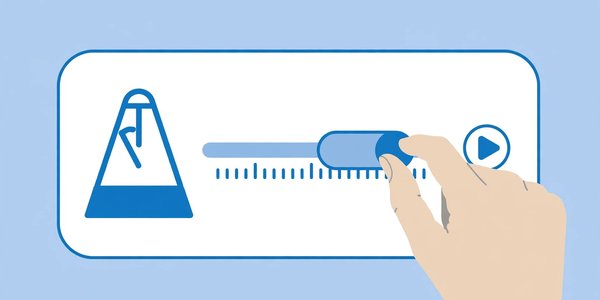
- Set your tempo in beats per minute. Everything starts with BPM, which tells you how many beats fit into one minute. Drag the slider or type a number directly into the tempo field. The range runs from a slow 40 BPM, ideal for careful scale work and warmups, all the way to 208 BPM for fast passages and speed drills. If you are working from sheet music, look for the tempo marking printed above the first staff, such as Andante or Allegro, and match it here for an authentic feel.
- Choose a time signature and turn on the accent. Most of the music you play will be in 4/4 time, so the tool starts there, but you can switch to 3/4 for waltzes, 6/8 for flowing compound grooves, and other common signatures. Enable the accent option to make beat one stand out with a higher pitched click. That emphasized downbeat works like a friendly guidepost, so you always know exactly where each new bar begins, even in long or complex pieces.
- Pick a click sound you enjoy hearing. A harsh click becomes irritating after twenty minutes of practice, so the tool includes several tones, from a classic mechanical tick to a soft woodblock and a smooth digital beep. Choose the one that feels pleasant at your normal practice volume, then set the level so the click sits clearly above your instrument without hurting your ears. Headphones work wonderfully for quiet late night sessions.
- Press start and lock in with the pulse. Hit the large start button and the metronome begins instantly, flashing in time with every click. Watch the visual pulse for the first few bars to internalize the groove, then let your ears take over. Count along out loud at first, one two three four, until the counting feels automatic. Once the rhythm sits comfortably in your body, pick up your instrument and join in.
- Play through your piece and notice where you drift. Your goal on the first run is not perfection. It is noticing where you rush ahead or drag behind. Typical trouble spots include tricky transitions, fast runs, and the bar right after a rest. When you feel yourself pulling ahead or falling behind, relax your shoulders, take a breath, and let the click gently pull you back into place. Small corrections, repeated daily, build rock solid timing over time.
- Fine tune the tempo, try tap tempo, and slow down when needed. If a passage sounds messy, lower the tempo until you can play it cleanly three times in a row, then raise it a few clicks and repeat the process. Not sure what tempo a song uses. Tap the tap tempo button in rhythm with the music and the tool calculates the BPM for you automatically. When you finish, press stop, and your settings stay ready for your next session.
Key Features of Our Metronome
This is not a bare bones click generator. Every feature was chosen to make real practice sessions smoother, quieter, and more enjoyable for musicians at every level.
- Wide tempo range from 40 to 208 BPM. Cover everything from very slow practice tempos to extremely fast performance speeds. The full range means one tool serves your first beginner exercise and your most demanding advanced repertoire.
- Tap tempo finder. Hear a song and wonder how fast it is. Tap along with the rhythm and the tool instantly calculates the beats per minute. It is the fastest way to match a recording or set a tempo by feel.
- Multiple time signatures with beat accents. Practice in 4/4, 3/4, 2/4, and 6/8, with an optional louder click on beat one. Accents train your internal sense of the bar, which is essential for confident ensemble playing.
- Several pleasant click sounds. Switch between a classic tick, a warm woodblock, and a soft digital beep. A sound you like is a sound you will practice with longer, and longer focused practice is what builds skill.
- Visual pulse on every beat. A bright flash marks each beat, with a distinct flash for accented downbeats. The visual cue is perfect for hearing impaired musicians, noisy rooms, or moments when you practice with the sound turned low.
- Precise and stable timing engine. The metronome uses your browser’s high resolution audio clock to schedule clicks, so the tempo stays rock steady without drifting. What you hear is an honest, trustworthy reference beat.
- Works on any device with a browser. Practice on your laptop at home, your tablet at lessons, or your phone in the rehearsal room. The layout adapts to small screens, and the large start button is easy to hit mid session.
- Completely free with no signup. There is no account to create, no app to install, and no trial that expires. Open the page and start practicing. Your time belongs to music, not to registration forms.
Why Use Our Metronome?
Great timing is not a talent reserved for a lucky few. It is a trainable skill, and the metronome is the most effective training partner ever invented. When you practice with a steady click, your brain learns to subdivide time accurately, your hands and voice learn to land exactly on the beat, and the habit of rushing difficult passages slowly disappears. Students who use a metronome regularly progress noticeably faster than those who do not, because every minute of practice reinforces the same reliable pulse. The benefits extend beyond solo practice. If you play in a band, an orchestra, or a worship team, tight timing is what makes the group sound professional instead of messy. Recording sessions become far less stressful too, since engineers love musicians who can play to a click without constant punching in. Exam candidates and audition hopefuls gain confidence knowing their tempo will hold steady under pressure. Our online metronome removes every excuse for skipping this essential training. It costs nothing, lives in your browser, and is ready in seconds whenever inspiration strikes. Whether you practice five minutes before breakfast or an hour every evening, a few clicks a day will transform the way your music feels, both to you and to everyone listening.
Tips for Best Results
Small habits make a big difference with metronome practice. These tips come from experienced teachers and will help you get more from every session.
- Start slower than you think you need. Most players set the tempo too high and reinforce mistakes. Drop the BPM until the passage feels almost too easy, master it there, then climb gradually.
- Practice subdivisions, not just beats. Set the click to eighth notes or triplets inside a slow tempo. Hearing the spaces between beats trains finer control than a single quarter note click ever could.
- Count out loud before you play. Clap or tap the rhythm while counting one e and a, two e and a. If you cannot count it, you cannot play it cleanly, so solve the rhythm away from your instrument first.
- Use the accent to feel the bar. Turn on the downbeat accent in 3/4 and 6/8 practice. Feeling where each bar starts is the foundation of confident phrasing and clean ensemble entrances.
- Keep sessions short and daily. Fifteen focused minutes every day beats a single exhausting three hour session. Consistency builds the neural pathways that make steady timing automatic.
- Record yourself occasionally. Play along with the click while recording on your phone, then listen back. You will hear rushing and dragging you never noticed live, and that awareness accelerates improvement.
Frequently Asked Questions
Quick answers to the questions musicians ask most about our free online metronome.
What does BPM mean in music?
BPM stands for beats per minute, and it measures tempo. A setting of 60 BPM means one beat every second, while 120 BPM means two beats every second. Higher numbers feel faster and more energetic, lower numbers feel slower and calmer. Composers often print a BPM value or an Italian tempo term on sheet music to tell you the intended speed.
Is this metronome really free to use?
Yes, completely free. There are no subscriptions, no premium tiers, and no locked features. You can practice as long as you like, as often as you like, without creating an account or paying anything. A Tool Today believes essential practice tools should be available to every musician.
How accurate is the online metronome timing?
Very accurate. The tool schedules clicks using your browser’s high resolution audio clock, which keeps the tempo steady without the drift you might expect from a web page. For practice purposes it is every bit as reliable as a dedicated hardware metronome, and far more convenient.
What is tap tempo and how do I use it?
Tap tempo lets you find the speed of any song by feel. Listen to the music and tap the tap button in time with the beat, usually for at least four to eight taps. The tool averages your taps and displays the matching BPM, which you can then use as your practice tempo. It is perfect for learning songs by ear.
Complete List of All Free Online Tools
Browse the full directory of 450+ free tools. Click any tool name to use it instantly - no signup required.
| # | Tool Name | Category |
|---|---|---|
| 1 | A B Test Significance Calculator | Calculators & Converters |
| 2 | Acronym Generator | Utility Tools |
| 3 | Ad Copy Generator | Utility Tools |
| 4 | Add Page Numbers To PDF | PDF Tools |
| 5 | Add Subtitles To Video | Media Tools |
| 6 | Add Subtract Days Calculator | Calculators & Converters |
| 7 | Age Calculator | Calculators & Converters |
| 8 | Angle Converter | Calculators & Converters |
| 9 | API Request Tester | Utility Tools |
| 10 | Area Converter | Calculators & Converters |
| 11 | Article Rewriter | Utility Tools |
| 12 | Audio Converter | Calculators & Converters |
| 13 | Audio Merger | Media Tools |
| 14 | Audio Metadata Editor | Media Tools |
| 15 | Audio Pitch Changer | Media Tools |
| 16 | Audio Speed Changer | Media Tools |
| 17 | Audio To Text Converter | Calculators & Converters |
| 18 | Audio Trimmer | Media Tools |
| 19 | Avatar Maker | Utility Tools |
| 20 | Background Remover | Utility Tools |
| 21 | Backlink Checker | SEO Tools |
| 22 | Banner Maker | Utility Tools |
| 23 | Barcode Generator | Developer Tools |
| 24 | Base64 Encoder Decoder | Developer Tools |
| 25 | Bass Booster | Utility Tools |
| 26 | Bibliography Generator | Utility Tools |
| 27 | Bill Splitter | Utility Tools |
| 28 | Binary Converter | Calculators & Converters |
| 29 | Binary To Text Converter | Calculators & Converters |
| 30 | Birthday Countdown | Date & Time Tools |
| 31 | Bmi Calculator | Calculators & Converters |
| 32 | Bmr Calculator | Calculators & Converters |
| 33 | Body Fat Calculator | Calculators & Converters |
| 34 | Body Surface Area Calculator | Calculators & Converters |
| 35 | Book Title Generator | Utility Tools |
| 36 | Brand Color Finder | Color Tools |
| 37 | Brand Kit Generator | Utility Tools |
| 38 | Break Even Calculator | Calculators & Converters |
| 39 | Broken Link Checker | Utility Tools |
| 40 | Browser Info Checker | Utility Tools |
| 41 | Budget Planner | Utility Tools |
| 42 | Business Card Designer | Utility Tools |
| 43 | Business Card Maker | Utility Tools |
| 44 | Business Days Calculator | Calculators & Converters |
| 45 | Business Name Generator | Utility Tools |
| 46 | Business Proposal Generator | Utility Tools |
| 47 | Button Generator | Utility Tools |
| 48 | Buyer Persona Generator | Utility Tools |
| 49 | Calorie Calculator | Calculators & Converters |
| 50 | Captcha Generator | Utility Tools |
Which time signatures does the metronome support?
The tool supports the signatures musicians use most, including 4/4, 3/4, 2/4, and 6/8, along with an adjustable accent on the downbeat. If you play popular, classical, or folk music, you will find everything you need for confident practice.
Can I use the metronome on my phone or tablet?
Absolutely. The page is fully responsive and works in any modern mobile browser on iOS and Android. The controls stay large and touch friendly, so you can start, stop, and adjust the tempo easily during lessons, rehearsals, or practice on the go.
Do I need to create an account or install an app?
No. There is nothing to install and no account to create. Open the metronome page in your browser and press start. Your settings remain on the page for the session, and you can bookmark it for one tap access whenever you practice.
What tempo should a beginner start with?
Most beginners do well starting between 60 and 80 BPM, which feels calm and gives you time to think between beats. Choose a speed where you can play your exercise correctly and relaxed, even if it feels almost too slow. Speed built on top of clean, comfortable playing lasts, while speed built on tension falls apart. As the exercise becomes easy, raise the tempo by four to eight BPM at a time. This gradual ladder approach is how professionals build serious velocity without developing sloppy habits.
Can I use the metronome for activities other than music?
Absolutely. Runners use it to lock in a steady stride cadence, which improves efficiency and reduces injury risk. Public speakers practice with a slow click to avoid rushing through presentations. Fitness fans time exercise intervals and rest periods with it. It even works as a gentle pacing aid for meditation breathing or for keeping a steady rhythm while learning to type. Anytime you need a reliable sense of time passing, the metronome delivers.
Table of Contents
What is Metronome?
The metronome is a free online tool that helps you with metronome tasks quickly and accurately. Our metronome is designed to be simple, fast, and reliable. Whether you need a metronome for personal use or professional work, this free metronome delivers instant results without any signup or download required.
How to Use the Metronome
Using our metronome is easy. Simply open the metronome tool above, enter your input, and get instant results. The metronome processes everything in your browser for maximum privacy and speed. No technical knowledge is needed to use this metronome effectively.
Benefits of Using Our Metronome
Our free metronome offers many advantages. It is completely free to use, requires no registration, works on all devices, and provides accurate results instantly. The metronome is updated regularly to ensure the best performance. For more information about metronome, you can Learn more about metronome on Wikipedia.
Frequently Asked Questions About Metronome
Is the metronome really free? Yes, our metronome is 100% free with no hidden costs or premium tiers.
Do I need to create an account to use the metronome? No, the metronome works instantly without any signup or login required.
