Kanban Board
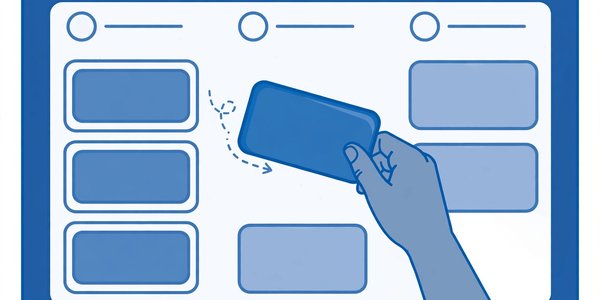
Staring at a long to-do list can feel overwhelming. Tasks pile up, priorities blur, and you have no idea how much work is actually in progress. The Kanban board solves this with a simple visual approach: your work is laid out as cards in columns, moving from left to right as tasks progress from idea to done. Originally developed at Toyota to manage manufacturing, Kanban has become one of the most popular ways for teams and individuals to organize work of any kind. Our free online Kanban board from A Tool Today gives you this powerful visual system right in your browser. Create columns for your workflow stages, add task cards, and drag them along as work moves forward. You can see bottlenecks instantly, celebrate finished work, and keep every project transparent. No downloads, no accounts, no cost. Software teams use Kanban for sprints, marketers use it for content pipelines, students use it for assignments, and freelancers use it to juggle clients. It works for personal goals too, from planning a wedding to managing a home renovation. Use our free Kanban board online and turn your chaotic task list into a clear visual workflow that keeps everything moving.

How to Use Kanban Board
Setting up your Kanban board takes just a few minutes, and the visual layout makes it intuitive from the start. Follow these steps to build a board that fits your workflow.
- Set up your workflow columns. Start with the classic three columns: To Do, In Progress, and Done. These cover most workflows beautifully. If your process has more stages, add columns to match reality, such as Backlog, To Do, In Review, and Done for content teams, or Ideas, Planning, Doing, and Completed for personal projects. Your columns should mirror how work actually flows through your hands, not some idealized version of it.
- Add your tasks as cards. Break your work into individual task cards, one card per task. Give each card a clear, specific title like Write product launch email instead of vague labels like Marketing stuff. Add details to the card such as a description, due date, or priority level so anyone looking at the board understands what needs to happen. Keep tasks small enough to finish in a reasonable time, since big vague cards tend to get stuck.
- Place cards in the correct column. Put new tasks in your first column, usually To Do or Backlog. Cards that you are actively working on belong in In Progress. The key discipline of Kanban is honesty: a card should only sit in In Progress if someone is genuinely working on it right now. This simple rule reveals the true state of your work and prevents the common problem of starting ten things and finishing none.
- Move cards as work progresses. When you start a task, drag its card into In Progress. When it is finished, move it to Done. This physical act of moving cards is surprisingly motivating, and the growing Done column gives you a visible record of accomplishment. For teams, moving cards keeps everyone informed without status meetings. Anyone can glance at the board and see exactly where every task stands.
- Limit work in progress. This is the secret weapon of Kanban. Set a maximum number of cards allowed in your In Progress column, such as three. When the column is full, you must finish something before starting anything new. This limit forces focus, reduces the mental cost of switching between tasks, and exposes bottlenecks. If cards keep piling up in one column, that stage of your workflow needs attention.
- Review and refine your board regularly. Once a week, look at your board with fresh eyes. Are cards getting stuck in a particular column? Are some tasks too big and need splitting? Should you add a column for a recurring stage you keep handling informally? Kanban works best when the board evolves with your real workflow. Small regular tweaks keep it accurate and useful instead of letting it drift into irrelevance.
Key Features
Our free Kanban board includes everything you need to visualize and manage your work effectively.
- Visual drag-and-drop columns. Your work is displayed as an intuitive board with columns for each workflow stage. Cards move smoothly between columns, giving you and your team an instant visual picture of what is planned, what is in progress, and what is complete. No more digging through lists or asking for status updates.
- Customizable workflow stages. Every team works differently, so your board should too. Create, rename, and reorder columns to match your exact process. Whether you need a simple three-column setup or a detailed multi-stage pipeline, the board adapts to your workflow instead of forcing you into a rigid template.
- Detailed task cards. Each card holds more than just a title. Add descriptions, due dates, priorities, and notes so every task carries its full context. Rich cards mean less time hunting for details in emails or chat messages, because the information lives right where the work is tracked.
- Work-in-progress limits. Set caps on how many cards can sit in each column to enforce focus and reveal bottlenecks. When a column hits its limit, it is a clear signal to finish existing work before starting new tasks. This single feature does more for productivity than almost any other project management technique.
- Instant bottleneck visibility. Because every task is visible on one board, problem areas jump out immediately. If ten cards are stuck in review while development sits empty, you know exactly where to focus. This transparency helps teams fix process problems early instead of discovering them at deadline time.
- Works for teams and individuals. Use the board solo to manage your personal projects, studies, or freelance clients, or share it with a team to coordinate complex work. The same simple visual language works at every scale, from a personal habit tracker to a company-wide product launch.
- No sign-up or installation needed. Open the tool in your browser and start building your board immediately. There is nothing to download and no account to create. This makes it easy to try Kanban for the first time or to set up a quick board for a short-term project without any overhead.
- Free forever with no limits. Create as many boards and cards as you need at no cost. A Tool Today believes visual work management should be accessible to everyone, from solo freelancers to growing teams, so the full tool is free with no premium tier hiding the best features.

Why Use Our Kanban Board?
Human brains process visual information far faster than text, which is why a Kanban board feels so much clearer than a to-do list. When your work is spread across columns, you understand your entire workload in a single glance instead of scrolling through lines of text trying to remember what is urgent. This clarity reduces the mental load of managing work, leaving more brainpower for actually doing it. Our free online Kanban board brings this advantage to anyone with a browser. For teams, the board becomes a shared source of truth that cuts down on status meetings and miscommunication. Instead of asking what everyone is working on, you look at the board. Instead of discovering at the last minute that a task is blocked, you see the stuck card days earlier. Remote teams especially benefit, because the board works asynchronously across time zones without anyone needing to be online at the same time. For individuals, Kanban tames the chaos of juggling multiple responsibilities. Students can track assignments from different classes in one place. Freelancers can see every client project at once and make sure nothing falls behind. Even household projects like renovations or event planning become manageable when every task is visible and moving forward. The work-in-progress limit is the feature that changes behavior most. By forcing you to finish before starting, it breaks the habit of having fifteen half-done tasks and replaces it with a steady rhythm of completed work. Finishing feels good, and the Done column becomes a motivating record of progress. If your current system is a mix of sticky notes, memory, and hope, try our free Kanban board online and experience what visual work management can do.
Tips for Best Results
These practical tips will help you get maximum value from your Kanban board.
- Keep task cards small and specific. Break large projects into cards that can be completed in a day or two. Small cards move through the board steadily, which keeps momentum high and makes progress visible. A card that sits in progress for three weeks is a sign it needs to be split into smaller pieces.
- Define what done means for each column. Agree on clear rules for when a card can move to the next column. For example, a card moves to Done only when the work is complete and reviewed, not just drafted. Clear exit criteria prevent cards from moving forward prematurely and keep quality high.
- Start with strict work-in-progress limits. Begin with a low limit, like two or three cards in progress, and only raise it if work genuinely flows faster. Most people discover their real capacity is lower than they thought. A strict limit feels uncomfortable at first but quickly becomes the habit that keeps you focused.
- Use the board as your daily starting point. Open your Kanban board first thing each morning and pick your focus from the To Do column. This replaces the morning scramble of figuring out what to work on. End the day by moving finished cards to Done, which gives you a satisfying sense of closure.
- Hold a quick weekly board review. Spend ten minutes each week looking for stuck cards, overloaded columns, and tasks that are no longer relevant. Archive completed work, delete obsolete cards, and adjust columns if your process has changed. A well-maintained board stays trustworthy, and a trustworthy board gets used.
- Make the board visible to everyone involved. If you work with a team, make sure everyone can see the board easily. Shared visibility creates natural accountability and reduces the need for check-in messages. For personal boards, keeping it as your browser homepage or a pinned tab works wonders for staying on track.
Frequently Asked Questions
What is a Kanban board?
A Kanban board is a visual tool for managing work. Tasks are represented as cards arranged in columns that represent stages of a workflow, such as To Do, In Progress, and Done. As work progresses, cards move from left to right across the board. This gives you an instant visual overview of everything in progress, what is coming up, and what has been completed. Our free online Kanban board from A Tool Today lets you create and manage boards right in your browser.
Is this Kanban board really free?
Yes, completely free with no sign-up required. You can create boards, add cards, and customize columns without paying anything or creating an account. A Tool Today offers this tool free because visual work management is something everyone should have access to, whether you are running a business or organizing your personal life.
What is the difference between Kanban and a to-do list?
A to-do list shows tasks as flat lines of text with no sense of progress or workflow. A Kanban board shows where each task stands in your process, how much work is in progress, and where bottlenecks are forming. The visual layout and work-in-progress limits make Kanban far better for managing ongoing workflows, while simple to-do lists work fine for one-off errands.
How many columns should my Kanban board have?
Start with three: To Do, In Progress, and Done. This covers most workflows. Add more columns only when you have a distinct stage that tasks regularly pass through, such as Review or Testing. Too many columns make the board confusing, while too few hide important stages. Let your real process guide you, and adjust as you learn what works.
Complete List of All Free Online Tools
Browse the full directory of 450+ free tools. Click any tool name to use it instantly - no signup required.
| # | Tool Name | Category |
|---|---|---|
| 1 | A B Test Significance Calculator | Calculators & Converters |
| 2 | Acronym Generator | Utility Tools |
| 3 | Ad Copy Generator | Utility Tools |
| 4 | Add Page Numbers To PDF | PDF Tools |
| 5 | Add Subtitles To Video | Media Tools |
| 6 | Add Subtract Days Calculator | Calculators & Converters |
| 7 | Age Calculator | Calculators & Converters |
| 8 | Angle Converter | Calculators & Converters |
| 9 | API Request Tester | Utility Tools |
| 10 | Area Converter | Calculators & Converters |
| 11 | Article Rewriter | Utility Tools |
| 12 | Audio Converter | Calculators & Converters |
| 13 | Audio Merger | Media Tools |
| 14 | Audio Metadata Editor | Media Tools |
| 15 | Audio Pitch Changer | Media Tools |
| 16 | Audio Speed Changer | Media Tools |
| 17 | Audio To Text Converter | Calculators & Converters |
| 18 | Audio Trimmer | Media Tools |
| 19 | Avatar Maker | Utility Tools |
| 20 | Background Remover | Utility Tools |
| 21 | Backlink Checker | SEO Tools |
| 22 | Banner Maker | Utility Tools |
| 23 | Barcode Generator | Developer Tools |
| 24 | Base64 Encoder Decoder | Developer Tools |
| 25 | Bass Booster | Utility Tools |
| 26 | Bibliography Generator | Utility Tools |
| 27 | Bill Splitter | Utility Tools |
| 28 | Binary Converter | Calculators & Converters |
| 29 | Binary To Text Converter | Calculators & Converters |
| 30 | Birthday Countdown | Date & Time Tools |
| 31 | Bmi Calculator | Calculators & Converters |
| 32 | Bmr Calculator | Calculators & Converters |
| 33 | Body Fat Calculator | Calculators & Converters |
| 34 | Body Surface Area Calculator | Calculators & Converters |
| 35 | Book Title Generator | Utility Tools |
| 36 | Brand Color Finder | Color Tools |
| 37 | Brand Kit Generator | Utility Tools |
| 38 | Break Even Calculator | Calculators & Converters |
| 39 | Broken Link Checker | Utility Tools |
| 40 | Browser Info Checker | Utility Tools |
| 41 | Budget Planner | Utility Tools |
| 42 | Business Card Designer | Utility Tools |
| 43 | Business Card Maker | Utility Tools |
| 44 | Business Days Calculator | Calculators & Converters |
| 45 | Business Name Generator | Utility Tools |
| 46 | Business Proposal Generator | Utility Tools |
| 47 | Button Generator | Utility Tools |
| 48 | Buyer Persona Generator | Utility Tools |
| 49 | Calorie Calculator | Calculators & Converters |
| 50 | Captcha Generator | Utility Tools |
What are work-in-progress limits?
Work-in-progress limits cap the number of cards allowed in a column at one time, most commonly the In Progress column. For example, a limit of three means you cannot start a fourth task until you finish one. This forces focus, reduces multitasking, and makes bottlenecks visible. It is one of the most powerful and most overlooked features of the Kanban method.
Can I use a Kanban board for personal projects?
Absolutely. Kanban works beautifully for personal use. People use it for job hunting, planning weddings, managing home renovations, tracking fitness goals, organizing study schedules, and running side businesses. Any project with multiple tasks that move through stages benefits from the visual clarity of a board.
Do I need a team to benefit from Kanban?
Not at all. Solo users often see the biggest improvement because Kanban replaces the mental juggling of keeping everything in your head. The board becomes your external brain, showing you exactly what to focus on next. Teams add the benefit of shared visibility, but individuals get the core value of clarity and focus on their own.
How is Kanban different from Scrum?
Both are agile methods, but they work differently. Scrum organizes work into fixed time periods called sprints with defined roles and ceremonies. Kanban is a continuous flow system with no required meetings or roles, just a visual board and a few simple rules. Kanban is easier to start with and more flexible, which is why many teams and individuals prefer it for everyday work management.
Table of Contents
What is Kanban Board?
The kanban board is a free online tool that helps you with kanban board tasks quickly and accurately. Our kanban board is designed to be simple, fast, and reliable. Whether you need a kanban board for personal use or professional work, this free kanban board delivers instant results without any signup or download required.
How to Use the Kanban Board
Using our kanban board is easy. Simply open the kanban board tool above, enter your input, and get instant results. The kanban board processes everything in your browser for maximum privacy and speed. No technical knowledge is needed to use this kanban board effectively.
Benefits of Using Our Kanban Board
Our free kanban board offers many advantages. It is completely free to use, requires no registration, works on all devices, and provides accurate results instantly. The kanban board is updated regularly to ensure the best performance. For more information about kanban board, you can Learn more about kanban board on Wikipedia.
Frequently Asked Questions About Kanban Board
Is the kanban board really free? Yes, our kanban board is 100% free with no hidden costs or premium tiers.
Do I need to create an account to use the kanban board? No, the kanban board works instantly without any signup or login required.
