Eye Chart Test
Your vision shapes almost everything you do. You rely on your eyes to read, drive, work, study, and enjoy the world around you, yet most people only think about their eyesight when something already feels wrong. Maybe you have started squinting at road signs, holding your phone a little farther away, or getting headaches after a long day at the computer. These small signs are easy to brush aside, but they can be early hints that your vision has changed. Our free Eye Chart Test gives you a quick and simple way to check how clearly you see, right from your own screen, without booking an appointment or spending a cent. It works like the classic Snellen chart you have seen at the eye doctor’s office, with rows of letters that get smaller as you move down. You read the smallest line you can see clearly, and the tool converts your result into an easy to understand vision score. It only takes a few minutes, and you can test each eye separately to spot differences between them. While no online test can replace a full professional eye exam, this tool is a smart first step. It helps you decide whether your vision seems fine or whether it might be time to visit an eye care professional for a closer look.
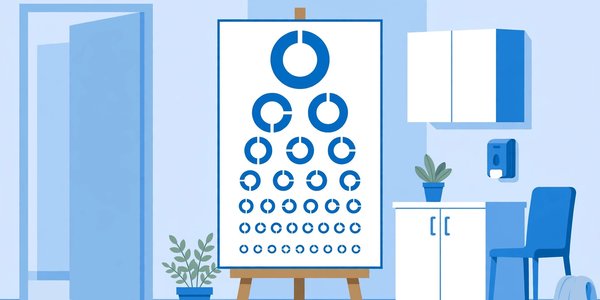
How to Use the Eye Chart Test
Using the Eye Chart Test is straightforward, but a little preparation makes your results much more reliable. Follow these steps carefully, and treat the process like a real screening rather than a casual glance at the screen. The whole test takes about five minutes per session.
- Set up your screen and viewing distance. Sit about 10 feet (3 meters) away from your monitor for the most accurate results. If you are using a phone or tablet, prop it up at eye level on a table and sit back the same distance. Make sure the chart fills a good portion of your screen so the letters are crisp and easy to read.
- Adjust your lighting and remove glare. Bright, even lighting works best. Turn up your screen brightness to a comfortable level and close blinds or move lamps that create reflections on the display. Glare can blur the letters and make your score look worse than your vision really is.
- Cover one eye completely. Use your palm or a piece of paper to cover your left eye first, without pressing on it. Keep both eyes open underneath your hand to avoid squinting, and do not peek. Testing one eye at a time is essential because your stronger eye can mask weakness in the other.
- Read the smallest line you can see. Starting from the top, read each row of letters out loud from left to right. Move down until the letters become too blurry to identify with confidence. Only count a line as passed if you can read most of its letters correctly, since guessing can inflate your score.
- Record your score for that eye. The tool shows your result as a Snellen fraction like 20/20 or 20/40, which tells you how your vision compares to normal. Write it down or use the printable summary so you can compare it with future tests and share it with your eye doctor if needed.
- Repeat with the other eye, then compare. Cover your right eye and test your left eye using the same steps and the same distance. When both eyes are done, look at the two scores side by side. A big difference between eyes is worth noting, even if both scores seem okay on their own.
Key Features
We built this Eye Chart Test to feel like a proper vision screening, not a toy. Every feature exists to make your check quick, clear, and genuinely useful.
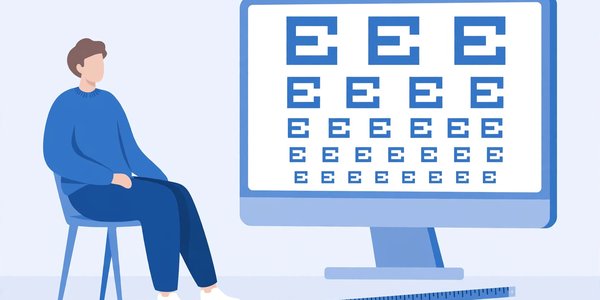
- Interactive Snellen style chart. The test uses the same letter based design eye doctors rely on, with rows that shrink in precise steps. Letters are rendered sharply at any screen size, so the chart stays accurate whether you are on a large desktop monitor or a compact laptop.
- Instant vision scoring. The moment you finish reading, the tool calculates your Snellen score automatically. You do not need to look up what each row means or do any math yourself, because the result appears immediately in a format you can understand at a glance.
- Separate testing for each eye. The guided flow walks you through your right eye and your left eye independently, then presents both scores together. This matters because many vision problems start in one eye, and a combined test can hide them completely.
- Multiple screen size support. Whether you open the tool on a phone, tablet, laptop, or desktop, the chart scales cleanly to fit your display. A built in sizing guide helps you confirm the letters are showing at the right proportions for your distance.
- Printable results summary. After your test you can print or save a neat summary of both eyes’ scores with the date. This is handy for tracking changes over months and gives your eye doctor useful background at your next appointment.
- Completely free with no signup. There is no account to create, no trial to cancel, and no paywall hiding your results. You open the page, take the test, and see your score, as many times as you like.
- Private by design. Your test happens entirely in your browser, and we do not ask for your name, email, or any personal details. Nothing about your vision results is uploaded or stored on our servers.
- Clear instructions for beginners. If you have never taken a vision test before, the step by step guidance explains exactly what to do, including how far to sit and how to cover each eye. You do not need any prior knowledge to get a meaningful result.
Why Use Our Eye Chart Test?
Vision changes often creep up slowly. You adapt without noticing, leaning closer to screens, turning up brightness, or avoiding night driving, until one day someone points out that you are squinting. A regular quick check with our Eye Chart Test helps you catch these gradual shifts early, when they are easiest to address. Think of it the way you think about stepping on a scale or checking your blood pressure. It is not a diagnosis, but it is valuable information about your own body.
Convenience is the biggest reason people love this tool. A professional eye exam is important, but it takes scheduling, travel, and often money. Our test takes five minutes at home, at school, or at the office, and you can repeat it whenever you wonder about your eyes. Parents use it to keep an eye on their children’s vision between checkups. Students use it before exam season when reading load spikes. Remote workers use it when screen fatigue starts setting in. Because it is free and unlimited, there is no reason to wait until problems feel serious.
Tracking over time is another powerful benefit. A single score is a snapshot, but scores recorded every few months tell a story. If your right eye drifts from 20/20 to 20/40 across a year, that trend is worth discussing with an eye care professional, even if you feel fine day to day. The printable summary makes this kind of tracking effortless, and bringing a history of scores to your appointment helps your doctor understand what has changed.
Tips for Best Results
Small details can shift your score, so these practical tips will help you get the most trustworthy result every time you test.
- Keep the distance consistent. Measure your seating distance with a tape measure the first time, and use the same spot for every future test. Even a foot of difference changes which lines you can read, so consistency is what makes your scores comparable over time.
- Test in the same lighting each time. Daylight, lamplight, and screen brightness all affect how the letters look. Pick one setup, such as your desk with the overhead light on, and reuse it so that changes in your score reflect changes in your eyes, not your room.
- Wear your usual correction first. If you normally wear glasses or contact lenses, take the test with them on to check your corrected vision. Then, if you are curious, repeat without them to see your natural vision. Label which is which on your printed summary.
- Do not guess the blurry letters. It is tempting to squint and gamble on a fuzzy row, but guessing inflates your score and hides real changes. Only count lines where you can read most letters confidently, and stop at the first row that truly defeats you.
- Rest your eyes before testing. After hours of screen time your eyes are tired, and fatigue can temporarily worsen your score. Test in the morning or after a break for a result that reflects your typical vision rather than end of day strain.
- Supervise children and note their behavior. Kids may rush, peek, or memorize letter order instead of actually reading. Sit with them, cover the eye fully, and watch for squinting or head tilting, which are themselves useful signs to mention to an eye doctor.
Frequently Asked Questions
Here are answers to the questions people ask most about our online Eye Chart Test.
How accurate is this online eye chart test?
It gives a useful approximation of your distance vision when you follow the setup steps carefully, especially the viewing distance and lighting. However, screen size, resolution, and room conditions vary, so treat it as a screening tool rather than a clinical measurement. If your score concerns you, or if you notice symptoms like persistent blurriness or headaches, book a professional eye exam for a precise assessment.
What does a score like 20/20 actually mean?
The top number is the testing distance in feet, and the bottom number is the distance at which a person with normal vision could read the same line. So 20/20 means you see at 20 feet what normal vision sees at 20 feet. A score of 20/40 means you need to be at 20 feet to read what normal vision reads at 40 feet, which suggests your distance vision is below average.
What distance should I sit from the screen?
Sit about 10 feet, or 3 meters, from your display for the standard test. This distance matches how the chart rows are calibrated. If your room does not allow the full distance, sit as far back as you can and note the actual distance on your results, because a shorter distance makes the test easier and the score less comparable.
Complete List of All Free Online Tools
Browse the full directory of 450+ free tools. Click any tool name to use it instantly - no signup required.
| # | Tool Name | Category |
|---|---|---|
| 1 | A B Test Significance Calculator | Calculators & Converters |
| 2 | Acronym Generator | Utility Tools |
| 3 | Ad Copy Generator | Utility Tools |
| 4 | Add Page Numbers To PDF | PDF Tools |
| 5 | Add Subtitles To Video | Media Tools |
| 6 | Add Subtract Days Calculator | Calculators & Converters |
| 7 | Age Calculator | Calculators & Converters |
| 8 | Angle Converter | Calculators & Converters |
| 9 | API Request Tester | Utility Tools |
| 10 | Area Converter | Calculators & Converters |
| 11 | Article Rewriter | Utility Tools |
| 12 | Audio Converter | Calculators & Converters |
| 13 | Audio Merger | Media Tools |
| 14 | Audio Metadata Editor | Media Tools |
| 15 | Audio Pitch Changer | Media Tools |
| 16 | Audio Speed Changer | Media Tools |
| 17 | Audio To Text Converter | Calculators & Converters |
| 18 | Audio Trimmer | Media Tools |
| 19 | Avatar Maker | Utility Tools |
| 20 | Background Remover | Utility Tools |
| 21 | Backlink Checker | SEO Tools |
| 22 | Banner Maker | Utility Tools |
| 23 | Barcode Generator | Developer Tools |
| 24 | Base64 Encoder Decoder | Developer Tools |
| 25 | Bass Booster | Utility Tools |
| 26 | Bibliography Generator | Utility Tools |
| 27 | Bill Splitter | Utility Tools |
| 28 | Binary Converter | Calculators & Converters |
| 29 | Binary To Text Converter | Calculators & Converters |
| 30 | Birthday Countdown | Date & Time Tools |
| 31 | Bmi Calculator | Calculators & Converters |
| 32 | Bmr Calculator | Calculators & Converters |
| 33 | Body Fat Calculator | Calculators & Converters |
| 34 | Body Surface Area Calculator | Calculators & Converters |
| 35 | Book Title Generator | Utility Tools |
| 36 | Brand Color Finder | Color Tools |
| 37 | Brand Kit Generator | Utility Tools |
| 38 | Break Even Calculator | Calculators & Converters |
| 39 | Broken Link Checker | Utility Tools |
| 40 | Browser Info Checker | Utility Tools |
| 41 | Budget Planner | Utility Tools |
| 42 | Business Card Designer | Utility Tools |
| 43 | Business Card Maker | Utility Tools |
| 44 | Business Days Calculator | Calculators & Converters |
| 45 | Business Name Generator | Utility Tools |
| 46 | Business Proposal Generator | Utility Tools |
| 47 | Button Generator | Utility Tools |
| 48 | Buyer Persona Generator | Utility Tools |
| 49 | Calorie Calculator | Calculators & Converters |
| 50 | Captcha Generator | Utility Tools |
Do I need to print the chart?
No printing is required. The chart is designed to work directly on your screen at any size, and the tool scores you automatically. Printing is only useful afterward, when you want a paper copy of your results summary to keep in your records or take to an appointment.
Can children use this test?
Yes, children who know the alphabet can use it with adult supervision. Make sure they understand they should read, not guess, and watch that they keep one eye fully covered. For younger children who do not know letters yet, a professional pediatric eye exam with picture charts is the better option.
How often should I check my vision?
For most adults with no symptoms, a quick check every six to twelve months is plenty, alongside a professional exam every one to two years as your eye doctor recommends. If you notice sudden changes, test sooner and contact an eye care professional promptly rather than waiting for your next routine check.
Why are my two eyes scoring differently?
Small differences between eyes are common and not always a problem. But a large or growing gap, or one eye that is clearly blurry while the other is sharp, deserves attention. Note both scores with dates and mention the difference at your next eye exam, since the trend information helps your doctor a lot.
Does this test replace an eye doctor visit?
No. This test only checks one aspect of vision, which is how clearly you see letters at a distance. A professional exam also checks eye health, eye pressure, focusing ability, peripheral vision, and more. Use our tool as an early warning system and a tracking aid, and keep up with regular professional exams.
Table of Contents
What is Eye Chart Test?
The eye chart test is a free online tool that helps you with eye chart test tasks quickly and accurately. Our eye chart test is designed to be simple, fast, and reliable. Whether you need a eye chart test for personal use or professional work, this free eye chart test delivers instant results without any signup or download required.
How to Use the Eye Chart Test
Using our eye chart test is easy. Simply open the eye chart test tool above, enter your input, and get instant results. The eye chart test processes everything in your browser for maximum privacy and speed. No technical knowledge is needed to use this eye chart test effectively.
Benefits of Using Our Eye Chart Test
Our free eye chart test offers many advantages. It is completely free to use, requires no registration, works on all devices, and provides accurate results instantly. The eye chart test is updated regularly to ensure the best performance. For more information about eye chart test, you can Learn more about eye chart test on Wikipedia.
Frequently Asked Questions About Eye Chart Test
Is the eye chart test really free? Yes, our eye chart test is 100% free with no hidden costs or premium tiers.
Do I need to create an account to use the eye chart test? No, the eye chart test works instantly without any signup or login required.
