CSV to JSON Converter
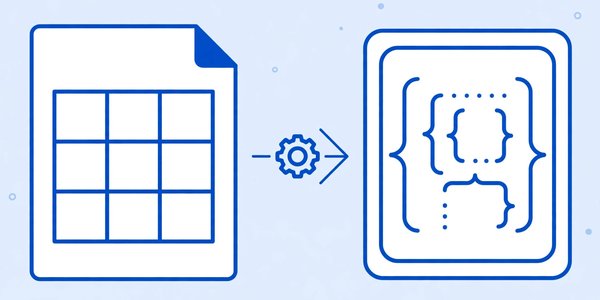
Data lives in two different worlds, and they do not always get along. Spreadsheets love CSV, that humble comma separated format that Excel and Google Sheets have used forever. Modern web apps love JSON, the structured format that powers APIs, databases, and JavaScript everywhere. When your data needs to travel from one world to the other, retyping it by hand is out of the question, and writing a one off script feels like overkill for a quick task. Our CSV to JSON Converter bridges the gap instantly. Paste your spreadsheet data or upload a CSV file, and get clean, properly formatted JSON back in seconds. Column headers become sensible keys, rows become tidy objects, and tricky details like quoted commas and line breaks are handled correctly. It even copes with the messy real world exports that break simpler tools, like inconsistent quoting and stray blank lines. Whether you are a developer feeding data into an API, an analyst preparing a dataset for a web project, or a student learning how data formats work, this free tool on A Tool Today turns a tedious chore into a one minute job. No signup, no software, no fuss. Data journalists cleaning public datasets, marketers preparing product feeds, and teachers demonstrating data concepts all reach for it regularly.
How to Use CSV to JSON Converter
Converting your spreadsheet data to JSON takes about a minute, even if you have never worked with JSON before. The tool does the structural thinking for you, so all you need to do is supply the data and pick a couple of sensible options. Here is the full walkthrough.
- Open the CSV to JSON Converter page on A Tool Today. Bookmark it now, because data format conversions have a habit of popping up right in the middle of deadline week.
- Provide your CSV data using whichever method suits you. You can paste the contents directly into the text area, which is perfect for quick conversions of small tables, or upload a CSV file from your device when you are working with larger datasets. Both paths lead to the same clean JSON. Pasting is fastest for a handful of rows, while uploading keeps large files organized and easy to re run.
- Confirm the delimiter your data uses. Commas are the classic choice and work for most files, but some spreadsheets export with semicolons, tabs, or pipes, especially in regions where commas serve as decimal separators. Picking the right delimiter here is the single most important setting, so glance at your raw data first. When in doubt, open the file in a plain text editor and look at what character actually separates the values.
- Tell the tool whether your first row contains headers. In most cases it does, and those header names become the keys in your JSON objects, which makes the output beautifully self describing. If your data has no header row, the converter can generate generic keys or use positional indexes instead.
- Choose your preferred JSON structure. The most popular option turns each row into an object inside an array, which is exactly what most APIs expect. If your destination documents a specific shape, match it here and you will skip a transformation step later. Some workflows prefer column based layouts or nested groupings, so pick the shape that matches where your data is headed.
- Click the Convert button and watch your JSON appear. The tool parses every row, escapes special characters properly, and formats the output with clean indentation. Large files process quickly, and you will see exactly what you are getting before you commit to anything.
- Copy or download the finished JSON. Use the one click copy button to grab it for your code editor, or download it as a .json file for your project folder. Give the output a quick scan to confirm the structure matches your expectations, then put it to work wherever your data needs to go. A few seconds of review now saves real debugging time later.
Key Features
Here is what makes our CSV to JSON Converter a trusted companion for developers, analysts, and data wranglers of every stripe.
- Smart header detection. Your column names automatically become meaningful JSON keys, so name, email, and price in your spreadsheet turn into readable keys in your output instead of cryptic numbered fields.
- Multiple delimiter support. Commas, semicolons, tabs, and pipes are all handled gracefully, which means exports from Excel, Google Sheets, and databases around the world all convert correctly.
- Proper handling of tricky characters. Quoted fields containing commas, embedded line breaks, and escaped quotes are parsed the way the CSV standard intends, so your data survives the journey intact instead of splitting in the wrong places.
- Beautiful pretty printed output. The JSON comes out with clean indentation that is easy to read, review, and debug. Compact minified output is available too when file size matters more than readability. Toggle between the two depending on whether a human or a machine reads the result next.
- Flexible output structures. Choose row based arrays of objects for APIs, column based layouts for analytics, or other shapes to match the exact expectations of your destination system.
- Handles large datasets. The converter chews through thousands of rows without breaking a sweat, making it practical for real migration work rather than just toy examples.
- Private by design. Your data is processed securely and never stored or shared. Paste commercially sensitive spreadsheets with confidence, knowing nothing lingers after conversion.
- Free with no signup. There are no accounts, no API keys to manage, and no usage tiers. Open the page and convert, whether it is your first row or your fifty thousandth.

Why Use Our CSV to JSON Converter?
CSV and JSON sit at opposite ends of the data food chain, and modern work constantly shuttles information between them. Developers hit this wall weekly. A client sends product data as a spreadsheet, but the website API only accepts JSON. A legacy system exports reports as CSV, but the new dashboard ingests JSON feeds. Writing a throwaway script for each of these moments is possible, but it burns time on plumbing instead of the actual project, and one off scripts have an annoying habit of choking on edge cases like commas inside quoted fields. Data analysts feel the same friction from the other direction. They clean and shape data in spreadsheets, then need it in JSON for visualization libraries, machine learning pipelines, or no code platforms that speak JSON natively. Students learning web development need to see the relationship between tabular data and structured data with their own eyes, and there is no better teacher than watching your own spreadsheet transform into objects you recognize from your code. Even outside technical roles, JSON pops up in configuration files, translation files, and content management imports, all places where starting from a comfortable spreadsheet makes life easier. Our converter handles the edge cases that trip up quick scripts, respects your privacy by processing without storing, and costs nothing to use as often as you like. It turns a fifteen minute scripting detour into a thirty second copy paste, and that reclaimed time adds up fast across a busy month. For anyone who regularly moves data between spreadsheets and the web, it earns its bookmark within the first week. There is also a learning dividend that is easy to overlook. Watching your own familiar spreadsheet turn into structured JSON demystifies a format that intimidates many beginners. Rows become objects, columns become keys, and suddenly the JSON you see in tutorials feels concrete instead of abstract. Teachers use this moment deliberately, converting a class roster or a sports table live in front of students and watching understanding click into place. Even experienced developers appreciate the speed for throwaway tasks, like turning a quick export into a mock API response for testing a frontend before the real backend exists.
Tips for Best Results
- Give your columns clean header names. Simple lowercase headers without spaces or special characters become the nicest JSON keys. Rename Name and Email Address to name and email before converting, and your output will be a joy to work with.
- Keep your delimiter consistent. Mixed delimiters confuse every parser on earth, so make sure your entire file uses one separator throughout. A quick scan of the raw text before converting catches most surprises.
- Watch out for commas inside fields. Legitimate CSV wraps such fields in quotes, like “Springfield, IL”, and our parser respects those quotes. If your data was hand assembled without quoting, fix those fields first for accurate results.
- Save your source as UTF-8. Character encoding issues turn names and international text into gibberish, so export or save your CSV as UTF-8 from your spreadsheet app before converting. Your accented characters will thank you.
- Test with a small sample first. When converting a massive file with unfamiliar formatting, run ten rows through first and inspect the JSON. Confirming the structure on a sample prevents a whole batch of rework later.
- Validate the JSON before deploying. Paste the output into any JSON validator or your code editor to confirm it parses cleanly. Catching a structural hiccup now beats debugging a failed API call later.
Frequently Asked Questions
Is the CSV to JSON Converter really free?
Yes, completely free with no limits that matter. Convert as many files as you need without signing up or paying. A Tool Today keeps everyday data utilities open to everyone, from students to professionals.
Can it create nested JSON structures?
The converter excels at the classic flat transformation where each row becomes an object, which covers the vast majority of real world needs. For deeply nested hierarchies, you can convert first and then reshape the output with a small script, or choose one of the structured output options the tool provides for common nesting patterns.
What if my CSV uses semicolons instead of commas?
No problem at all. Simply select semicolon as your delimiter before converting. This situation is common with European spreadsheet exports where commas serve as decimal separators, and the tool handles it just as smoothly as standard comma separated data.
How large a file can I convert?
The converter comfortably handles files with thousands of rows, covering typical migration and reporting tasks. Extremely massive datasets may be better processed with a dedicated script or database tool, but for the everyday files most people encounter, you will not hit a wall.
How are commas inside quoted fields handled?
Correctly, according to CSV standards. A field like “Springfield, IL” wrapped in quotes stays together as one value instead of splitting into two. This is exactly the kind of edge case that breaks naive scripts, and it is one of the best reasons to use a proper converter.
Is my data kept private?
Yes. Your data is processed securely and automatically discarded afterward. Nothing is stored, logged, or shared with third parties. You can convert business sensitive spreadsheets without worry.
Complete List of All Free Online Tools
Browse the full directory of 450+ free tools. Click any tool name to use it instantly - no signup required.
| # | Tool Name | Category |
|---|---|---|
| 1 | A B Test Significance Calculator | Calculators & Converters |
| 2 | Acronym Generator | Utility Tools |
| 3 | Ad Copy Generator | Utility Tools |
| 4 | Add Page Numbers To PDF | PDF Tools |
| 5 | Add Subtitles To Video | Media Tools |
| 6 | Add Subtract Days Calculator | Calculators & Converters |
| 7 | Age Calculator | Calculators & Converters |
| 8 | Angle Converter | Calculators & Converters |
| 9 | API Request Tester | Utility Tools |
| 10 | Area Converter | Calculators & Converters |
| 11 | Article Rewriter | Utility Tools |
| 12 | Audio Converter | Calculators & Converters |
| 13 | Audio Merger | Media Tools |
| 14 | Audio Metadata Editor | Media Tools |
| 15 | Audio Pitch Changer | Media Tools |
| 16 | Audio Speed Changer | Media Tools |
| 17 | Audio To Text Converter | Calculators & Converters |
| 18 | Audio Trimmer | Media Tools |
| 19 | Avatar Maker | Utility Tools |
| 20 | Background Remover | Utility Tools |
| 21 | Backlink Checker | SEO Tools |
| 22 | Banner Maker | Utility Tools |
| 23 | Barcode Generator | Developer Tools |
| 24 | Base64 Encoder Decoder | Developer Tools |
| 25 | Bass Booster | Utility Tools |
| 26 | Bibliography Generator | Utility Tools |
| 27 | Bill Splitter | Utility Tools |
| 28 | Binary Converter | Calculators & Converters |
| 29 | Binary To Text Converter | Calculators & Converters |
| 30 | Birthday Countdown | Date & Time Tools |
| 31 | Bmi Calculator | Calculators & Converters |
| 32 | Bmr Calculator | Calculators & Converters |
| 33 | Body Fat Calculator | Calculators & Converters |
| 34 | Body Surface Area Calculator | Calculators & Converters |
| 35 | Book Title Generator | Utility Tools |
| 36 | Brand Color Finder | Color Tools |
| 37 | Brand Kit Generator | Utility Tools |
| 38 | Break Even Calculator | Calculators & Converters |
| 39 | Broken Link Checker | Utility Tools |
| 40 | Browser Info Checker | Utility Tools |
| 41 | Budget Planner | Utility Tools |
| 42 | Business Card Designer | Utility Tools |
| 43 | Business Card Maker | Utility Tools |
| 44 | Business Days Calculator | Calculators & Converters |
| 45 | Business Name Generator | Utility Tools |
| 46 | Business Proposal Generator | Utility Tools |
| 47 | Button Generator | Utility Tools |
| 48 | Buyer Persona Generator | Utility Tools |
| 49 | Calorie Calculator | Calculators & Converters |
| 50 | Captcha Generator | Utility Tools |
Can I get minified JSON output?
Yes. Choose pretty printed JSON when you want to read and debug the output, and switch to compact minified JSON when file size matters, such as embedding data in a web page or sending it over a limited connection.
Do I need to install anything or create an account?
Neither. The converter runs entirely in your browser with no downloads and no signup forms. Paste your data or upload your file and you are converting within seconds.
Will empty cells cause problems?
No, empty cells are handled gracefully. They become null values or empty strings in your JSON, depending on the output settings you choose. This keeps every object structurally consistent, which is exactly what APIs and parsers expect. If you prefer, clean up blanks in your spreadsheet first for tidier output.
Can I convert JSON back to CSV?
This tool handles the CSV to JSON direction, which is the more common need. For the reverse trip, A Tool Today offers a companion JSON to CSV Converter that turns structured data back into spreadsheet friendly tables whenever you need it.
Table of Contents
What is Csv to JSON Converter?
The csv to json converter is a free online tool that helps you with csv to json converter tasks quickly and accurately. Our csv to json converter is designed to be simple, fast, and reliable. Whether you need a csv to json converter for personal use or professional work, this free csv to json converter delivers instant results without any signup or download required.
How to Use the Csv to JSON Converter
Using our csv to json converter is easy. Simply open the csv to json converter tool above, enter your input, and get instant results. The csv to json converter processes everything in your browser for maximum privacy and speed. No technical knowledge is needed to use this csv to json converter effectively.
Benefits of Using Our Csv to JSON Converter
Our free csv to json converter offers many advantages. It is completely free to use, requires no registration, works on all devices, and provides accurate results instantly. The csv to json converter is updated regularly to ensure the best performance. For more information about csv to json converter, you can Learn more about csv to json converter on Wikipedia.
Frequently Asked Questions About Csv to JSON Converter
Is the csv to json converter really free? Yes, our csv to json converter is 100% free with no hidden costs or premium tiers.
Do I need to create an account to use the csv to json converter? No, the csv to json converter works instantly without any signup or login required.
