SEO Score Checker
You have published great content, but your traffic is flat and you have no idea why. Sound familiar? Most site owners work blind, guessing at what might be holding their rankings back. Our SEO Score Checker ends the guessing. Paste in any URL and within seconds you get a clear score plus a plain language breakdown of what is working and what needs attention. It looks at the factors search engines actually care about: title tags, meta descriptions, headings, page speed signals, mobile readiness, and more. Then it hands you a prioritized fix list instead of a confusing data dump. Whether you run a personal blog, a client site, or an online store, knowing your score is the fastest way to find quick wins. Maybe your titles are too long. Maybe your images lack alt text. Maybe a technical issue is quietly dragging everything down. This guide walks you through running your first check, understanding the results, and turning a mediocre score into a competitive advantage, one fix at a time.
Best of all, there is no signup and no software to install. You get instant, honest feedback on any page, which makes it the fastest way to sanity check your work before you hit publish.

How to Use the SEO Score Checker
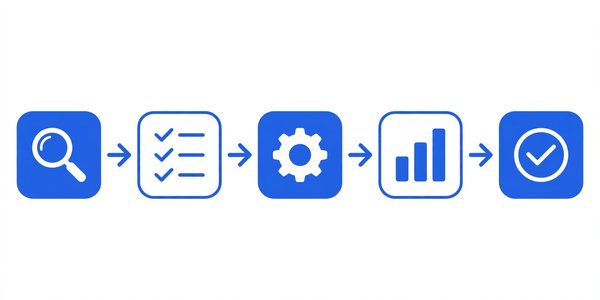
Running an SEO audit used to require expensive software and training. Our checker compresses it into a sixty second workflow anyone can follow. Here is how to get the most from it.
- Enter the page URL you want to test. Paste the full address of the page, including https, into the input field. Start with your homepage for an overall picture, then test your most important landing pages individually. Each page gets its own score because SEO issues vary from page to page. Testing one URL at a time keeps the report focused and actionable.
- Run the analysis and wait for results. Click the check button and let the tool fetch and analyze your page. The scan examines on page elements, technical signals, and performance factors in a single pass. This usually takes under a minute, though very large pages may take a little longer. Avoid navigating away while the analysis runs so the scan completes cleanly.
- Read your overall score first. Your score is a quick health indicator, not a Google ranking factor itself. A high score means your page follows best practices; a low score means fixable issues are holding you back. Do not obsess over a single number. Instead, treat it as a starting benchmark you will improve over time. Write it down so you can measure progress after making changes.
- Work through issues by priority. The report sorts findings by impact, so start at the top where fixes move the needle most. Critical issues like missing title tags or broken mobile layouts deserve attention before minor tweaks. Click each issue to see exactly what is wrong and where. Fixing three high impact items often beats fixing twenty trivial ones.
- Apply the fixes on your site. Take the recommendation list to your website and work through it methodically. Most on page fixes, like rewriting a title tag or adding alt text, take only minutes each. Technical fixes may need a developer, so export or screenshot the report to share with them. Make one round of changes, then move to the next step instead of trying to perfect everything at once.
- Re run the check to confirm improvement. After publishing your fixes, run the checker again on the same URL. Your score should climb, and previously flagged issues should clear from the report. If something still fails, the tool will tell you exactly what remains. Repeat this cycle monthly, because sites drift: new plugins, theme updates, and fresh content can all introduce new issues over time.
Key Features
- Instant SEO scoring: Get a clear 0 to 100 score for any page in under a minute, with no signup required.
- On page element analysis: Checks titles, meta descriptions, headings, and keyword usage against proven best practices.
- Technical SEO audit: Flags issues like missing alt text, broken links, and improper redirects that hurt crawling.
- Mobile readiness check: Verifies your page works well on phones, where most searches now happen.
- Page speed insights: Highlights performance problems that frustrate visitors and influence rankings.
- Prioritized recommendations: Issues are ranked by impact, so you always know what to fix first.
- Competitor friendly benchmarking: Score rival pages too, and see exactly where you need to outperform them.
- Unlimited free checks: Audit as many pages as you like, whenever you like, without hitting a paywall.

Why Use Our SEO Score Checker?
SEO fails most often not from lack of effort but from lack of direction. Site owners spend hours on tactics that do not matter while a missing meta description or a slow loading hero image quietly costs them rankings. Our checker replaces guesswork with a clear action list. For beginners, it is like having a patient tutor that explains every issue in plain language and tells you how to fix it. You learn SEO by doing, and each fixed issue makes the concepts stick. For freelancers and agencies, it is a client communication superpower. Instead of explaining technical problems in jargon, you share a visual report with a score that improves as you work. Clients see progress, and you spend less time justifying your hours. For store owners and bloggers, it finds the quick wins hiding in plain sight. A product page with no unique title, a blog post with three competing H1 tags, an image gallery with no alt text: these are five minute fixes with real ranking impact, but only if someone points them out. The checker also keeps you honest over time. Websites decay as themes update, plugins pile up, and content grows. A monthly check catches that drift before it costs you traffic. Because it is free and unlimited, there is no reason to audit only once and forget about it. Make the score part of your routine, and your site stays sharp while competitors slowly fall behind.
Tips for Best Results
- Fix high impact issues first. A missing title tag matters far more than a slightly long URL, so follow the report’s priority order.
- Compare against top ranking competitors. Score the pages outranking you to see which best practices they follow that you do not.
- Do not chase a perfect 100. Scores in the 85 to 95 range usually mean the page is solid; the last points are often diminishing returns.
- Check new pages before publishing. Run drafts through the checker via a staging URL to catch issues before Google ever sees them.
- Track scores over time. Keep a simple spreadsheet of monthly scores for key pages to spot trends and prove progress.
- Pair the score with real analytics. A great score means little if visitors bounce, so cross check with traffic and conversion data.
Common Mistakes to Avoid
Most problems with this kind of optimization come from a handful of avoidable errors. Watch out for these and you will stay ahead of the majority of site owners.
- Chasing a perfect 100. A perfect score is rarely worth the effort and sometimes forces awkward keyword stuffing. Aim for a strong score in the high 80s or 90s, then move on to publishing more content.
- Comparing scores across different tools. Every checker weights factors differently, so a 78 on one tool might equal a 91 on another. Pick one tool and track your trend over time instead of comparing numbers.
- Fixing only the easy items. It is tempting to knock out the quick wins and ignore the hard stuff like page speed or thin content. The hard items usually carry the most ranking weight.
- Optimizing without checking competitors. A score of 80 feels great until you see competitors scoring 92 on the same keywords. Always benchmark against the pages you are actually trying to outrank.
- Checking once and never again. Scores drift as content ages, competitors improve, and search engines update their criteria. Recheck key pages monthly so small problems never become big ones.
- Treating every suggestion as mandatory. Some recommendations conflict with good design or readability. Use your judgment. A suggestion that makes your page worse for humans is not worth a point or two of score.
Advanced Tips and Real-World Use Cases
Content teams use the checker as a pre publish gate. Writers run their draft URL through the tool before handing it to an editor, which catches missing meta descriptions and weak title tags at the cheapest possible moment. Over a month, this habit eliminates the most common on page mistakes across the whole team.
Freelancers turn scores into client reports. Run the checker on a prospect’s key pages before a sales call and you walk in with specific, quantified issues instead of vague promises. Screenshots of before and after scores also make monthly retainer reports far more convincing.
For site audits, the power workflow is batch comparison. Score the homepage, top five landing pages, and five underperformers, then look for patterns. If every underperformer shares the same missing elements, you have found a site wide template problem rather than five separate content problems.
After a Google core update, recheck your pages and compare against competitors that gained traffic. Score gaps that appear after an update often point directly at what the update rewarded, which is more actionable than most update commentary.
Frequently Asked Questions
What does an SEO score actually measure?
An SEO score summarizes how well a page follows technical and on page best practices. It typically weighs factors like title and meta quality, heading structure, content depth, image optimization, mobile friendliness, and page speed. The score is an estimate of optimization health, not a direct Google ranking factor. Use it as a diagnostic tool: a higher score means fewer obstacles between your content and the rankings it deserves.
Is a higher SEO score guaranteed to rank me higher?
No, and any tool that promises that is misleading you. Rankings depend on many things a page level checker cannot see, including backlink strength, content quality, search intent match, and competition. What the score does is remove technical handicaps. Two pages with equal content quality will see the better optimized one win, so think of the score as making sure you are not losing for avoidable reasons.
How often should I check my SEO score?
Monthly checks hit the sweet spot for most sites. That cadence catches drift from updates and new content without turning into busywork. Always check after major changes, like a theme switch, a site migration, or a big content push. New pages deserve a check before they go live. If you run an active store with daily product changes, consider a biweekly rhythm for your most important category pages.
Complete List of All Free Online Tools
Browse the full directory of 450+ free tools. Click any tool name to use it instantly - no signup required.
| # | Tool Name | Category |
|---|---|---|
| 1 | A B Test Significance Calculator | Calculators & Converters |
| 2 | Acronym Generator | Utility Tools |
| 3 | Ad Copy Generator | Utility Tools |
| 4 | Add Page Numbers To PDF | PDF Tools |
| 5 | Add Subtitles To Video | Media Tools |
| 6 | Add Subtract Days Calculator | Calculators & Converters |
| 7 | Age Calculator | Calculators & Converters |
| 8 | Angle Converter | Calculators & Converters |
| 9 | API Request Tester | Utility Tools |
| 10 | Area Converter | Calculators & Converters |
| 11 | Article Rewriter | Utility Tools |
| 12 | Audio Converter | Calculators & Converters |
| 13 | Audio Merger | Media Tools |
| 14 | Audio Metadata Editor | Media Tools |
| 15 | Audio Pitch Changer | Media Tools |
| 16 | Audio Speed Changer | Media Tools |
| 17 | Audio To Text Converter | Calculators & Converters |
| 18 | Audio Trimmer | Media Tools |
| 19 | Avatar Maker | Utility Tools |
| 20 | Background Remover | Utility Tools |
| 21 | Backlink Checker | SEO Tools |
| 22 | Banner Maker | Utility Tools |
| 23 | Barcode Generator | Developer Tools |
| 24 | Base64 Encoder Decoder | Developer Tools |
| 25 | Bass Booster | Utility Tools |
| 26 | Bibliography Generator | Utility Tools |
| 27 | Bill Splitter | Utility Tools |
| 28 | Binary Converter | Calculators & Converters |
| 29 | Binary To Text Converter | Calculators & Converters |
| 30 | Birthday Countdown | Date & Time Tools |
| 31 | Bmi Calculator | Calculators & Converters |
| 32 | Bmr Calculator | Calculators & Converters |
| 33 | Body Fat Calculator | Calculators & Converters |
| 34 | Body Surface Area Calculator | Calculators & Converters |
| 35 | Book Title Generator | Utility Tools |
| 36 | Brand Color Finder | Color Tools |
| 37 | Brand Kit Generator | Utility Tools |
| 38 | Break Even Calculator | Calculators & Converters |
| 39 | Broken Link Checker | Utility Tools |
| 40 | Browser Info Checker | Utility Tools |
| 41 | Budget Planner | Utility Tools |
| 42 | Business Card Designer | Utility Tools |
| 43 | Business Card Maker | Utility Tools |
| 44 | Business Days Calculator | Calculators & Converters |
| 45 | Business Name Generator | Utility Tools |
| 46 | Business Proposal Generator | Utility Tools |
| 47 | Button Generator | Utility Tools |
| 48 | Buyer Persona Generator | Utility Tools |
| 49 | Calorie Calculator | Calculators & Converters |
| 50 | Captcha Generator | Utility Tools |
Why did my score drop when I changed nothing?
Scores can shift for reasons outside your control. The checker may have updated its criteria, your hosting may be slower this week, or a third party script you load may have changed. Sometimes Google itself updates what it considers best practice, and scoring tools follow. Investigate the specific failed items rather than the number alone. If the new failures are minor or outside your control, a small dip is not worth losing sleep over.
Can I check my competitors’ SEO scores?
Yes, and you absolutely should. Enter any public URL, including competitor pages that outrank you. Comparing their reports against yours reveals exactly which best practices they follow that you are missing. Maybe their titles are tighter, their pages load faster, or their heading structure is cleaner. This kind of gap analysis is one of the most practical uses of a score checker, turning vague envy into a concrete fix list.
What is a good SEO score to aim for?
For most pages, anything from 85 upward indicates solid optimization with no major issues. Scores between 70 and 85 usually have a handful of fixable problems worth addressing. Below 70 suggests significant issues that are likely hurting visibility. Remember that different tools score differently, so pick one checker and track trends within it rather than comparing numbers across tools.
Does the checker work for large websites?
The checker analyzes one page per run, which is actually ideal for large sites. Instead of a overwhelming site wide dump, you audit strategically: homepage, key category pages, top landing pages, and any page that underperforms. For a full site crawl with thousands of URLs, dedicated crawling software is the next step. But for finding and fixing the issues that matter most, page by page checks are faster and more focused.
Why do different pages on my site get different scores?
Because each page is judged on its own merits. A well optimized blog post can score 92 while a thin category page scores 64, even with the same template. This is actually useful. The variation tells you which pages need attention instead of giving you one meaningless site wide average. Focus your effort on the pages that matter most for traffic and revenue.
Can I use the score checker on a page that is not published yet?
Yes, as long as the page is publicly reachable by URL. Staging sites and password protected drafts cannot be checked because the tool needs to fetch the page like a visitor would. Many users check pages on a public staging subdomain, fix the issues, then push to production. Just remember to recheck the live URL after launch.
Table of Contents
What is SEO Score Checker?
The seo score checker is a free online tool that helps you with seo score checker tasks quickly and accurately. Our seo score checker is designed to be simple, fast, and reliable. Whether you need a seo score checker for personal use or professional work, this free seo score checker delivers instant results without any signup or download required.
How to Use the SEO Score Checker
Using our seo score checker is easy. Simply open the seo score checker tool above, enter your input, and get instant results. The seo score checker processes everything in your browser for maximum privacy and speed. No technical knowledge is needed to use this seo score checker effectively.
Benefits of Using Our SEO Score Checker
Our free seo score checker offers many advantages. It is completely free to use, requires no registration, works on all devices, and provides accurate results instantly. The seo score checker is updated regularly to ensure the best performance. For more information about seo score checker, you can Learn more about seo score checker on Wikipedia.
Frequently Asked Questions About SEO Score Checker
Is the seo score checker really free? Yes, our seo score checker is 100% free with no hidden costs or premium tiers.
Do I need to create an account to use the seo score checker? No, the seo score checker works instantly without any signup or login required.
