Flashcard Maker
Flashcards remain one of the most effective study methods ever researched, and for good reason. Testing yourself with cards forces active recall, which builds stronger memories than rereading notes ever could. Our free flashcard maker lets you build beautiful digital decks in minutes, right in your browser. Type your terms on one side and definitions on the other, then flip through them anywhere you happen to be.
Students use these digital cards for vocabulary, math formulas, historical dates, science terms, medical terminology and exam revision across every subject you can imagine. There is no app to install and no account to create. Your decks save automatically in your browser, so you can pick up exactly where you left off, even days later.
Think about your typical revision routine. You reread the same chapter twice, highlight half the page, and still blank on the test. Now imagine a different routine: short, focused card sessions where every flip is a mini quiz and every mini quiz makes the memory stronger. Shuffle the cards, track which ones you keep missing, and focus your limited time where it counts most. Use our free flashcard maker online to turn boring review sessions into quick, satisfying study wins.
It suits every kind of learner. Medical students drill anatomy terms between lectures, language learners build vocabulary on the commute, and professionals memorize key facts before certification exams. Because the tool lives in your browser and costs nothing, there is no reason to wait for some perfect study setup. Open it today, make your first ten cards, and feel the difference that active recall makes from the very first session.
How to Use Flashcard Maker
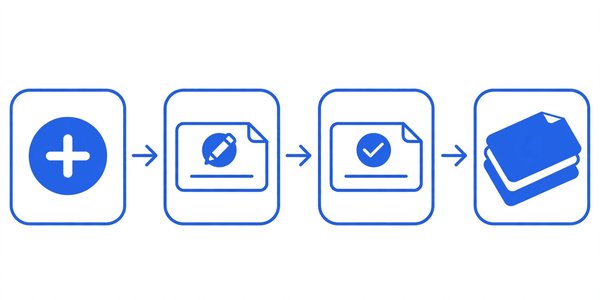
Creating your first deck takes about two minutes, and the second one takes even less. The interface is deliberately simple so you spend your time learning, not figuring out buttons and menus. If you can type, you can build a deck. Here is the full walkthrough.
- Open the flashcard maker. Visit the Flashcard Maker page on A Tool Today. Your workspace loads instantly with no signup, and any decks you created before are waiting for you exactly as you left them, ready for another round.
- Create a new deck. Give your deck a clear, specific name like Biology Chapter 5 or Spanish Verbs List 3. A precise name helps you find the right set fast when exam week arrives and your collection of decks keeps growing with every subject.
- Add your cards. Type a term, question or prompt on the front of each card and the answer on the back. Add as many cards as you need, though most students find 20 to 40 cards per deck is the sweet spot for a single focused sitting without mental fatigue. If a topic is large, split it into two decks rather than one giant one, since smaller decks get finished far more often.
- Study in flip mode. Click a card to flip it and reveal the answer. Always say or at least think your guess before flipping, since producing the answer yourself strengthens the memory far more than silently reading both sides of the card.
- Mark the cards you miss. Flag every card you get wrong so you can group them for extra review later. Spending more time on your weak cards instead of the ones you already know is the single fastest way to raise your score before a test.
- Shuffle and repeat. Shuffle the deck to break any dependence on card order, then run through it again with fresh eyes. Two or three short sessions spread across different days beat one long cram session every single time, according to decades of learning research.
Key Features
Simple on the surface and smart underneath. Every feature is built around one goal: helping you remember more in less time. Here is everything the maker gives you for better study sessions.
- Unlimited decks and cards. Create as many decks as your courses demand, with as many cards as each topic needs. There are no caps, no card limits and no premium upsells hiding your own study material behind a payment screen.
- One-click card flipping. Smooth flip animations make digital cards feel natural and satisfying to use. Click or tap to reveal answers, keeping your study rhythm fast and focused without any fiddly controls getting in the way.
- Shuffle mode. Randomize card order with a single click so you learn the material itself, not just the sequence it was entered in. This prevents the common trap of memorizing card positions instead of actual content, a trap that fails you on test day.
- Mark tough cards. Star or flag the cards you keep missing during review sessions. Studying only your flagged cards can turn a 100 card deck into a targeted 15 card workout that fixes your real weaknesses in a fraction of the time.
- Automatic saving. Every change saves instantly in your browser as you work, with no save button to remember. Close the tab, shut down your laptop or come back tomorrow, and your decks are exactly as you left them, down to the last card.
- Works on any device. Study on your phone between classes, on a tablet at the library, or on a laptop at home. The layout adapts smoothly so cards stay big, clear and easy to flip no matter which screen you are using.
- Clean, distraction-free design. No ads cluttering the study screen and no popups breaking your concentration mid-session. Just your cards and a calm interface that keeps you in the learning zone for as long as you choose to stay.
- Perfect for every subject. Vocabulary, math formulas, historical dates, science terms, medical terminology, programming syntax, music theory. If it fits on two sides of a card, this tool handles it beautifully, which makes it the one study tool every student needs. New subjects simply mean new decks, all waiting in the same familiar place.
Why Use Our Flashcard Maker?
Rereading notes feels productive, but research consistently shows it is one of the weakest ways to learn anything. Your brain remembers best when it has to retrieve information on demand, and flashcards are retrieval practice in its purest form. Each flip is a tiny test, and each tiny test strengthens the memory a little more. Students who switch from rereading to flashcard practice often notice their retention jumping within just a couple of weeks.
Paper cards work fine, but they get lost in backpacks, wear out with use, and cannot shuffle themselves. Digital decks fix all of that in one stroke. Your cards live safely in your browser, shuffle with one click, and let you concentrate review time on the cards you actually miss instead of grinding through the ones you already know by heart.
The real magic is spaced repetition, the practice of revisiting material at growing intervals. Studying a deck today, again in three days, and again next week locks facts into long-term memory far better than cramming ever could. Our maker makes this rhythm effortless because your decks are always one click away, ready for a five-minute session whenever a gap appears in your day.
Teachers and parents love it too. Build a deck once and share it with a whole class, or sit with your child and flip through cards together at the kitchen table. Because A Tool Today keeps the tool free with no accounts required, nobody needs permission, passwords or downloads to start learning right now.
It also fits beautifully into the small gaps of your day. Five minutes in a checkout line, ten minutes on a bus, or a quick round while dinner cooks: these micro sessions add up to serious study time across a week. Since your decks auto-save and load instantly, you can start and stop without ever losing your place. Learning stops being something you schedule and becomes something you simply do.
Tips for Best Results
Flashcards are simple, but small technique changes make a surprisingly big difference in how much you retain. Use these proven tips to get more from every deck you build.
- Keep cards short. Put exactly one idea on each card. If the back of a card holds a whole paragraph, split it into two or three separate cards. Short cards are faster to review, easier to remember, and far less intimidating when a deck looks long.
- Use your own words. Write definitions in your own phrasing instead of copying the textbook word for word. Rewriting forces genuine understanding, while copying lets your eyes do the work that your brain should be doing. Your future test-taking self will thank you.
- Study in short bursts. Fifteen focused minutes beat an hour of distracted flipping. Set a timer, run through a deck with full attention, then take a real break before starting the next round. Your concentration is a resource, so spend it wisely.
- Shuffle every time. Always shuffle before a review round, without exception. Recognizing a card only because of the card that came before it is fake confidence, and fake confidence evaporates the moment you sit down for the real test.
- Review your misses first. Start each session with your flagged cards before touching the rest of the deck. Clearing weak spots early builds momentum and confidence that carries through everything else you review afterward.
- Mix old and new decks. Once a deck feels easy, fold a few of its cards into sessions with newer material. This interleaving keeps older knowledge fresh while you keep learning new topics, which is exactly how durable long-term learning works.
Frequently Asked Questions
Is the flashcard maker really free?
Yes, completely free with no strings attached. Use our free flashcard maker online with unlimited decks and unlimited cards at no cost. There is no account to create, no trial period to expire, and no locked features waiting behind a payment screen. Every student gets the full tool, whether you are studying for one exam or building decks for an entire degree program.
Complete List of All Free Online Tools
Browse the full directory of 450+ free tools. Click any tool name to use it instantly - no signup required.
| # | Tool Name | Category |
|---|---|---|
| 1 | A B Test Significance Calculator | Calculators & Converters |
| 2 | Acronym Generator | Utility Tools |
| 3 | Ad Copy Generator | Utility Tools |
| 4 | Add Page Numbers To PDF | PDF Tools |
| 5 | Add Subtitles To Video | Media Tools |
| 6 | Add Subtract Days Calculator | Calculators & Converters |
| 7 | Age Calculator | Calculators & Converters |
| 8 | Angle Converter | Calculators & Converters |
| 9 | API Request Tester | Utility Tools |
| 10 | Area Converter | Calculators & Converters |
| 11 | Article Rewriter | Utility Tools |
| 12 | Audio Converter | Calculators & Converters |
| 13 | Audio Merger | Media Tools |
| 14 | Audio Metadata Editor | Media Tools |
| 15 | Audio Pitch Changer | Media Tools |
| 16 | Audio Speed Changer | Media Tools |
| 17 | Audio To Text Converter | Calculators & Converters |
| 18 | Audio Trimmer | Media Tools |
| 19 | Avatar Maker | Utility Tools |
| 20 | Background Remover | Utility Tools |
| 21 | Backlink Checker | SEO Tools |
| 22 | Banner Maker | Utility Tools |
| 23 | Barcode Generator | Developer Tools |
| 24 | Base64 Encoder Decoder | Developer Tools |
| 25 | Bass Booster | Utility Tools |
| 26 | Bibliography Generator | Utility Tools |
| 27 | Bill Splitter | Utility Tools |
| 28 | Binary Converter | Calculators & Converters |
| 29 | Binary To Text Converter | Calculators & Converters |
| 30 | Birthday Countdown | Date & Time Tools |
| 31 | Bmi Calculator | Calculators & Converters |
| 32 | Bmr Calculator | Calculators & Converters |
| 33 | Body Fat Calculator | Calculators & Converters |
| 34 | Body Surface Area Calculator | Calculators & Converters |
| 35 | Book Title Generator | Utility Tools |
| 36 | Brand Color Finder | Color Tools |
| 37 | Brand Kit Generator | Utility Tools |
| 38 | Break Even Calculator | Calculators & Converters |
| 39 | Broken Link Checker | Utility Tools |
| 40 | Browser Info Checker | Utility Tools |
| 41 | Budget Planner | Utility Tools |
| 42 | Business Card Designer | Utility Tools |
| 43 | Business Card Maker | Utility Tools |
| 44 | Business Days Calculator | Calculators & Converters |
| 45 | Business Name Generator | Utility Tools |
| 46 | Business Proposal Generator | Utility Tools |
| 47 | Button Generator | Utility Tools |
| 48 | Buyer Persona Generator | Utility Tools |
| 49 | Calorie Calculator | Calculators & Converters |
| 50 | Captcha Generator | Utility Tools |
Do I need to sign up or download anything?
No. Everything runs directly in your web browser, and your decks save automatically on your device as you work. Just open the page and start making cards. It works in the browsers you already have, with nothing extra to install and no updates to manage.
How many flashcards can I create?
As many as you want. There are no limits on the number of decks or the number of cards inside each deck, so you can build complete study sets for entire courses without ever worrying about hitting a cap or paying to unlock more space.
Will my decks be saved if I close the tab?
Yes. Your decks auto-save in your browser storage every single time you make a change. When you return on the same device and browser, everything is waiting for you exactly as you left it, ready for your next study session whenever that may be.
Can I use it on my phone?
Absolutely. The maker is fully responsive, so creating cards, flipping through decks and shuffling works smoothly on phones, tablets, laptops and desktop computers. Many students do most of their daily review on their phones during commutes and breaks.
Is it good for language learning?
It is excellent for languages. Put a new word on the front and the translation on the back, or add an example sentence to the back for extra context that shows real usage. Shuffle mode keeps you sharp, and short daily sessions build vocabulary remarkably fast over a few weeks.
Can teachers share decks with students?
Yes. A teacher can build a deck once and have the entire class study from the same set of cards. Since there are no accounts involved, students open the tool and start learning in seconds, which removes every common classroom technology headache in one move.
How often should I review my decks?
Short daily sessions work best for most learners. Reviewing a deck for ten to fifteen minutes each day, then spacing reviews further apart as cards become easy, follows the spaced repetition pattern that research shows produces the strongest long-term retention. Even on your busiest days, a single quick round keeps your memory warm and your streak alive.
Table of Contents
What is Flashcard Maker?
The flashcard maker is a free online tool that helps you with flashcard maker tasks quickly and accurately. Our flashcard maker is designed to be simple, fast, and reliable. Whether you need a flashcard maker for personal use or professional work, this free flashcard maker delivers instant results without any signup or download required.
How to Use the Flashcard Maker
Using our flashcard maker is easy. Simply open the flashcard maker tool above, enter your input, and get instant results. The flashcard maker processes everything in your browser for maximum privacy and speed. No technical knowledge is needed to use this flashcard maker effectively.
Benefits of Using Our Flashcard Maker
Our free flashcard maker offers many advantages. It is completely free to use, requires no registration, works on all devices, and provides accurate results instantly. The flashcard maker is updated regularly to ensure the best performance. For more information about flashcard maker, you can Learn more about flashcard maker on Wikipedia.
Frequently Asked Questions About Flashcard Maker
Is the flashcard maker really free? Yes, our flashcard maker is 100% free with no hidden costs or premium tiers.
Do I need to create an account to use the flashcard maker? No, the flashcard maker works instantly without any signup or login required.
