
Introduction
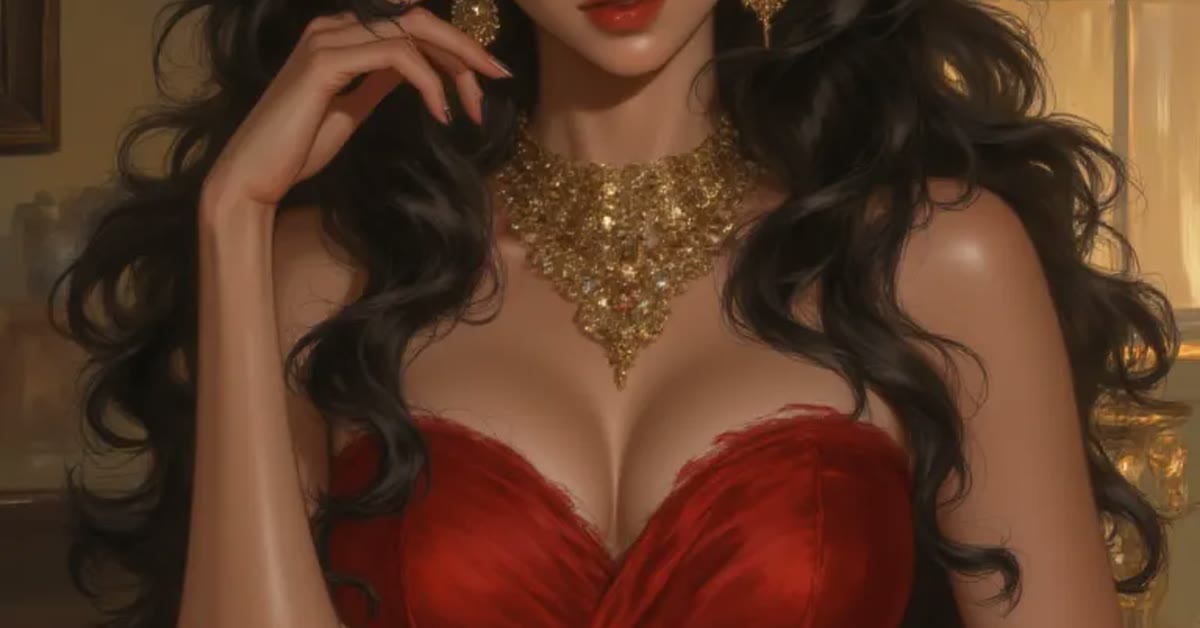
The luxury red background ai portrait prompt creates a bold, glamorous portrait that looks like a fashion magazine cover. A rich deep-red background, elegant studio lighting, and refined gold accents give the image instant drama and confidence. The face stays sharp and natural while the colors do the luxury work around it.
This prompt is perfect for profile pictures, portfolio shots, and festive posts. Red is a powerful color that draws the eye, so the portrait stands out in any feed. It suits confident poses and formal outfits best, where the premium mood matches the subject.

Table of Contents
How to Use This Luxury Red Background AI Portrait Prompt
- Upload a clear portrait to ChatGPT or Gemini and paste the prompt exactly as written.
- If the red looks too bright, ask for a deeper wine-red tone with softer shadows.
- Crop the best result to a square for profile use or a vertical frame for stories and reels.
Copy-Paste Prompt
Create a luxury AI portrait against a rich deep-red background with elegant studio lighting, a confident pose, and a premium fashion-magazine feel. Add soft shadows, refined gold accents, and a bold glamorous mood. Keep the face sharp and natural. Ultra-realistic detail, 4K, cinematic lighting.
Pro Tips
- Wear black, white, or gold outfits. These colors contrast beautifully with the deep red background.
- Keep jewelry simple and elegant. One gold piece is enough to match the refined accents.
- Ask for a slight head turn if a straight front pose feels too stiff for the glamorous mood.
More Prompts to Try
Deep red is a world of its own, and the luxury red background ai portrait prompt opens many rooms inside it. The variations below keep the bold glamorous core — rich red backdrop, elegant studio light, gold accents, confident pose — but change the shade of red, the styling, or the occasion. Each prompt is original and ready to copy and paste. Try them on the same portrait to build a set of covers, profiles, and festive posts with one consistent luxury identity.
Wine Red Evening
A deeper, darker wine-red version with candle-like warmth, for evening events and formal portraits.
Create a luxury AI portrait against a deep wine-red background with soft evening studio lighting, a confident elegant pose, and a premium fashion-magazine feel. Add soft shadows, refined gold accents, and a bold sophisticated mood. Keep the face sharp and natural. Ultra-realistic detail, 4K, cinematic lighting.
Scarlet Power Suit
A brighter scarlet version with strong light and a power pose, for business and leadership branding.
Create a luxury AI portrait against a bright scarlet-red background with strong elegant studio lighting, a confident power pose, and a premium editorial feel. Add crisp shadows, refined gold accents, and a bold commanding mood. Keep the face sharp and natural. Ultra-realistic detail, 4K, cinematic lighting.
Crimson Bridal Glow
A bridal version with crimson tones, soft gold jewelry light, and a graceful festive mood.
Create a luxury AI portrait against a rich crimson-red background with soft bridal studio lighting, a graceful confident pose, and a premium wedding-editorial feel. Add gentle shadows, refined gold jewelry accents, and a bold festive mood. Keep the face sharp and natural. Ultra-realistic detail, 4K, cinematic lighting.
Ruby Velvet Drama
A velvet-textured version with deep ruby tones and dramatic side light, for artistic portraits.
Create a luxury AI portrait against a deep ruby velvet background with dramatic side studio lighting, a confident artistic pose, and a premium gallery feel. Add rich shadows, refined gold accents, and a bold dramatic mood. Keep the face sharp and natural. Ultra-realistic detail, 4K, cinematic lighting.
Red and Black Noir
A noir version mixing deep red with black shadows, for a mysterious cinematic profile.
Create a luxury AI portrait against a deep red and black background with moody noir studio lighting, a confident mysterious pose, and a premium cinematic feel. Add deep shadows, subtle gold accents, and a bold enigmatic mood. Keep the face sharp and natural. Ultra-realistic detail, 4K, cinematic lighting.
Festive Red Celebration
A celebration version with warm red tones, soft confetti light, and a joyful glamorous mood.
Create a luxury AI portrait against a festive deep-red background with warm celebration lighting, a joyful confident pose, and a premium editorial feel. Add soft golden bokeh, refined gold accents, and a bold happy mood. Keep the face sharp and natural. Ultra-realistic detail, 4K, cinematic lighting.
Classic Hollywood Red
A vintage Hollywood version with old-glamour light and a timeless star quality.
Create a luxury AI portrait against a classic deep-red background with vintage Hollywood studio lighting, a graceful confident pose, and a timeless star quality. Add soft shadows, refined gold accents, and a bold glamorous mood. Keep the face sharp and natural. Ultra-realistic detail, 4K, cinematic lighting.
How to Customize This Prompt
Start with the shade of red, because red is not one color. Wine red is deep, dark, and formal. Scarlet is bright, energetic, and commanding. Crimson is rich and festive. Ruby is jewel-like and dramatic. Burgundy is muted and expensive. Name the shade directly in a follow-up, and the whole backdrop will shift while the face stays intact. Check the shade on your phone screen, because phone screens render reds more vividly than monitors, and a red that looks rich on a monitor can look loud on a phone.
Next, customize the outfit, because red backgrounds are demanding partners. Black outfits create classic contrast and let the red do the talking. White outfits glow against red and feel fresh and bridal. Gold outfits harmonize with the accents and feel maximally luxurious. Dark green or navy can work for a rich jewel-toned palette, but bright patterns and neon colors fight the red and must be avoided. If your photo has a busy outfit, ask for a simple black or white outfit change in the follow-up. One outfit change usually works cleanly in a head-and-shoulders portrait.
The lighting is the third lever. Soft, diffused studio light flatters the face and keeps the red velvety. Strong directional light adds drama and sculpted shadows, which suits fashion and noir versions. A single side light creates a half-lit cinematic look that is striking but risky for profile pictures, where both eyes should read clearly. For a profile picture, keep the light soft and frontal with a gentle gold rim. For a poster or cover, push the light harder and let the shadows deepen.
Jewelry and accents need restraint. One gold piece — earrings, a necklace, or a watch — matches the refined gold accents without competing. Two or three gold pieces start to look like a jewelry advertisement. If the AI adds heavy jewelry you did not ask for, ask for simple elegant jewelry only. The face is the hero; gold is the supporting actor. Keep the supporting actor in the background.
Finally, customize the pose and the crop. A slight head turn adds elegance and avoids the flatness of a straight front pose. Shoulders angled slightly, chin level, eyes direct to camera is the classic luxury pose. A square crop suits profiles. A vertical crop suits stories and posters. Ask for the pose and crop in the prompt so the composition serves the use. A confident pose with a level chin and direct eyes reads as power; a tilted chin reads as casual, which fights the luxury mood.
Step-by-Step Guide
Follow these steps to get a bold, glamorous red portrait that looks photographed, not filtered. The luxury red background ai portrait prompt keeps working even on older photos, as long as the subject stays clear and bright.
- Choose a confident base photo. Pick a clear, well-lit portrait with a direct gaze and a composed expression. Avoid photos with sunglasses, hats, or busy backgrounds. The red backdrop will supply all the drama, so the face should supply the calm confidence. In practice, the luxury red background ai portrait prompt needs only a clear photo and a few minutes from start to finish.
- Decide the shade and the use. Before generating, choose the red shade and the platform: wine red for formal profiles, scarlet for leadership branding, crimson for festive posts. Write the choice down so the follow-ups stay consistent. A portrait built for one use rarely serves another well. That is why the luxury red background ai portrait prompt keeps trending among creators who post aesthetic edits every day.
- Upload and paste the prompt. Upload the photo at full resolution to ChatGPT or Gemini and paste the luxury red background ai portrait prompt exactly as written. Full resolution matters because red backgrounds show compression artifacts early, and a soft upload produces a blotchy backdrop. Compared with random prompts, the luxury red background ai portrait prompt gives far more predictable and polished results.
- Check the red first. Look at the backdrop before the face. Is the red rich and even, with a velvety gradient rather than a flat wall? Is it the shade you asked for? If the red is too bright, too pink, or uneven, fix it in the follow-up before judging anything else. The red is half the portrait. The luxury red background ai portrait prompt rewards patience, so generate a few versions and pick the most natural one.
- Check the face and the outfit. Confirm the face is sharp, natural, and true to the original, and that the outfit harmonizes with the red. If the outfit clashes, ask for a simple black or white change. If the face drifted, ask for the original face restored with only the background and light changed. If you post regularly, the luxury red background ai portrait prompt helps you keep one consistent look across your whole feed.
- Refine light and accents. Ask for softer shadows if the light is harsh, or deeper shadows if the portrait feels flat. Check the gold accents: they should be refined and few. Remove any extra jewelry or props the AI added. One follow-up for light and one for accents is usually enough. What makes the luxury red background ai portrait prompt reliable is the balance it keeps between mood, detail and realism.
- Try a shade variation. Once the base portrait works, run one variation from this article on the same photo. A matched set in two red shades gives you options for different platforms and occasions with a consistent luxury identity. A second pass with the luxury red background ai portrait prompt often fixes dull colors and flat lighting in one go.
- Crop and test at real sizes. Crop square for profiles and vertical for stories, keeping the face centered with room above the head. View the portrait at comment-avatar size and at full profile size. The red must read as luxury at both, and the face must stay clear at the smallest size. If the face vanishes small, crop tighter. The luxury red background ai portrait prompt also travels well across apps, so the same steps work in most AI image tools.
Common Mistakes to Avoid
Choosing a red that is too bright. Neon or cherry red reads as cheap and loud, not luxurious. Luxury reds are deep, dark, and rich: wine, burgundy, crimson, ruby. If the result looks like a sale poster, ask for a deeper wine-red tone with softer shadows. Deep reds photograph as expensive; bright reds photograph as urgent. Many users save the luxury red background ai portrait prompt as their go-to starting point for this whole edit style.
Wearing a clashing outfit. Busy patterns, neon colors, and clashing hues fight the red backdrop and make the portrait look accidental. Black, white, and gold are the safe partners. If your photo has a loud outfit, change it in the follow-up rather than hoping the red will overpower it. The red should frame the outfit, not fight it. When the luxury red background ai portrait prompt is used on a sharp photo, skin tones and small details stay realistic.
Overdoing gold accents. Gold is refined in small doses and gaudy in large ones. A gold background pattern, gold jewelry, gold text, and gold props together look like a treasure chest exploded. Keep one gold element: either the accent light, or one jewelry piece, or a subtle backdrop texture. Restraint is what separates luxury from costume. Try the luxury red background ai portrait prompt on two or three photos first and keep the version with the most natural light.
Flattening the face with red light. Red light spilling onto the face makes skin look sunburnt and unhealthy. The red belongs on the background, not on the cheeks. If the face glows red, ask for the face kept natural with neutral skin tones and the red confined to the background. Check the cheeks and forehead specifically, because red spill shows there first. The luxury red background ai portrait prompt is popular because it gives a premium look without any manual retouching skill.
Using the portrait everywhere identically. One red portrait used as a profile, a banner, a poster, and a story cover without re-cropping looks lazy and crops badly. Crop for each use, and consider a second shade variation for variety. Consistency of identity does not mean one identical file everywhere; it means one coherent style adapted well. Every version of the luxury red background ai portrait prompt keeps the main subject sharp while the mood stays soft and cinematic.
Best Tools for This Edit
ChatGPT is the most reliable tool for red background portraits because it renders rich, even reds and preserves the face well. Its follow-up editing adjusts the red shade precisely without disturbing the face. For a single luxury profile picture, ChatGPT is the safest first choice, especially for the wine and crimson variations. For a cleaner finish, pair the luxury red background ai portrait prompt with a high resolution upload and a steady crop.
Gemini produces velvety, cinematic reds with beautiful soft light, which suits the ruby velvet and Hollywood variations especially well. Its reds can occasionally run warm toward pink, so name the shade explicitly — deep wine-red, not just red — in the prompt and follow-ups. Gemini is an excellent choice when the mood matters more than exact shade matching. Small changes after using the luxury red background ai portrait prompt let you match the edit to your own feed style.
Manual editors help with the final polish: evening out the backdrop gradient, a gentle vignette to deepen the edges, and a careful crop. Do not add red filters on top of the AI result, which push the shade brighter and cheaper. One gentle vignette pass is enough. Keep the original file so you can re-crop for different platforms without regenerating. The luxury red background ai portrait prompt works best when the subject is well lit and the background stays simple.
Frequently Asked Questions
Does red suit every skin tone? Yes, when the shade and the light are chosen well. Deep wine and burgundy flatter most skin tones because they are dark and rich. Brighter scarlet suits deeper skin tones beautifully and can overwhelm very fair skin if the light is harsh. Keep the face lit neutrally and the red on the background, and every skin tone looks regal against it. A clear base photo makes the luxury red background ai portrait prompt work faster and keeps faces natural in the output.
Can I use this portrait for a professional profile? Yes, with the right shade and expression. Wine red and burgundy read as confident and premium on LinkedIn and business pages. Scarlet reads as bold and leadership-oriented. Keep the expression composed and the crop professional. A red portrait stands out in a feed of grey and blue corporate headshots, which is exactly the point. Most creators share the luxury red background ai portrait prompt result as the final post because it needs very little extra editing.
What if the red background looks flat? Ask for a gradient or velvet texture in the backdrop, with softer light in the center and deeper tones at the edges. A flat wall of color looks digital; a gentle gradient looks photographed. A subtle vignette in post-processing also adds depth. The backdrop should feel like a studio wall with light falling across it, not like a color fill. If a result looks off, run the luxury red background ai portrait prompt again with a sharper base photo before adjusting anything else.
How do I keep gold accents refined? Name one gold element and forbid the rest: one pair of earrings, or one necklace, or a subtle gold rim light. If the AI adds more, ask for simple elegant jewelry only. Refined gold is a detail the viewer discovers; gaudy gold is a detail that shouts. The difference is quantity, and one is always enough. The real strength of the luxury red background ai portrait prompt is how it turns a plain photo into a scene with a clear story.
Can this style work for festive posts? Beautifully. Crimson and festive red versions suit Diwali, Christmas, weddings, and celebrations. Add the occasion in the prompt, keep the styling elegant, and let the red carry the festive feeling. A glamorous red portrait needs no extra decoration; the color itself is the celebration. Beginners get the best results when they follow the luxury red background ai portrait prompt exactly before changing any detail.
Final Words
Red means confidence, and this prompt builds a portrait that enters the room before you do. Use it when you want to be noticed, remembered, and taken seriously, with a deep rich backdrop, elegant light, and refined gold doing the luxury work around a calm confident face. Choose the shade carefully, dress simply, keep the gold restrained, and crop for the platform. When the red is deep, the light is soft, and the face is true, the portrait does not ask for attention. It commands it quietly, which is the very definition of luxury. Used well, the luxury red background ai portrait prompt keeps colors, light and mood consistent across every version you generate.