Introduction
The navratri slow motion edit video template is built for the most beautiful moment of Garba, which is the spin. Slow motion lets viewers see the fabric flare, the colors blur, and the joy on the dancer’s face. When the biggest twirl lands on the dhol beat, the reel feels alive. Used carefully, the navratri slow motion edit video template keeps the pacing, visuals, and mood working toward the same feeling.
Festival reels need warmth. Warm festive colors, a soft glow, and graceful movement will always beat fast cuts during Navratri. Keep the edit devotional and joyful, and let the dance itself be the star of every frame. That balance is what makes the navratri slow motion edit video template easy to adapt without losing the original idea. That is exactly where the navratri slow motion edit video template earns its keep during a busy festival shoot.
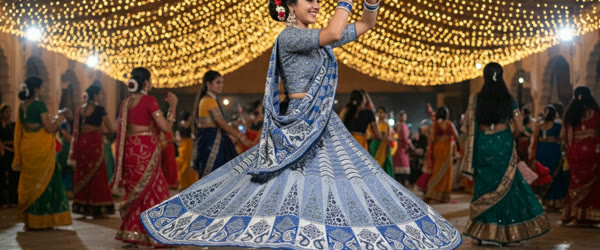
Table of Contents
How to Use This Prompt
- Open CapCut or VN, import the template, and add your Garba clips with the clearest spins first.
- Slow the best twirl to half speed and place its peak exactly on the strongest dhol beat.
- Apply warm festive colors and a soft glow, then export in vertical 9:16.
Edit Brief
Edit brief: devotional, graceful mood with slow-motion spins and flowing fabric; time the biggest twirl to the dhol beat, warm festive colors, and a soft glow.
Pro Tips for Navratri Slow Motion Edit Video Template
- Film spins from a slight distance so the full flare of the skirt stays in the frame.
- Use only one slow-motion section, because slowing every clip makes the reel feel sleepy.
- Add the glow at low strength so faces stay crisp and the festival lights stay soft.
More Edit Briefs to Try
The slow-motion spin is a versatile moment, and it can carry many different Navratri stories. The briefs below keep the same grammar, graceful slow motion, one big twirl on the dhol beat, warm festive colors, while changing the subject and the setting. Each brief tells you what to film and where the slow motion belongs, so you can plan the shoot with the edit already in mind. The unifying rule is simple: slow down only the most beautiful movement, and let everything else play at natural speed, because contrast is what makes slow motion feel special.
Dandiya Sticks in Rhythm
Edit brief: joyful dandiya mood with two dancers striking sticks in rhythm; slow the moment the sticks meet to half speed on the strongest dhol beat, keep the colors warm and the glow soft, and let the sticks’ motion blur slightly for a dreamy finish. Film from a slight distance so both dancers stay in frame. For a more personal finish, let the navratri slow motion edit video template set the rhythm and then change one detail at a time.
Mother and Daughter Garba
Edit brief: tender family mood with a mother and daughter spinning together; slow the shared twirl to half speed on the dhol beat, hold the moment their skirts flare together, and finish with warm golden light on their smiling faces. Keep the camera steady and the grade warm, with no text at all. The navratri slow motion edit video template works best when the key moment stays easy to follow. A steady frame rate helps the navratri slow motion edit video template keep every spin smooth and clean.
Chaniya Choli Detail Close-Up
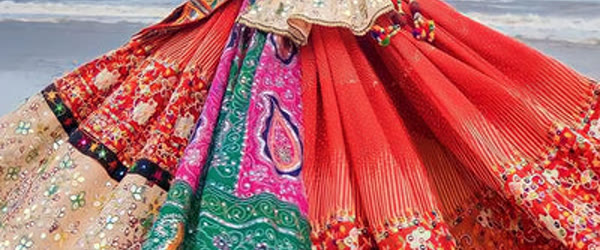
Edit brief: fashion-focused mood built on fabric and embroidery; slow a close-up of the skirt flaring and the mirror work catching the light, timed to a soft dhol hit rather than the biggest beat. Warm colors, soft glow, and a shallow depth of field keep the detail luxurious and the movement graceful. A careful pass with the navratri slow motion edit video template can sharpen the edit without changing its emotional intent.
Group Circle From Above
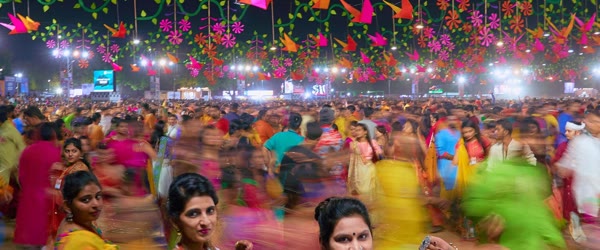
Edit brief: celebratory mood filmed from a raised angle looking down on a circle of dancers; slow the moment the circle spins outward, letting the colors spiral gently on the dhol beat. Warm festive grade, soft glow, and a wide frame that keeps the whole circle visible from start to finish.
Diya Lighting Moment
Edit brief: devotional mood with a dancer lighting a diya before the dance; slow the flame catching to half speed, hold the warm glow on the face, then cut to a gentle spin as the dhol begins. Warm amber tones, soft glow, and a reverent pace that honors the ritual before the celebration. Across a whole series of reels, the navratri slow motion edit video template keeps the festive look consistent.
Rain-Soaked Garba Night
Edit brief: dramatic monsoon mood with dancers spinning as light rain falls; slow the biggest twirl as raindrops catch the festival lights, keep the colors warm against the cool rain, and finish with a glowing, joyful close-up. The contrast between cool rain and warm light makes this version unforgettable.
How to Customize This Template
Customizing a Navratri template starts with the dance, because Garba has many forms and each one moves differently. A fast, energetic Garba wants a shorter slow-motion section and a harder beat hit, while a graceful, devotional Garba wants a longer slow section and a softer landing. Watch your raw footage once without editing and notice where the movement is most beautiful; that moment, and only that moment, earns the slow motion. Everything else should play at natural speed so the slow section feels like a gift rather than a gimmick.
Next, adapt the colors to your venue. Outdoor night Garba under strings of lights wants warm amber and gold tones, while an indoor hall with bright tube lights wants a slightly cooler grade with warm skin tones preserved. The goal is always the same: faces warm and crisp, backgrounds glowing and soft. Apply one consistent warm grade across all clips, and check the transition into the slow-motion section specifically, because grade shifts are most visible when the motion changes. When you compare versions, the navratri slow motion edit video template gives each reel the same clear creative baseline. Beginners often find the navratri slow motion edit video template easier than building the whole effect from scratch.
Then choose the music edit deliberately. The dhol beat is the heartbeat of this template, and the biggest twirl must land on its strongest hit. If your song has multiple strong beats, pick the first one for the reveal and let later beats carry smaller moments, so the edit builds instead of repeating. Finally, decide on text before you start: most Navratri reels work best with no text or a single short greeting, because the dance and the devotion are the message. A cluttered caption on the video will fight the grace you worked to capture.
- Let the dance decide: energetic Garba wants short slow motion, graceful Garba wants longer.
- Slow only the best moment: one beautiful twirl beats five slowed clips.
- Grade for the venue: warm amber outdoors, balanced warmth indoors.
- Pick the first strong beat: the reveal lands once, and later beats support it.
- Keep text minimal: no text or one short greeting, never a paragraph.
- Protect the faces: warm, crisp faces matter more than any background effect.
Step-by-Step Guide
Follow these steps to build a Navratri slow-motion reel that feels alive.
- Film the dance with slow motion in mind. Shoot in the highest frame rate your phone allows, ideally 60 or 120 frames per second, because high frame rate is what makes slow motion smooth instead of jerky. Film from a slight distance so the full flare of the skirt stays in frame, and keep the camera as steady as you can.
- Import the template and select the best spins. Open CapCut or VN, load the template, and watch all your clips once through. Mark the two or three most graceful spins, and choose the single best one for the slow-motion reveal. The rest of the clips will play at natural speed and support the star moment.
- Place the star spin on the timeline. Put the best twirl so its peak, the widest flare of the fabric, lands exactly on the strongest dhol beat. Play it back three times and nudge by single frames until the peak and the beat arrive together. This alignment is the emotional center of the entire reel.
- Slow the twirl to half speed. Apply slow motion only to the star spin, reducing it to about half speed, and check that the motion stays smooth. If the footage was shot at a low frame rate and the slow motion stutters, shorten the slowed section to just the peak of the twirl rather than the whole spin.
- Keep the other clips at natural speed. Resist the temptation to slow everything down. Natural-speed clips before and after the slow section create contrast, and contrast is what makes the slow moment feel magical. A reel where everything is slow feels sleepy; a reel with one slow moment feels alive.
- Apply warm colors and a soft glow. Grade the whole reel with warm festive tones, add a soft glow at low strength, and verify that faces stay crisp while the lights bloom gently. The glow should feel like festival light, not like a filter, so keep its strength low and check it on a phone screen.
- Add music and check the mix. Use the original Garba track so the platform links your reel to the song, balance the dhol so it punches through without distorting, and listen once on phone speakers. Phone speakers compress bass, so the dhol must be slightly louder than feels natural on headphones.
- Export vertical and post during the festival. Export in 9:16 at the highest quality, add a short festive caption with two or three relevant hashtags, and post during Navratri evenings when the audience is actively celebrating. Festival content has a short, intense window, and posting inside it matters more than any amount of polish.
Common Mistakes to Avoid
Slowing down every clip. When everything is slow, nothing is special, and the reel drags. The template’s power comes from contrast: natural speed everywhere, one glorious slow moment on the beat. If your reel feels sleepy, the fix is almost always to restore natural speed to all but the star spin. The real strength of the navratri slow motion edit video template is how it turns a familiar song moment into a polished sequence.
Filming too close to the dancer. A tight shot cuts off the skirt flare, which is the most beautiful part of the spin, and it makes the slow motion feel cramped. Step back until the full twirl fits comfortably in the frame, with a little room to spare. The flare needs space to breathe, and your viewers need to see it whole. Keep the navratri slow motion edit video template focused, and the final reel will usually feel more deliberate. Warm light and a clean background let the navratri slow motion edit video template do the heavy lifting.
Shooting at a low frame rate. Slow motion made from 30-frame-per-second footage stutters visibly, because there are not enough frames to stretch. Always shoot dance footage at 60 or 120 frames per second when you plan to slow it down. This single technical habit matters more than any editing trick, and it cannot be fixed after the fact. Small changes around the navratri slow motion edit video template can produce a fresh result while preserving the timing that works.
Overdoing the glow. A strong glow turns faces milky, blows out the festival lights, and makes the whole reel look hazy. Keep the glow at low strength, check faces specifically, and remember that the goal is warm light, not fog. If you cannot see the dancer’s expression clearly, the glow is too strong. For consistency across a series, the navratri slow motion edit video template helps related edits share the same mood and finish.
Posting after Navratri ends. Festival reels have an intense but brief window, and a Navratri reel posted a week late will reach a fraction of its potential audience. Film during the early nights, edit the same evening, and post while the celebration is live. Speed matters more than perfection for seasonal content. When the dhol beat drops, the navratri slow motion edit video template makes the reveal feel much bigger.
Best Tools for This Edit
CapCut is the fastest editor for Navratri slow-motion reels, with simple speed controls, warm filter presets, and beat markers that make placing the twirl straightforward. Its slow-motion quality from high-frame-rate footage is excellent, and its vertical export is tuned for Reels and Shorts. Most creators can build the entire reel in CapCut in under half an hour. The navratri slow motion edit video template is most effective when cuts, text, and music all support one another.
VN Video Editor offers finer control over speed curves, which matters when you want the slow motion to ease in and out gracefully rather than switching abruptly. Its speed-ramp tools let the twirl decelerate into slow motion and accelerate back to natural speed, producing a fluid, professional feel. VN template codes for Navratri edits are widely shared, so you can start from a proven structure. Before you export, check that the navratri slow motion edit video template still makes the main moment clear.
InShot is a good choice for quick phone-only builds during the festival itself, when you are filming at a Garba event and want to post the same night. Its slow-motion, warm filters, and text tools cover everything this template needs, and its simplicity keeps the turnaround fast. For festival content, speed of posting often matters more than advanced features. A polished result from the navratri slow motion edit video template often comes from restraint rather than extra effects. That reliability is why the navratri slow motion edit video template suits a full Navratri reel series.
Frequently Asked Questions
What frame rate should I shoot Garba videos at?
Shoot at 60 frames per second at minimum, and 120 if your phone supports it. High frame rates give the editor enough frames to stretch into smooth slow motion. Footage shot at 30 frames per second will stutter when slowed, and no editing trick can fully repair it, so set the frame rate before you start filming. The navratri slow motion edit video template gives beginners a dependable structure while leaving room to experiment.
Can I use this template for Dandiya as well as Garba?
Yes. The same grammar, one slow moment on the beat, warm colors, soft glow, works beautifully for Dandiya, with the slow section placed on the moment the sticks meet. Film the sticks meeting from a slight distance so both dancers stay in frame, and time the slow section to the sharpest dhol hit for maximum impact. When the first version is close, refine the navratri slow motion edit video template instead of starting from a completely new edit.
Should the slow-motion section include the whole spin?
No, just the peak: the widest flare of the fabric and the most expressive moment of the face, usually one to two seconds at half speed. Slowing the entire spin dilutes the effect and makes the reel feel long. A short, perfect slow moment will be replayed; a long, average one will be scrolled past. That is why the navratri slow motion edit video template rewards a clear reveal more than constant movement.
How do I keep the glow from washing out faces?
Apply the glow at low strength, mask it away from faces if your editor supports it, and always check the result on a phone screen. Faces should stay crisp and warm while the background lights bloom softly. If a face looks milky, reduce the glow by half and check again; the difference is usually dramatic. Used at full quality, the navratri slow motion edit video template can make a short clip feel ready to publish.
Is it okay to use recorded Garba music from an event?
Using the original trending audio through the platform’s music library is the safest route, because the platform handles licensing and links your reel to the song page. Recording live music at an event can cause audio quality problems and copyright flags, so prefer the platform’s audio library version of the same track whenever it is available. The navratri slow motion edit video template also adapts well to celebrations, couples, personal moments, and themed variations.
Final Words
One perfect spin, one strong beat, and warm light is all a Navratri reel needs. Try this template and let the dance shine. For the final check, compare the export against the navratri slow motion edit video template and remove anything that distracts from it.
Leave a Reply