Introduction
LMC 8.4 is a popular modified camera app, and its real magic comes from config files. This lmc 8.4 config file guide explains what the config changes, including HDR behaviour, sharpness, and colour, and who should install it. A well-matched config can make a mid-range phone produce noticeably sharper, more vivid photos, especially in tricky light where the stock camera struggles. You can also read more background on Configuration file to understand the wider context.
A config file is simply a saved set of camera settings, tuned for a particular phone model or chipset. Loading one replaces dozens of manual slider changes with a single tap, and the difference shows up immediately in detail, dynamic range, and noise control. The key is matching the config to your device rather than grabbing the first file you find. Used the right way, lmc 8.4 config file can make the whole process faster and much more enjoyable.

Table of Contents
- Quick Take on the LMC 8.4 Config File
- How to Install the LMC 8.4 Config File
- Pro Tips
- What an LMC 8.4 Config File Actually Changes
- How to Choose the Right LMC 8.4 Config File for Your Phone
- Step-by-Step Guide to Testing an LMC 8.4 Config File Properly
- Common Mistakes to Avoid With LMC 8.4 Config Files
- Best Tools and Apps for Testing Camera Configs
- Frequently Asked Questions About the LMC 8.4 Config File
- Quick Checklist Before You Install Any Config
- Final Words
Quick Take on the LMC 8.4 Config File
Download LMC 8.4 built for your chipset, load a config made for your phone model, and test it in daylight and at night. Keep the config that stays stable and sharp, and change only one setting at a time if you want to tune it further. In practice, lmc 8.4 config file works best when you combine it with patience and a clear plan.
How to Install the LMC 8.4 Config File
- Install the LMC 8.4 APK version that matches your chipset, and allow installs from trusted sources only during setup.
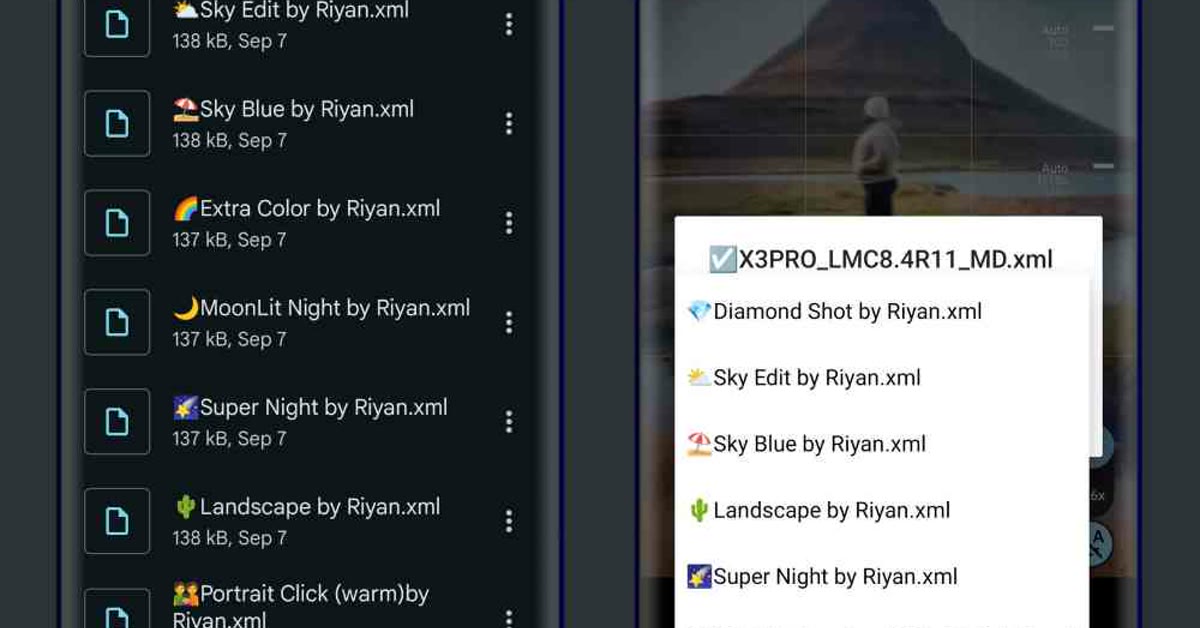
- Place the config file in the LMC configs folder on your phone, then double-tap near the shutter area to load it.
- Take test shots in daylight, indoors, and at night, and keep the config that looks best across all three.
Pro Tips
- Back up your working config before trying new ones, so a bad file never leaves you without a good camera.
- Keep the stock camera app for video and ultrawide shots, since modified apps sometimes struggle with those modes.
- Check that the config matches your exact model, because a file tuned for another phone can cause crashes or dull colours.

What an LMC 8.4 Config File Actually Changes
A config file is not magic, and understanding what it changes helps you choose wisely and troubleshoot calmly. At its core, a config is a saved bundle of processing settings that the LMC camera app applies to every photo: how aggressively it merges multiple exposures for HDR, how much sharpening it adds, how it handles noise in shadows, and how it renders colour, contrast, and saturation. The stock camera on most phones already does all of this, but with conservative settings chosen to look acceptable on every scene. A tuned config pushes those same controls further in a specific direction, such as sharper detail, punchier colour, or cleaner night shots.
HDR behaviour is usually the biggest visible change. A config tuned for dynamic range takes more exposures and merges them more boldly, so bright skies and dark shadows both keep detail in the same shot. The trade-off is motion: moving subjects can ghost or blur when many frames are merged, which is why some configs offer separate modes for still scenes and action. Sharpness is the second change, and it is the easiest to overdo. You do not need expensive tools to get value from lmc 8.4 config file, only the right approach.
A little extra sharpening makes textures crisp; too much creates halos around edges and a crunchy, artificial look, especially on skin and foliage. Colour is the third, and it is the most personal: some configs aim for vivid, saturated colour that pops on social media, while others aim for natural, muted tones that edit well later. None of these directions is objectively right, which is why testing on your own photos matters more than any recommendation.
Noise control is the quiet fourth change, and it matters most at night. Phone sensors are small, so low light produces grain, and the config decides how hard to smooth that grain away. Heavy smoothing removes grain but also removes fine detail, leaving skin waxy and textures plasticky. Light smoothing keeps detail but leaves visible noise. The best configs for a given phone strike a balance tuned to that sensor, which is exactly why a config made for another model can look wrong on yours: the sensor, the lens, and the chipset all shape what the processing should do.
How to Choose the Right LMC 8.4 Config File for Your Phone
Choosing well is mostly about matching, not about finding a universally “best” file. Start with your exact phone model and chipset, and look for configs explicitly made for that combination. A config tuned for a different sensor can cause dull colours, crashes, or strange behaviour, so the model match is the first filter, not an afterthought. If no config exists for your exact model, look for one made for the same chipset and sensor family, and treat it as a starting point to test rather than a finished solution.
Next, decide what you photograph most. A config tuned for daylight landscapes will not be the best choice for indoor portraits, and a night-focused config may over-process bright scenes. Many experienced users keep two or three configs and switch between them: one for daylight, one for portraits, one for night. That sounds like extra work, but loading a config takes seconds once the files are in place, and the right config for the scene beats a single compromise config every time.
Read the description that comes with a config before installing it. A good config description says which phone it was tuned on, what it prioritises, and what it trades away. Vague descriptions promising everything — sharper, brighter, better in all conditions — are a warning sign, because real processing always trades one thing for another. Finally, check the date and the community feedback. Configs age as the app updates, and a file made for an older LMC version may behave oddly on a newer one. Recent feedback from users with your phone model is the most reliable signal you will find. The real strength of lmc 8.4 config file is how simple it makes an otherwise complicated task.
Step-by-Step Guide to Testing an LMC 8.4 Config File Properly
A config earns its place by performing in real light, not by looking good in one test shot. Follow these eight steps to judge any config fairly. Once you try lmc 8.4 config file on a real project, you will quickly see why it has become so popular.
- Back up your current setup. Before loading anything new, save or note your working config and settings. A backup means a bad file costs you minutes, not a working camera.
- Load one config at a time. Place the file in the LMC configs folder, load it with the double-tap gesture near the shutter, and confirm the app shows the config name. Never stack changes from two configs at once.
- Shoot a daylight scene. Photograph a detailed outdoor scene with sky, foliage, and shadows. Check edge detail, sky colour, and whether shadows hold detail without looking grey and flat.
- Shoot a portrait. Photograph a person in soft light and check skin texture closely. Good configs keep skin natural; over-sharpened configs make skin look crunchy and artificial.
- Shoot indoors. Photograph a room with mixed lighting and check white balance and noise. Indoor light exposes colour casts and grain that daylight hides.
- Shoot at night. Photograph a street or a dim room and check whether lights blow out, shadows turn to mush, or noise overwhelms detail. Night is where configs differ most.
- Compare with the stock camera. Shoot the same scenes with your phone’s original camera app, and compare side by side on a large screen. The config should win clearly in the scenes it claims to improve, not just look different.
- Keep the winner, delete the rest. Keep the config that performs best across all four tests, and remove the others. A small, tested set of configs beats a folder full of untested files, because you will actually remember which one to load.
Common Mistakes to Avoid With LMC 8.4 Config Files
Installing a config for the wrong phone. The most common failure is also the most avoidable. A config tuned for another sensor can crash the app, produce dull colours, or make photos worse than stock. Match the exact model first, and treat same-chipset files as experiments, not guarantees.
Judging from one photo. A single sunny shot flatters almost any config. Judge across daylight, portrait, indoor, and night, because a config that shines in one condition and collapses in another is not a daily driver.
Changing five settings at once. When a result disappoints, the temptation is to adjust HDR, sharpness, and colour together. Change one setting, test again, and you will learn what each control actually does. Changing everything at once teaches nothing.
Deleting the stock camera app. Modified camera apps sometimes struggle with video, ultrawide lenses, or slow motion. Keep the stock app for those modes, and use LMC where it genuinely wins: still photos in tricky light. That is exactly why so many creators keep coming back to lmc 8.4 config file for their projects.
Downloading from untrusted sources. Config files come from community forums and file hosts, and not all of them are clean or honest. Stick to well-known communities, check feedback from users with your phone, and never install an APK from a source you do not trust. A camera app has deep access to your phone, so the source matters as much as the settings.
Best Tools and Apps for Testing Camera Configs
LMC 8.4 itself is the main tool, and its strength is the config system: loading, switching, and comparing configs takes seconds once the files are organised. Learn the double-tap load gesture, the config folder location on your phone, and the reset option, and the whole workflow becomes painless.
Your phone’s stock camera app is the essential comparison tool. Every config claim should be checked against the stock app on the same scene, because “different” is not the same as “better”, and the stock app is the baseline your photos must beat. A careful setup at the start helps lmc 8.4 config file deliver exactly the result you had in mind.
A photo comparison app or a simple side-by-side view helps more than memory. Open the LMC shot and the stock shot together on a large screen, zoom to 100 percent, and compare edge detail, skin, and shadows directly. Memory flatters the newest shot; a side-by-side view does not.
A file manager with a clear folder structure keeps the workflow sane. Keep one folder for tested, working configs with clear names including the phone model, and a separate folder for untried files. When a new config disappoints, delete it immediately, so your working set stays small and trustworthy.
Frequently Asked Questions About the LMC 8.4 Config File
What exactly is a config file? It is a saved set of camera processing settings — HDR behaviour, sharpness, noise control, and colour — tuned for a particular phone or chipset. Loading one applies dozens of settings at once, replacing manual slider changes with a single tap.
Will any config file work on my phone? No. Configs are tuned for specific models and sensors, and a mismatched file can cause crashes, dull colours, or worse photos. Always start with a config made for your exact model, and test same-chipset files cautiously.
Is LMC 8.4 safe to install? LMC is a modified camera app distributed outside official app stores, so safety depends entirely on the source. Download only from well-known, trusted communities, check feedback from other users, and keep your phone’s security settings in mind. Never install camera apps from random links or pop-up ads.
Why do my photos look worse with a new config? Usually because the config was tuned for a different phone, or because it prioritises a style you do not like, such as heavy sharpening or vivid colour. Test across daylight, portrait, indoor, and night, and judge against the stock camera before deciding.
Can one config be best for everything? Rarely. Daylight, portraits, and night shots reward different processing, which is why many users keep two or three configs and switch between them. A small set of tested configs beats one compromise file.
How do I go back if a config breaks the app? Reload your backed-up working config, or clear the app’s data and start fresh with a known-good file. This is why backing up before experimenting matters: recovery takes seconds when a good config is saved. Many beginners get the best results from lmc 8.4 config file once they follow a few simple habits.
Quick Checklist Before You Install Any Config
Use this short checklist every time a new config tempts you, and most bad installs never happen. Confirm the config names your exact phone model. Read its description for what it prioritises and what it trades away. Check that it matches your current LMC version. Back up the config that already works. Load the new file, shoot the four test scenes, and compare against the stock camera on a large screen. Keep it only if it wins clearly in the scenes you actually shoot. Delete it immediately if it crashes, dulls colours, or loses to stock. A disciplined checklist turns config hunting from gambling into a quick, repeatable test, and your camera stays reliable while you explore.
Final Words
The right config turns a good camera app into a great one. Match it to your phone, test it in real light, and enjoy sharper photos from today onward. If you take a little time to understand lmc 8.4 config file, the quality of your final result improves a lot.
Leave a Reply