Introduction
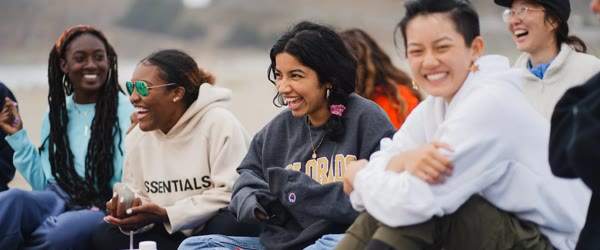
The cinematic beach college photo editing prompt turns a group photo into a fun summer memory that looks like a movie scene. College friends laughing together, waves behind them, and bright sunshine create a carefree mood that everyone wants to be part of. The warm tones and youthful energy make the image perfect for reunion posts and trip memories.
This prompt works best with real group photos where everyone is relaxed and happy. The beach setting adds color and freedom, while the cinematic finish gives the picture a polished look. It is the kind of photo friends tag each other in and save.
Table of Contents
How to Use This Cinematic Beach College Photo Editing Prompt
- Upload a clear group photo to ChatGPT or Gemini and paste the prompt exactly as written.
- If any face changes too much, ask the tool to restore the original faces and only improve the beach background and light.
- Save the best version and share it with the group as a trip memory or reunion post.

Copy-Paste Prompt
Transform this photo into a fun cinematic beach portrait with college friends laughing together, waves behind them, bright sunshine, and colorful beach vibes. Keep the energy youthful and candid, add warm tones and a carefree summer mood. Ultra-realistic detail, 4K, cinematic lighting.
Pro Tips
- Use a photo where everyone is visible and well lit. Dark or cropped faces are hard for the tool to restore.
- Keep the group close together in the frame. The beach should frame the friends, not swallow them.
- Ask for natural skin tones. Over-warm edits can make a group photo look orange and unreal.
More Prompts to Try
College beach photos deserve more than one version, because every trip has many moods: the arrival, the laughter, the sunset, the goodbye. The variations below keep the cinematic beach college photo editing prompt core — friends laughing, waves, sunshine, warm tones, carefree summer mood — but change the moment, the time of day, or the activity. Each prompt is original and ready to copy and paste. Use them across reunion posts, trip recaps, and throwback Thursdays so the memories stay alive all year.
Sunset Goodbye Beach
A golden evening version with the group watching the sunset together, for the emotional end of a trip.
Transform this photo into a cinematic beach portrait of college friends watching the sunset together, golden light on the waves, warm tones, and a peaceful happy mood. Keep the energy youthful and candid, with friends sitting close and laughing softly. Ultra-realistic detail, 4K, cinematic lighting.
Beach Volleyball Fun
An action version with a volleyball game, sand flying, and energetic laughter.
Transform this photo into a fun cinematic beach portrait of college friends playing volleyball, sand flying, bright sunshine, colorful beach vibes, and joyful shouts. Keep the energy youthful and candid, add warm tones and a carefree summer mood. Ultra-realistic detail, 4K, cinematic lighting.
Bonfire Night Beach
A night version with a bonfire, stars, and friends gathered close, for the most memorable night of the trip.
Transform this photo into a cinematic beach portrait of college friends gathered around a bonfire at night, warm firelight on happy faces, stars above, waves soft in the background. Keep the energy youthful and candid, add warm tones and a cozy carefree mood. Ultra-realistic detail, 4K, cinematic lighting.
Beach Selfie Squad
A close selfie version with the group squeezed together, smiling at the camera, waves behind.
Transform this photo into a fun cinematic beach selfie with college friends squeezed together smiling at the camera, waves and sunshine behind them, bright colors, and a joyful candid mood. Keep the energy youthful, add warm tones and a carefree summer feeling. Ultra-realistic detail, 4K, cinematic lighting.
Monsoon Beach Adventure
A rainy version with wet sand, dramatic clouds, and friends laughing through the rain.
Transform this photo into a cinematic monsoon beach portrait of college friends laughing together in light rain, dramatic clouds, waves behind them, and bright joyful energy. Keep the mood youthful and candid, add warm tones and a carefree adventurous feeling. Ultra-realistic detail, 4K, cinematic lighting.
Beach Sunrise Walk
A calm morning version with the group walking along the shore at sunrise, for reflective reunion posts.
Transform this photo into a calm cinematic beach portrait of college friends walking together along the shore at sunrise, soft golden light, gentle waves, and a peaceful happy mood. Keep the energy youthful and candid, add warm tones and a serene summer feeling. Ultra-realistic detail, 4K, cinematic lighting.
Beach Carnival Colors
A festive version with colorful umbrellas, beach stalls, and a carnival atmosphere.
Transform this photo into a festive cinematic beach portrait of college friends among colorful umbrellas and beach stalls, bright sunshine, waves behind, and joyful laughter. Keep the energy youthful and candid, add vivid warm tones and a carefree carnival mood. Ultra-realistic detail, 4K, cinematic lighting.
How to Customize This Prompt
Start with the group’s truth, because group photos live or die on authenticity. Choose a photo where everyone is relaxed, visible, and genuinely happy. A photo where one person is blinking, one is cropped, and one is looking away will not be saved by a beach background. The best group photos are slightly imperfect: someone mid-laugh, someone with windblown hair, someone caught turning. Those imperfections are the memory. The prompt polishes the scene; it cannot invent togetherness that was not there.
Next, customize the group arrangement. The prompt works best when the group is close together in the frame, with the beach framing them rather than swallowing them. If the group is spread across a wide beach, the people become small and the emotion disappears. Ask for the group kept close together and prominent in the frame. If someone stands far apart, ask for the group gathered closer. Togetherness in the frame mirrors togetherness in life, and viewers feel it instantly.
Faces are the third and most critical lever. In a group photo, the AI must preserve several faces at once, and it will often drift one or two. Check every face at full size against the original, and ask for the original faces restored with only the background and light improved if any face changed. Do not accept a version where a friend looks like a stranger. Friends tag each other in these photos, and a wrong face embarrasses everyone. Face preservation matters more than any other refinement in group edits.
The beach setting can be tuned independently. Bright midday sun suits energetic volleyball and carnival versions. Golden hour suits sunset and sunrise versions. Night with a bonfire suits the most emotional posts. Name the time of day in the prompt, and keep the light consistent across all faces. Mixed light — one face in sun, one in shadow — happens when the AI rebuilds the scene unevenly. Ask for consistent warm light across all faces in the follow-up if the lighting splits.
Finally, customize the caption and the tagging. Group photos perform best when everyone is tagged and the caption names the trip, the year, or the inside joke. Write the caption together if you can, or ask the group for one line each. The image shows the day; the caption should name it. Tagging everyone promptly matters, because the first hours of a group post decide its reach, and tagged friends share it to their own circles.
Step-by-Step Guide
Follow these steps to turn a group photo into a cinematic beach memory without losing anyone’s face. The cinematic beach college photo editing prompt keeps working even on older photos, as long as the subject stays clear and bright.
- Choose a photo where everyone is visible. Pick a group photo where every face is visible, well lit, and reasonably sharp. Avoid photos where someone is half hidden, heavily shadowed, or turned away. Count the faces before generating; the AI must preserve exactly that many, and you must verify exactly that many afterward. In practice, the cinematic beach college photo editing prompt needs only a clear photo and a few minutes from start to finish.
- Decide the moment and the time of day. Choose the variation that matches the trip moment you want to remember: sunset goodbye, bonfire night, volleyball energy, or morning walk. The time of day decides the light, so decide it before generating, not after. That is why the cinematic beach college photo editing prompt keeps trending among creators who post aesthetic edits every day.
- Upload and paste the prompt. Upload the group photo at full resolution to ChatGPT or Gemini and paste the cinematic beach college photo editing prompt exactly as written. Full resolution is essential for groups, because each face is small in the frame and small faces lose detail fastest. Compared with random prompts, the cinematic beach college photo editing prompt gives far more predictable and polished results.
- Count and check every face first. Compare the result with the original, face by face, left to right. Every person must look like themselves, with the right number of people and no extras. If any face drifted, ask for the original faces restored with only the beach and light improved, and regenerate. Do not proceed until every face passes. The cinematic beach college photo editing prompt rewards patience, so generate a few versions and pick the most natural one.
- Check the group arrangement and light. Confirm the group is close together and prominent, the beach frames them, and the light is warm and consistent across all faces. If the group spread out or the light split, fix it in a follow-up before judging the colors or the waves. If you post regularly, the cinematic beach college photo editing prompt helps you keep one consistent look across your whole feed.
- Refine the beach and the mood. Ask for gentler waves, warmer tones, or a simpler background if the scene distracts from the group. The beach should support the friends, never compete with them. One follow-up for the scene is usually enough once the faces are stable. What makes the cinematic beach college photo editing prompt reliable is the balance it keeps between mood, detail and realism.
- Try a variation for the reunion post. Once the base image works, run one variation on the same photo for a reunion or throwback post. The sunset and bonfire versions pair beautifully with the main daytime version, giving the trip a beginning, a middle, and an end across three posts. A second pass with the cinematic beach college photo editing prompt often fixes dull colors and flat lighting in one go.
- Share with the group first. Send the finished image to the group chat before posting publicly. Let everyone approve their own face and tag themselves. Post with the trip name, the year, and a short honest caption. Group photos belong to the group, and sharing them with consent first is both respectful and smart, because approved posts get shared more. The cinematic beach college photo editing prompt also travels well across apps, so the same steps work in most AI image tools.
Common Mistakes to Avoid
Accepting changed faces. The most serious mistake in group edits is posting a version where a friend looks different. It embarrasses the friend and undermines trust in the whole post. Always verify every face against the original. If the tool cannot preserve a face, use the original photo with a warm filter instead. An honest original beats a polished stranger every time. Many users save the cinematic beach college photo editing prompt as their go-to starting point for this whole edit style.
Letting the beach swallow the group. A vast beach with tiny people is a landscape, not a group memory. The friends must be prominent, occupying the main part of the frame. If the group shrinks, ask for the group kept large and close together with the beach as background. The people are the post; the beach is the setting. When the cinematic beach college photo editing prompt is used on a sharp photo, skin tones and small details stay realistic.
Over-warming the group photo. Warm tones suit beach photos, but over-warming turns every face orange and the sand into a yellow desert. Ask for natural skin tones with warm light, and check the result at normal brightness. Natural warmth glows; orange warmth burns. The difference is one follow-up asking for softer warmth. Try the cinematic beach college photo editing prompt on two or three photos first and keep the version with the most natural light.
Using a photo with hidden faces. A photo where faces are hidden behind sunglasses, hands, or other people cannot be restored reliably. The AI will invent the hidden parts, and the inventions will be wrong. Choose a photo where every face is visible. If no such photo exists, post the original honestly rather than forcing an edit that invents people. The cinematic beach college photo editing prompt is popular because it gives a premium look without any manual retouching skill.
Posting without group consent. Group photos involve everyone’s image, and posting without asking can upset friends who prefer privacy. Share the edit in the group chat first and get a quick yes from everyone visible. Consent takes minutes and prevents problems that last much longer. It also earns you shares, because people share posts they approved. Every version of the cinematic beach college photo editing prompt keeps the main subject sharp while the mood stays soft and cinematic.
Best Tools for This Edit
ChatGPT is the most reliable choice for group beach portraits because it preserves multiple faces well and follows the beach scene instructions closely. Its follow-up editing fixes individual faces without disturbing the rest of the group. Save each version where every face passes before any further changes, so you never lose a good result. For a cleaner finish, pair the cinematic beach college photo editing prompt with a high resolution upload and a steady crop.
Gemini produces warm, glowing beach light with beautiful pastel skies that suit the sunset and morning variations especially well. Its group face preservation is good, though it occasionally softens the smallest faces. Request natural detail on every face explicitly. Gemini is an excellent choice for the golden hour versions, where its soft light shines. Small changes after using the cinematic beach college photo editing prompt let you match the edit to your own feed style.
Basic photo editors are the right fallback if AI face preservation fails for anyone in the group. A gentle warm filter, a small brightness lift, and a careful crop can produce a lovely beach memory from the original photo without any AI risk. Use this fallback proudly when the group matters more than the effect. An honest group photo always beats a polished one with a wrong face. The cinematic beach college photo editing prompt works best when the subject is well lit and the background stays simple.
Frequently Asked Questions
Can this prompt work for a group of ten or more? Yes, but with extra care. Large groups need the highest resolution upload and the most careful face checking. Keep the group arranged in two rows if possible, so every face is visible. Verify every face individually, and expect one or two follow-ups to fix drifted faces. If the group is very large, consider two edits: one of the full group and one of a smaller subgroup. A clear base photo makes the cinematic beach college photo editing prompt work faster and keeps faces natural in the output.
What if one person’s face keeps changing? Isolate the problem: ask the tool to restore that one person’s face from the original while keeping everything else unchanged. If it still fails, crop that person from the original photo and recombine manually, or use the basic-editor fallback for the whole image. One stubborn face should not block a good group post; work around it rather than forcing it. Most creators share the cinematic beach college photo editing prompt result as the final post because it needs very little extra editing.
Should the photo be posed or candid? Candid wins for beach memories. Laughter, movement, and windblown hair read as real and joyful. Posed group photos can work, but they need relaxed expressions to avoid stiffness. The best group photos are taken between poses, when everyone forgot the camera. Choose the candid frame from the burst, even if it is slightly imperfect. If a result looks off, run the cinematic beach college photo editing prompt again with a sharper base photo before adjusting anything else.
Can I add people who were not in the original photo? Technically possible, but risky and often inappropriate. Added people rarely match the light, scale, and style of the original group, and the result looks pasted. More importantly, adding someone to a memory they were not part of misrepresents the moment. Do not add people to group memories. Celebrate the people who were there. The real strength of the cinematic beach college photo editing prompt is how it turns a plain photo into a scene with a clear story.
How do I handle different skin tones in one group? Ask for natural skin tones for every person, with warm light applied evenly. Check each face individually, because AI tools sometimes warm one skin tone correctly and oversaturate another. If one person’s tone shifts, ask for that person’s natural tone restored specifically. Every person deserves to look like themselves, with their own beautiful skin tone intact. Beginners get the best results when they follow the cinematic beach college photo editing prompt exactly before changing any detail.
Final Words
College days pass fast, but beach photos keep them alive, and this prompt makes those photos look like the summers they were. Use it to gather laughing friends, waves, and sunshine into one cinematic frame, while protecting every face and keeping the group close together. Choose a photo where everyone is visible and happy, verify each face with care, and share the result with the group first. The beach will fade from memory, but a good group photo, honestly made, keeps the laughter close for years. Used well, the cinematic beach college photo editing prompt keeps colors, light and mood consistent across every version you generate.
Leave a Reply