Introduction
Spider-Man swinging through a city at sunset is the kind of shot that stops thumbs mid-scroll. Spider Man AI video editing prompts create that action with fast dynamic cameras, rushing wind, and glowing city lights far below.
The energy comes from speed and height. A camera that follows the swing closely, a skyline that rushes past, and golden sunset light make the viewer feel the flight. The prompt below builds the swing, and the steps show you how to edit it into a reel fans will replay.
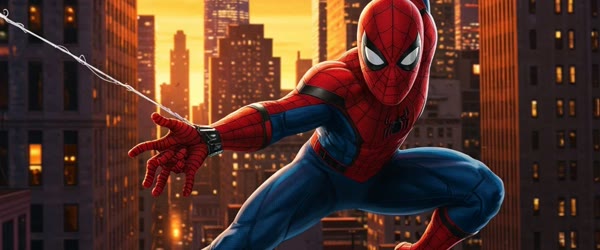
Table of Contents
- How to Use These Spider Man AI Video Editing Prompts
- Copy-Paste Prompt
- Pro Tips
- More Prompts to Try for Spider-Man AI Videos
- How to Customize These Spider-Man Video Prompts
- Step-by-Step Guide to Creating the Spider-Man Video
- Common Mistakes to Avoid
- Best Tools for This Edit
- Frequently Asked Questions
- Final Words
How to Use These Spider Man AI Video Editing Prompts
- Generate the video from the prompt and watch the web-swinging motion closely. The swing arc should feel smooth and physical, with the city moving naturally in the background.
- Add a heroic music track with a strong beat and a wind sound effect layered underneath. Let the music peak as Spider-Man swings closest to the camera for maximum impact.
- Trim to the best ten to twenty seconds and export vertical. One clean swing sequence with good light will beat a longer video with shaky motion.
Copy-Paste Prompt
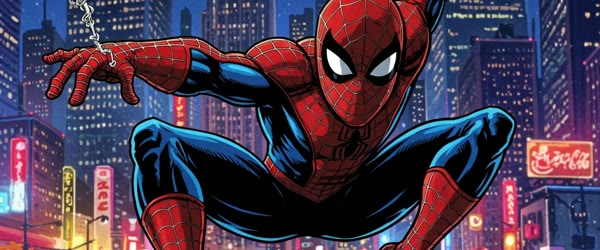
Create an action video of Spider-Man swinging between city skyscrapers at sunset, fast dynamic camera following the swing, wind rushing, epic superhero energy, glowing city lights below, ultra-realistic motion, 4K, cinematic lighting.
Pro Tips
- Generate at sunset light settings, because the golden sky and early city lights give the swing a cinematic comic-book glow.
- Keep the camera behind and slightly below Spider-Man, since that angle makes the viewer feel like they are flying with him.
- Cut on the beat of the music at the fastest moment of the swing to make the action feel even more powerful.

More Prompts to Try for Spider-Man AI Videos
Spider-Man is the perfect AI video hero, because swinging gives you motion, height, and freedom in every shot. These original spider man ai video editing prompts explore different Spider-Man moments, from city swings to quiet rooftop pauses, so you can build an action series that never repeats the same swing. Keep the camera dynamic, the city glowing, and the energy heroic, and every video will feel like a blockbuster. Used well, the spider man ai video editing prompts can make the whole result feel more polished and professional. Used well, the spider man ai video editing prompts can make the whole result feel more polished and professional.
Sunset Swing Through the City
The signature Spider-Man shot: swinging between skyscrapers as the sun sets.
Create an action video of Spider-Man swinging between city skyscrapers at sunset, fast dynamic camera following the swing, wind rushing, epic superhero energy, glowing city lights below, ultra-realistic motion, 4K, cinematic lighting.
The following camera is the key. It must move with the swing, diving and rising in the same arc, so the viewer feels the momentum. The sunset light makes the glass towers glow, which gives the whole shot its blockbuster colour. Keep the swing continuous, because a cut mid-swing breaks the physics the audience feels in their stomach.
Rooftop Perch Pause
A quiet, characterful moment between the action, showing the hero at rest.
Create an action video of Spider-Man crouching on a city rooftop edge at dusk, mask half lifted, city lights spreading below, slow push-in camera, calm thoughtful mood before the next leap, ultra-realistic motion, 4K, cinematic lighting.
The pause gives the action meaning. Without quiet moments, swinging becomes noise; with them, the hero becomes a person. The push-in must be very slow, arriving at the masked face exactly as the clip ends. The city lights below do the storytelling, so keep them bright and endless.
Web Rescue Dive
A heroic rescue: diving to catch someone falling, with the city rushing past.
Create an action video of Spider-Man diving from a skyscraper to rescue a falling person, fast plunging camera, wind and city blurring past, web shooting at the last moment, heroic tense energy, ultra-realistic motion, 4K, cinematic lighting.
The dive needs speed and a clear goal. The camera must plunge with the hero, so the city blurs and the falling person grows larger. The web shot is the payoff, and it must land exactly at the last possible moment. Time it late, because a late save feels heroic and an early save feels easy.
Rain Swing Battle
A wet, dramatic version with rain, lightning, and a villain silhouette.
Create an action video of Spider-Man swinging through heavy rain and lightning, chasing a dark villain silhouette across rooftops, fast dynamic camera, wet suit glistening, intense storm energy, ultra-realistic motion, 4K, cinematic lighting.
Rain adds danger and texture. The wet suit catches the lightning, the rooftops go slick, and the villain silhouette gives the chase a target. Keep the chase continuous, because cutting away will lose the tension. The lightning should flash, never stay, so the darkness keeps returning and the danger keeps renewing.
Morning Patrol Glide
A calm, beautiful version of the hero surveying his city at dawn.
Create an action video of Spider-Man gliding smoothly above the city at dawn, golden light on the towers, gentle soaring camera, peaceful watchful mood, quiet hero energy, ultra-realistic motion, 4K, cinematic lighting.
The glide is the opposite of the swing: smooth, slow, and serene. Dawn light makes the city look hopeful, and the hero’s calm patrol tells the audience the city is safe. This is the version to post in the morning, when viewers want inspiration rather than adrenaline.
Alley Landing Impact
A grounded, powerful version ending with a heroic three-point landing.
Create an action video of Spider-Man dropping from above into a dark alley, landing in a heroic crouch, dust and debris bursting outward, slow-motion impact, camera circling low, powerful dramatic energy, ultra-realistic motion, 4K, cinematic lighting.
The landing is the entire video. Everything before it, the drop, the blur, the rush, exists to make the landing feel powerful. Slow the impact to half speed, let the dust ring expand, and circle the camera slowly around the crouch. Hold the final pose for a full beat, because the pose is the poster.
How to Customize These Spider-Man Video Prompts
Customisation starts with the suit. The classic red and blue, the black symbiote, the Iron Spider, and the homemade suit each tell a different Spider-Man story, and fans will notice which one you use. Name the suit explicitly, because a generic “Spider-Man suit” prompt will produce a random version that may not match your series. The suit decides the colour palette, the mood, and the audience’s expectations, so choose it before anything else. That is exactly why the spider man ai video editing prompts has become a favourite with so many creators. That is exactly why the spider man ai video editing prompts has become a favourite with so many creators.
Next, control the city. New York skyscrapers, a generic glowing metropolis, a rainy noir city, and a dawn-lit skyline each create a different Spider-Man world. The city is the stage, and it must match the action: tall towers for swinging, rooftops for pauses, alleys for landings. Name the city’s character in one phrase, and the AI will build the right skyline.
The camera is the third lever, and it matters more in Spider-Man videos than in any other genre. Following cameras create speed, push-ins create intimacy, plunging cameras create danger, and circling cameras create power. Choose one camera move per video and hold it, because switching moves mid-swing breaks the physics. The camera should move like it is flying with the hero, never like it is watching from a tripod.
Finally, tune the energy arc. Every Spider-Man video needs one peak: the swing’s apex, the rescue’s catch, the landing’s impact. Build the whole clip toward that single peak, and let everything before it be preparation. A video with three peaks feels scattered; a video with one peak feels like a scene from a film.
Step-by-Step Guide to Creating the Spider-Man Video
Follow these steps in order. Superhero videos fail on physics more than on anything else, so the movement steps matter most. With a little practice, the spider man ai video editing prompts becomes quick and easy to repeat. With a little practice, the spider man ai video editing prompts becomes quick and easy to repeat.
- Choose the suit, city, and action before generating. Write down all three, and pick the matching prompt from this article. The three choices together define the video, and deciding them first prevents the mismatched results that make superhero videos look cheap.
- Write the prompt with the hero, the action, the camera, and the light. Include all four explicitly. A prompt missing the camera move will produce a static shot; one missing the light will produce a flat video. The action must be one clear movement: swing, dive, glide, or land.
- Open your AI video tool and generate a short clip first. Use Flow AI or any image-to-video tool that accepts text prompts. Generate five to eight seconds, and check the suit, the swing physics, and the camera speed before committing longer.
- Check the suit and the body first. The suit’s colours and web pattern must stay consistent, and the body must move like a human athlete, not a rubber doll. If the limbs bend wrongly or the suit shifts colour, simplify the action and regenerate.
- Check the physics of the movement. The swing must arc, the dive must accelerate, and the landing must impact. If the movement floats or stutters, the video will feel weightless and fake. Strengthen the motion words with “dynamic”, “fast”, and “momentum” and regenerate.
- Extend the best clip or generate a matching second shot. If the short clip works, generate a second shot with the same suit, city, and light descriptions, such as a pause after the swing. Cut between action and pause, so the video breathes like a real film scene.
- Add sound and music timed to the peak. A whooshing swing sound, a deep impact thud, and an epic orchestral swell timed to the peak moment will sell the physics. Keep the music heroic but not overwhelming, because the movement should lead and the music should follow.
- Export in vertical 1080 by 1920 and watch on a phone. Superhero videos are watched on phones, often with sound, often in feeds full of competing action. Check that the hero reads clearly on the small screen, the swing feels fast, and the peak lands hard before posting.
Common Mistakes to Avoid
Letting the suit change mid-clip. A suit that shifts from red-blue to black, or loses its web pattern halfway, destroys the illusion instantly. Name the suit explicitly in every prompt, and check it in every frame. Consistency of costume is the foundation of superhero video. The spider man ai video editing prompts works best when you keep the setup simple and follow the steps in order. The spider man ai video editing prompts works best when you keep the setup simple and follow the steps in order.
Breaking the physics. Floating swings, weightless landings, and instant stops all read as fake. The movement must accelerate, arc, and impact like a real body in motion. If the physics feel wrong, simplify the action to one movement and regenerate.
Using a static camera. A still camera watching Spider-Man swing feels like security footage, not cinema. The camera must fly with the hero, following, diving, or circling. Stillness kills superhero action faster than any other mistake.
Overloading the scene with villains and explosions. One villain silhouette is enough; five villains, three explosions, and a collapsing building will bury the hero. The hero is the star. Keep the scene to the hero, the city, and one clear action.
Forgetting the quiet moment. Non-stop action becomes noise. Every action series needs a pause: the rooftop perch, the dawn glide, or the breath before the leap. The quiet moment makes the action meaningful, so include one in every series, even if it is only the final frame.
Best Tools for This Edit
Flow AI is the best tool for generating Spider-Man videos from these prompts, because it renders dynamic camera movement, city scale, and heroic motion with cinematic realism. Its following cameras track the swing smoothly, and it keeps the suit consistent when descriptions match. Generate short clips first and extend the ones where the physics hold. Many beginners start with the spider man ai video editing prompts because the results look clean and natural. Many beginners start with the spider man ai video editing prompts because the results look clean and natural.
CapCut is the best editor for assembling Spider-Man clips, timing the music to the peak, and adding sound effects. Its speed controls let you ramp into the swing and slow the landing impact, and its transitions are clean enough for action pacing. Use CapCut to join an action shot and a pause shot into one film-like scene.
VN Video Editor suits editors who want precise control over the grade and the speed ramping. Its colour tools let you build the sunset glow or the storm grade exactly, and its keyframe controls give you command over zooms. VN is ideal when the generated footage is good but needs its colour unified into one blockbuster look.
Frequently Asked Questions
Can AI really render convincing Spider-Man swinging? Yes, for short clips with one clear swing. The failures come from long sequences with multiple swings, direction changes, and landings in one clip. Keep each clip to one swing or one landing, five to eight seconds, and the physics will hold. A careful pass with the spider man ai video editing prompts can lift an ordinary attempt into something special. A careful pass with the spider man ai video editing prompts can lift an ordinary attempt into something special.
What if the suit keeps changing? Describe the suit identically in every prompt, including colours and pattern, and simplify the action. If drift persists, generate the clip as an image first, confirm the suit, and animate that image. Image-to-video holds costume identity better than text-to-video. Once you try the spider man ai video editing prompts, you can adjust the small details to match your own style. Once you try the spider man ai video editing prompts, you can adjust the small details to match your own style.
Should I add the Spider-Man theme music? Famous theme music may be copyrighted, so use original epic orchestral music with a similar heroic energy instead. The audience will feel the heroism without the legal risk, and the video will be safe to monetise. Choose music that swells at the peak moment. In short, the spider man ai video editing prompts keeps the whole process fast, free and fun. In short, the spider man ai video editing prompts keeps the whole process fast, free and fun.
How long should a Spider-Man video be? Fifteen to twenty-five seconds is ideal. That covers one swing or one rescue with a peak and a breath, without repeating the action. Longer videos need a second action or a story beat, or they will feel repetitive. For a reliable finish, save the spider man ai video editing prompts and reuse it whenever you need this look. For a reliable finish, save the spider man ai video editing prompts and reuse it whenever you need this look.
Can children watch these videos? Yes, all the versions in this article are action-packed but family-friendly, with no graphic content. The rescue and patrol versions are especially suitable for younger viewers. Keep captions fun and heroic, and the series will build a young, loyal audience. That simple approach is what makes the spider man ai video editing prompts so popular right now. That simple approach is what makes the spider man ai video editing prompts so popular right now.
Final Words
Spider man ai video editing prompts turn text into flight: a swing through sunset towers, a dive to a rescue, a landing that shakes the alley. Keep the suit consistent, the physics believable, and the camera flying with the hero, and the video will feel like a scene from the films. Build a series that alternates action and pause, swing and perch, and let the hero become familiar to your audience. Shared widely by creators, the spider man ai video editing prompts keeps delivering consistent results.
The best Spider-Man video is not the longest one; it is the one where a single swing makes the viewer feel, for five seconds, that they are flying too. Spider-Man AI video editing prompts work when the swing feels fast and the city feels huge. Keep the camera close, the sunset golden, and the energy epic, and fans will watch it again and again. Pair the finished clip with a second swing from a different angle, and the two shots together will feel like a full superhero sequence made for the big screen. If you want a dependable option, the spider man ai video editing prompts is hard to beat for this style.
Leave a Reply