
Introduction
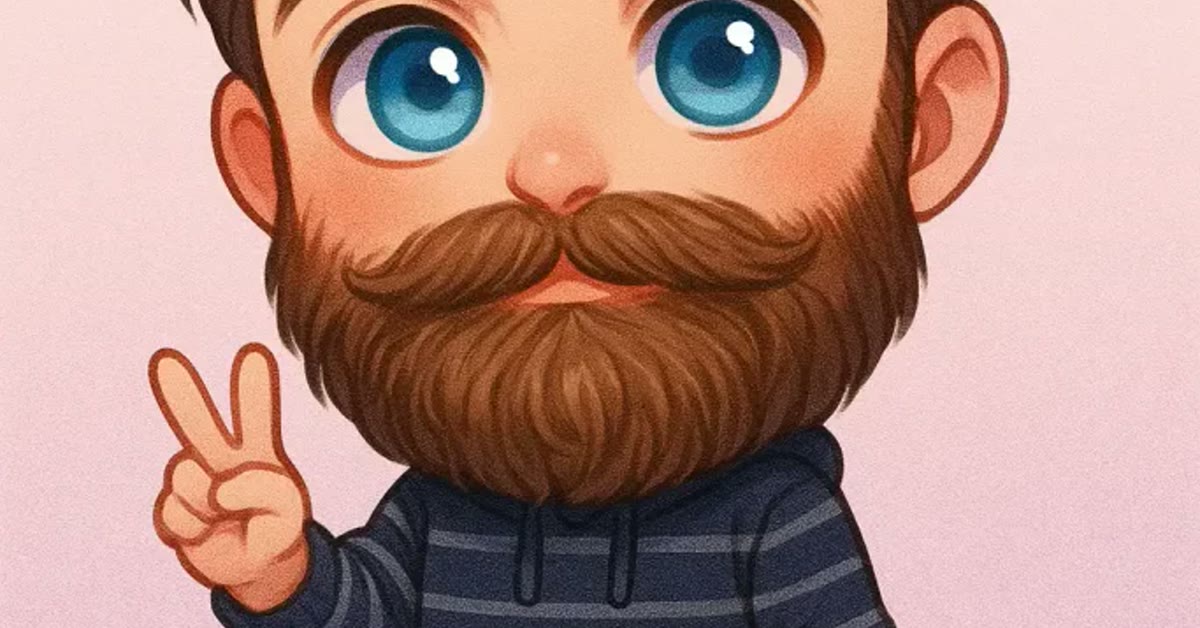
The viral mini cartoon style ChatGPT photo editing prompts turn a normal photo into a cute, chibi-like cartoon. The look is easy to spot: a slightly oversized head, big expressive eyes, soft rounded features, and bright cheerful colours on a simple pastel background. A mini cartoon version of a selfie makes a fun profile picture.
This style is made for joy. It works best on smiling photos, and it is a favourite for profile pictures, stickers, and gifts, because the result is charming without losing who the person is.
Table of Contents
- How to Use These Mini Cartoon Style ChatGPT Photo Editing Prompts
- Copy-Paste Prompt
- Pro Tips for Viral Mini Cartoon Style Chatgpt Photo Editing Prompts
- More Prompts to Try
- How to Customize This Prompt
- Step-by-Step Guide
- Common Mistakes to Avoid
- Best Tools for This Edit
- Frequently Asked Questions
- Final Words
How to Use These Mini Cartoon Style ChatGPT Photo Editing Prompts
- Pick a smiling photo. A happy expression gives the cartoon version the joyful mood the prompt asks for.
- Paste the prompt with your photo. Keep the wording as written for the first result, so the proportions and colours come through together.
- Tune the background. If the pastel feels plain, ask for a simple prop or pattern. If the face feels too small, ask for a closer crop.
Copy-Paste Prompt
Transform this photo into a cute mini cartoon style portrait with a slightly oversized head, big expressive eyes, and soft rounded features. Use bright cheerful colours, a simple pastel background, and playful shading. Keep the original outfit and hairstyle recognisable, with a joyful mood, crisp outlines, 4K clarity, and vibrant cinematic lighting.
Pro Tips for Viral Mini Cartoon Style Chatgpt Photo Editing Prompts
- Keep the hairstyle and outfit recognisable. Those details are what make the cartoon feel like the real person.
- Ask for crisp outlines. Clean lines keep the cartoon style sharp instead of blurry at small sizes.
- Try it as a profile picture. The big eyes and bright colours stay readable even in a tiny circle crop.
More Prompts to Try
The mini cartoon style is a flexible, joyful language: oversized head, big expressive eyes, soft rounded features, bright colours, and a simple pastel background. The variations below keep that language and change the scene, the outfit, or the joke, so one style produces a whole set of portraits. Each prompt keeps the outfit and hairstyle recognisable and the mood joyful, and changes only the setting or the gag.
Mini cartoon picnic. Use this for an outdoor version with a picnic blanket, snacks, and sunshine.
Transform this photo into a cute mini cartoon style portrait at a picnic, with a slightly oversized head, big expressive eyes, and soft rounded features. Use bright cheerful colours, a simple pastel park background, and playful shading. Keep the original outfit and hairstyle recognisable, with a joyful mood, crisp outlines, 4K clarity, and vibrant cinematic lighting.
Mini cartoon superhero. Use this for an action version with a cape and a heroic pose played for laughs.
Transform this photo into a cute mini cartoon style portrait as a tiny superhero, with a slightly oversized head, big expressive eyes, and soft rounded features. Use bright cheerful colours, a simple pastel city background, and playful shading. Keep the original outfit and hairstyle recognisable, with a joyful mood, crisp outlines, 4K clarity, and vibrant cinematic lighting.
Mini cartoon winter. Use this for a snowy version with a scarf, snowflakes, and rosy cheeks. This mini cartoon look keeps facial features cute and recognisable.
Transform this photo into a cute mini cartoon style portrait in winter, with a slightly oversized head, big expressive eyes, and soft rounded features. Use bright cheerful colours, a simple pastel snowy background, and playful shading. Keep the original outfit and hairstyle recognisable, with a joyful mood, crisp outlines, 4K clarity, and vibrant cinematic lighting.
Mini cartoon beach. Use this for a seaside version with sunglasses, sand, and a bright sky.
Transform this photo into a cute mini cartoon style portrait at the beach, with a slightly oversized head, big expressive eyes, and soft rounded features. Use bright cheerful colours, a simple pastel sea background, and playful shading. Keep the original outfit and hairstyle recognisable, with a joyful mood, crisp outlines, 4K clarity, and vibrant cinematic lighting.
Mini cartoon detective. Use this for a mystery version with a magnifying glass and a curious expression.
Transform this photo into a cute mini cartoon style portrait as a little detective, with a slightly oversized head, big expressive eyes, and soft rounded features. Use bright cheerful colours, a simple pastel background, and playful shading. Keep the original outfit and hairstyle recognisable, with a joyful mood, crisp outlines, 4K clarity, and vibrant cinematic lighting.
Mini cartoon birthday. Use this for a celebration version with a party hat, balloons, and confetti.
Transform this photo into a cute mini cartoon style portrait at a birthday party, with a slightly oversized head, big expressive eyes, and soft rounded features. Use bright cheerful colours, a simple pastel party background, and playful shading. Keep the original outfit and hairstyle recognisable, with a joyful mood, crisp outlines, 4K clarity, and vibrant cinematic lighting.
How to Customize This Prompt
Customizing a mini cartoon prompt is about protecting two things: the likeness and the cuteness. The likeness lives in the phrases “keep the original outfit and hairstyle recognisable,” and the cuteness lives in the proportions — slightly oversized head, big eyes, soft rounded features. Change the scene freely, but keep those phrases identical in every version, so the set reads as one cartoon world.
Start with the expression, since cartoon comedy is facial. Big expressive eyes do the work in this style, and the expression word sets the joke: “joyful” is the default, “curious” suits a detective, “delighted” suits a picnic. Keep the expression within the cheerful family and avoid “serious” or “dramatic,” which fight the style.
Next, choose one gag per portrait. A picnic gets snacks, a detective gets a magnifying glass, a birthday gets balloons. One clear gag reads instantly at small size, while three gags compete and blur. Name the gag concretely and place it near the face or hands, where the eye goes first.
Then set the background simply. Cartoon backgrounds should be flat and uncluttered: one pastel colour field, one or two simple shapes, and the playful shading. A busy, realistic background behind a flat cartoon character looks pasted together. Ask for “simple pastel background” in every version, and name at most two background elements.
Finally, keep the colours bright and cheerful. Words like “bright,” “cheerful,” and “vibrant” belong in every version, and words like “muted,” “realistic shading,” or “photorealistic” must stay out. If a result comes out too realistic, the usual cause is a missing style phrase — put the proportions and colour phrases back in and regenerate.
Step-by-Step Guide
- Pick a photo with a clear, cheerful face. Front-facing shots with a visible smile adapt best, since the cartoon style exaggerates the expression it finds.
- Paste the main prompt unchanged with your photo. Judge the first result on two things only: is the outfit and hairstyle recognisable, and does it look like a cartoon rather than a filtered photo?
- Check the proportions and colours. A slightly oversized head, big eyes, and bright flat colours are the style’s signature. If the result looks like a normal photo with a filter, the style phrases need repeating more firmly.
- Refine the gag in one follow-up. If the playful details are missing or wrong, name the exact gag — “add a party hat and balloons” — and repeat the recognisability phrase.
- Build the set with variations. Run three or four scene variations on the same photo to create a matching cartoon series for a profile collection or a sticker set.
- Compare the series at small size. Cartoon portraits are often used as avatars and stickers, so check that the face and the gag both read clearly at thumbnail size. If the gag vanishes when small, make it bigger and simpler.
- Export at high quality and keep the backgrounds clean. The bright colours compress well, but re-saving the same JPEG repeatedly softens the outlines. Export once at the highest quality and work from that file.
- Save the prompt family together. Keep the main prompt and the variations you used in one note, so the next cartoon portrait starts from a proven style rather than a fresh guess.
Common Mistakes to Avoid
The most common mistake is losing the recognisability. A cartoon that keeps neither the outfit nor the hairstyle is just a cartoon, not a portrait. The recognisability phrase must stay in every prompt and every follow-up, and the source photo must be clear and front-facing.
Another mistake is mixing cartoon and realistic styles in one prompt. Asking for “cartoon style with realistic shading” pulls the AI in two directions and usually produces an uncanny middle ground. Commit to the cartoon language — oversized head, big eyes, flat colours, simple background — and let realism stay out of it.
A third mistake is overloading the scene. Five gags, three backgrounds, and a crowd of characters in one portrait produce clutter that reads as noise at small size. One gag, one background idea, one expression: that is the whole recipe, and it scales from avatar to poster without changes.
A fourth mistake is using a dark or blurry source photo. Cartoon conversion needs clear facial features to exaggerate, and a dark photo hides the eyes and smile the style depends on. Choose the brightest, sharpest photo available, even if the pose is plain.
A fifth mistake is adding realistic text or logos. Cartoon lettering drawn by the AI often misspells, and brand logos rendered in cartoon style look unofficial. Keep text out of the portrait, and add captions or names afterwards in an editor where every letter is controlled.
Best Tools for This Edit
ChatGPT’s image tools are a natural home for this prompt, since they handle style transfer — photo to mini cartoon — confidently and keep the outfit and hairstyle recognisable while redrawing the rest. They are strong at the big eyes, soft features, and bright colours this style needs, and their conversational follow-ups make gag refinements easy. Use ChatGPT when you want the most cartoon-like result from an ordinary photo.
Google Gemini is a good alternative when the source photo must stay close to the original. It preserves proportions more conservatively, which helps recognisability, though the cartoon effect may come out gentler. If the first Gemini result looks too photographic, repeat the style phrases — “slightly oversized head, big expressive eyes, bright cheerful colours” — more firmly in the follow-up.
CapCut is the finishing tool for turning mini cartoon portraits into stickers, avatars, and reel covers. Its background remover, sticker maker, and text tools let a cartoon portrait become a chat sticker or a profile badge in minutes. Export the portrait at the highest quality first, then do all sticker and text work in CapCut so the outlines stay crisp.
Frequently Asked Questions
Will the cartoon portrait still look like me? Yes, if the prompt keeps the outfit and hairstyle recognisable and the source photo is clear and front-facing. The style exaggerates proportions — bigger head, bigger eyes — but the outfit, hair, and expression stay yours. Check the first result against the photo before building a series.
Can I use this style for a group photo? It works, but each face needs room. On a crowded group photo the cartoon faces can blur together. Crop to two or three people at most, or edit each person separately and combine them afterwards.
Why does my result look like a filter instead of a cartoon? The style phrases were probably too weak or the source photo too realistic. Repeat “slightly oversized head, big expressive eyes, soft rounded features, bright cheerful colours” explicitly, simplify the background, and ask for a “flat cartoon illustration” finish.
Is this style suitable for kids’ content? Yes, it is one of the safest and most cheerful styles for children’s profiles, birthday posts, and school content. Keep the gags kind and the expressions joyful, and avoid any scary or mocking variations.
Can I print the cartoon portrait? Yes. Export at the highest resolution the tool offers and print from that file. The bright colours print cleanly, and the crisp outlines stay sharp at poster size, which makes this style a good choice for birthday banners and room decor.
Final Words
A slightly oversized head, big expressive eyes, and one good gag are all this style needs. Try it on a cheerful photo and let the cartoon do the talking.
Build the series one scene at a time, keep the outfit and hairstyle recognisable in every version, and the collection will feel like a cartoon show starring you. That is the whole charm of the style — familiar faces, drawn cute, in a world of their own.
Big eyes, bright colours, and a joyful mood are all this style needs. Try it on a smiling photo and enjoy the cute result.
Make a matching set for friends by running the same prompt on each of their smiling photos, since the shared style turns individual portraits into a collection. The cartoon versions also work well as chat stickers, because the big eyes and bright colours read clearly at sticker size. If the background feels empty, ask for one simple prop, such as a balloon or a star, rather than a busy scene. Keep the original photo beside the cartoon when you share it, because the before-and-after comparison is half the fun.