
Introduction
A golden hour video prompt is the easiest way to capture the most beautiful light of the day. The prompt below creates a dreamy video of a person walking through tall grass as the sun sets, with a slow tracking shot, warm amber flares, and gentle wind moving the field.
Golden hour videos feel magical because the light is naturally cinematic. The amber glow softens everything, the long shadows add depth, and the slow pace lets viewers breathe. This style suits travel reels, poetry videos, and any content that needs warmth and calm. Once you try this golden hour video prompt, small tweaks to the wording can give you a completely fresh version. Notice how this golden hour video prompt keeps the subject natural instead of over-processed. This is where the golden hour video prompt quietly does the heavy lifting for your edit.
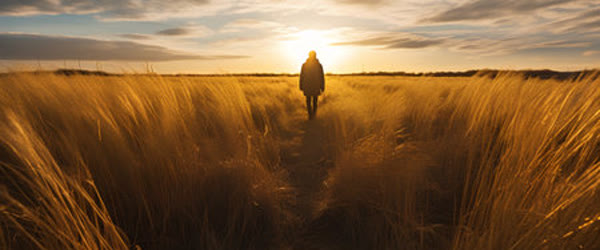
Table of Contents
How to Use This Prompt
- Paste the prompt into your AI video tool and add a field or sunset image as the starting frame if possible.
- Generate the clip and check the tracking movement, the light flares, and the wind motion.
- Trim to the 5 to 8 seconds with the warmest light, and pair it with soft ambient music.
Copy-Paste Prompt
Create a golden hour video of a person walking through tall grass as the sun sets, slow tracking shot from behind, warm amber light flaring through the frame, gentle wind moving the field, peaceful dreamy mood, ultra-realistic motion, 4K, cinematic lighting.
Pro Tips
- A tracking shot from behind feels more cinematic than a front-facing walk.
- Keep the pace slow, since the golden hour mood depends on unhurried movement.
- Let the light flare naturally, avoiding extra glow effects that can look fake.
More Prompts to Try
Golden hour is a light with a thousand subjects, and one walk through tall grass only catches one of them.
The seven prompts below are original variations on the same amber, dreamy, peaceful language. Each one changes the subject, the landscape, or the camera, while keeping the slow pace and the glowing light that define the style. Use them for travel reels, poetry videos, and calm content across the seasons. Paste each prompt whole into your AI video tool.
Golden Hour Ocean Walk
A peaceful walk along the shoreline as the sun sets over the sea, with waves glowing and sand shining.
Create a golden hour video of a person walking along the shoreline as the sun sets over the sea, slow tracking shot from behind, warm amber light flaring over the waves, gentle sea breeze, peaceful dreamy mood, ultra-realistic motion, 4K, cinematic lighting.
Golden Hour Mountain Ridge Many creators keep a golden hour video prompt like this saved for days when they need results fast. A small change in the lighting words can make this golden hour video prompt feel completely new. Save this golden hour video prompt now, because it is the kind of idea you will come back to.
A majestic walk along a mountain ridge at sunset, with valleys glowing below and clouds lit gold.
Transform this scene into a golden hour video of a person walking along a mountain ridge at sunset, slow tracking shot, warm amber light flaring through the frame, gentle wind, peaceful awe, ultra-realistic motion, 4K, cinematic lighting.
Golden Hour City Street
A cinematic walk down a city street at sunset, with buildings glowing, long shadows, and warm windows lighting up.
Create a golden hour video of a person walking down a quiet city street at sunset, slow tracking shot from behind, warm amber light flaring between buildings, long shadows, peaceful dreamy mood, ultra-realistic motion, 4K, cinematic lighting.
Golden Hour Couple Walk What makes this golden hour video prompt different is the balance between detail and simplicity. That flexibility is why a golden hour video prompt like this stays popular with editors. With the right input, this golden hour video prompt delivers a result that looks professionally made.
A romantic walk with a couple holding hands through a meadow at sunset, petals and light drifting together.
Transform this scene into a golden hour video of a couple holding hands and walking through a meadow at sunset, slow tracking shot from behind, warm amber light flaring through the frame, gentle wind, romantic peaceful mood, ultra-realistic motion, 4K, cinematic lighting.
Golden Hour Horse Ride
A free, epic ride with a horse galloping slowly through a golden field at sunset, mane flowing in the wind.
Create a golden hour video of a person riding a horse slowly through a golden field at sunset, slow tracking shot alongside, warm amber light flaring through the frame, mane flowing in gentle wind, peaceful free mood, ultra-realistic motion, 4K, cinematic lighting.
Golden Hour Forest Path If the first result feels off, run the golden hour video prompt again with one detail changed. Keep this golden hour video prompt in your toolkit for your next project and compare the difference. That is the charm of a well-written golden hour video prompt: simple on the surface, powerful underneath.
A quiet, magical walk down a forest path at sunset, with light streaming between trees and dust glowing in the air.
Transform this scene into a golden hour video of a person walking down a forest path at sunset, slow tracking shot from behind, warm amber light streaming between trees, dust glowing in the air, peaceful dreamy mood, ultra-realistic motion, 4K, cinematic lighting.
Golden Hour Rooftop Stillness
A contemplative still scene on a rooftop at sunset, a person sitting quietly as the city glows gold below.
Create a golden hour video of a person sitting quietly on a rooftop at sunset, slow gentle camera drift, warm amber light flaring over the city below, gentle wind, peaceful reflective mood, ultra-realistic motion, 4K, cinematic lighting.
How to Customize This Prompt
A golden hour video is tuned with four dials: the subject, the landscape, the camera, and the wind. Start with the subject. The original prompt follows a person walking away from the camera, which creates longing and peace.
You can change the subject to a couple, a rider, a child, or no person at all, just the landscape glowing. Each subject changes the feeling: a lone walker is contemplative, a couple is romantic, a rider is free, an empty landscape is pure calm. Choose the subject that matches the emotion of your audio, because the video and the music must feel the same thing. A good golden hour video prompt should save you time, and this one is built to do exactly that. The more specific your input, the more this golden hour video prompt can do for you. Every variation in this guide starts from the same golden hour video prompt, so your results stay consistent.
Next, customize the landscape. Tall grass is soft and dreamy, but the golden hour blesses every landscape: the sea glows, the mountains burn, the city shines, the forest turns to cathedral light. Name the landscape clearly, and keep it simple. One landscape per clip, with one dominant texture, grass, water, stone, leaves. Mixed landscapes confuse the light. The golden hour is generous, but it is not a collage. Give it one place to shine.
The camera is the third dial. The slow tracking shot from behind is the signature, and it should stay slow. But you can vary it: a tracking shot alongside for a rider, a gentle drift for a still rooftop scene, a slow push-in for a forest path. Keep the movement unhurried and continuous. Golden hour camera moves should feel like breathing, not like driving. If the camera moves too fast, the peace breaks. If it stops entirely, the dream breaks. Slow, steady, continuous is the rule.
Wind is the final dial, and it is the secret of golden hour video. The prompt’s “gentle wind moving the field” is what makes the clip feel alive rather than painted. Customize the wind’s subject: grass swaying, hair moving, leaves rustling, a dress flowing, water rippling. Wind must be visible in something. A golden hour video with no moving element feels frozen, however beautiful the light. Finally, protect the flares. Amber flares are the punctuation of the style, but they must stay soft and natural. One or two flares per clip, at the edges, are magic. Flares everywhere are a filter. Let the light flare naturally, and never stack extra glow effects on top.
Step-by-Step Guide
Follow these steps to generate a golden hour video that glows warmly, moves slowly, and calms the viewer. Treat this golden hour video prompt as a starting point, then shape it around your own photo or clip. Even beginners can get a clean result from this golden hour video prompt on the first try. If you post results online, this golden hour video prompt gives your feed a recognizable style.
- Choose the landscape and the feeling in one sentence. Write it plainly: “A lone walk through tall grass at sunset, peaceful and dreamy.” If the sentence is clear, the prompt will be clear. If it tries to hold three feelings, the video will hold none of them well.
- Create or choose a strong starting frame if your tool supports it. An image-to-video workflow gives the most reliable golden light. Use a photo of the landscape at sunset, with the sun low, the light warm, and the subject placed small in the frame. The video tool will animate the walk and the wind from that anchor. A great sunset frame is half the video.
- Paste the full prompt with the camera and wind named. Open your AI video tool, paste the complete prompt, and confirm the slow tracking shot, the amber flares, and the gentle wind are all explicit. These three phrases carry the style. Do not trim them to save tokens.
- Generate at the highest quality, five to eight seconds. Golden hour needs time to breathe, and five seconds is the minimum for a tracking shot to feel slow. Eight seconds is the sweet spot. Longer generations risk warping, so generate eight and trim to the warmest six.
- Watch for light consistency and natural motion. On the first generation, check that the light stays warm and low throughout, that the walk is smooth, and that the grass sways naturally. Flickering light or stuttering motion breaks the dream instantly. Reject versions where the sun seems to jump or the grass shudders.
- Generate two more versions and compare warmth. Golden hour varies in warmth and softness. One version may be too orange, another too pale, another just right. Compare the three at full screen in a dim room, and choose the version that glows like a real sunset, not like a filter.
- Trim to the warmest seconds and add ambient music. Cut to the five to eight seconds with the warmest light and the smoothest walk. Add soft ambient music, piano, strings, or nature sounds, at a volume that sits under the image rather than leading it. The music should feel like the light sounds.
- Export in the ratio your platform needs. Export vertical for reels and shorts, horizontal for YouTube, at the highest quality. Watch the export once with sound. If the walk feels slow, the light feels warm, and your shoulders drop, the video is ready. Calm is the metric.
Common Mistakes to Avoid
Rushing the camera. A fast tracking shot at golden hour feels like a chase, not a dream. The pace must be slow enough that the viewer notices the light changing on the grass. If your tool generates a fast version, regenerate with stronger “slow” wording, or slow the clip to eighty percent in your editor. Slowness is the style.
Overdoing the flares. Amber flares are beautiful, but a frame full of flares looks like a lens accident. One or two soft flares, at the frame edges, are enough. If a generation is full of glowing blobs, ask for “subtle natural flares” in a follow-up, or choose a cleaner version. Restraint is what makes light cinematic.
Letting the light flicker. AI video sometimes flickers the sun, the sky brightening and dimming frame by frame. This is the most common golden hour failure, and it is unfixable in editing. Watch the sky closely in every version, and reject any with visible flicker. A steady glow is non-negotiable.
Adding upbeat or loud music. Fast pop or heavy beats over a slow sunset walk creates a jarring mismatch that confuses viewers. Golden hour music is slow, soft, and spacious: ambient piano, gentle strings, or quiet nature sounds. The music must match the pace of the walk, or the video feels like two different things fighting. The details inside this golden hour video prompt are what give the final result its polished look. This golden hour video prompt is designed to be copied, pasted, and customized in minutes. Do not be afraid to experiment once the golden hour video prompt gives you a solid base result.
Using midday light and calling it golden. A bright blue-sky, high-sun generation is not golden hour, however warm the grade. The sun must be low, the shadows long, the light amber. If a version looks like noon, it is noon, and no amount of warm filtering will make it sunset. Regenerate with the sun explicitly low on the horizon.
Best Tools for This Edit
AI video tools like Runway, Kling, or Pika generate the golden walk. Image-to-video is the strongest path: a real sunset photo as the first frame, animated with a named slow tracking shot, produces the most believable light and the smoothest motion. Try the same prompt in two tools and keep the version with the steadiest light and the most natural wind.
CapCut or VN assembles the final reel. Trim to the warmest seconds, add ambient music, balance the audio so it sits under the image, and export in the right ratio. Both editors handle the gentle color polish the style needs: a slight warmth lift, nothing more. Golden hour should be graded, not filtered.
A music library with ambient and cinematic tracks completes the calm. Search for “ambient piano sunset,” “cinematic calm,” or “nature sounds golden hour,” and preview with the video playing. The right track will feel like the light sounds, and the viewer will stay for the whole clip without knowing why. That is the music doing its job. You can reuse this golden hour video prompt for a whole series and still keep every result looking fresh. When you share the result, this golden hour video prompt is the part people will ask you about.
Frequently Asked Questions
What time is golden hour in real life?
The hour before sunset, and the hour after sunrise, when the sun is low and the light turns amber. The evening golden hour is warmer and longer in summer, softer and shorter in winter. For AI generation, you do not need the real time, but knowing it helps you describe the light honestly: low sun, long shadows, warm amber, soft contrast.
Can I generate a golden hour video from a midday photo?
It is possible but harder, since the AI must relight the whole scene. A sunset photo as the starting frame gives a far better result. If you only have a midday photo, expect several generations and careful checking for flicker and unnatural color. A sunset frame is worth finding.
Why does my golden hour video look too orange? For best results, pair this golden hour video prompt with a clear, high-quality source image. Try this golden hour video prompt with two different photos and notice how the mood shifts.
The grade is too warm, and the AI has painted everything with the sun’s color. Ask for warmer light but cooler shadows, or for natural skin and grass tones with the amber kept in the sky and the flare. Real golden hour is orange in the light and neutral in the shade. That contrast is what makes it look real.
Can I add a person who was not in the original photo?
Yes, with image-to-video and a clear prompt, but keep the person small and walking away from the camera. A distant walking figure is forgiving. A close face walking toward the camera is demanding and often warps. For golden hour, the distant walker is also the more cinematic choice. Small figure, vast light.
What caption works best for a golden hour video?
One short, calm line. A single sentence about peace, endings, or gratitude, or one line of poetry, outperforms a long caption. Golden hour content is about feeling, not information. Write the caption the way the light feels: slowly, warmly, and briefly. Let the video do the rest. This golden hour video prompt also works nicely when you want a consistent look across several posts. A reliable golden hour video prompt removes the guesswork from getting the look you want.
Final Words on Golden Hour Video Prompt
Tall grass, amber light, and one peaceful walk into the sunset, and now a whole world of golden hours to wander through. Paste the main prompt, try the ocean walk, the mountain ridge, or the forest path, and keep the version where the light makes you slow down. A great golden hour video does not entertain. It calms. It reminds the viewer that the day ends beautifully, that light can be soft, and that walking slowly toward the sun is sometimes the whole point. Hold the pace, let the wind move the field, let the flare glow softly, and share a golden hour video full of calm and beauty that the feed will thank you for.
Tall grass, amber light, and one peaceful walk into the sunset. Paste this prompt, pick your warmest take, and share a golden hour video full of calm and beauty.