
Introduction
The beautiful layers prompt builds a dreamy portrait from depth. Soft foreground leaves frame the subject, glowing bokeh lights float behind, and warm tones tie the layers into one romantic image. The subject stays sharp and glowing while the world around them melts into art. Once you save this beautiful layers prompt, you can repeat the same look across a whole series of photos. Once you save this beautiful layers prompt, you can repeat the same look across a whole series of photos. A beautiful layers prompt works best when every layer is described in order, starting from the far background and ending with the subject in front.
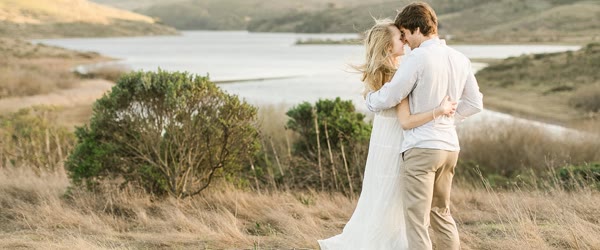
This prompt suits couple photos, pre-wedding shoots, and artistic portraits. Layered edits feel richer than flat photos because the eye moves through the frame. The romantic mood makes it a favorite for anniversary posts and dreamy profile pictures. Layering is a core trick in photo editing, and this prompt builds the whole look around it. Try this beautiful layers prompt with different lighting to see which version suits your style best.

Table of Contents
How to Use This Beautiful Layers Prompt
- Upload a clear portrait to ChatGPT or Gemini and paste the prompt exactly as written.
- If the leaves cover the face, ask the tool to keep the foreground framing at the edges only.
- Download the best version and share it as a romantic or artistic post.

Copy-Paste Prompt
Transform this photo into a beautiful layered edit with the subject framed through soft foreground leaves, glowing bokeh lights, and a dreamy layered background. Add depth, warm tones, and a romantic artistic mood. Keep the subject sharp and glowing. Ultra-realistic detail, 4K, cinematic lighting.
Pro Tips
- Use a photo taken outdoors. Natural greenery blends with the leaf framing far better than indoor shots.
- Ask for warm golden bokeh rather than white. Golden lights feel romantic, while white can look cold.
- Keep the subject centered. Layers frame a centered subject best and keep the balance pleasing.
More Prompts to Try
Layered edits are endlessly versatile, because the layers themselves can change while the structure stays the same. Swap the leaves for flowers, the bokeh for city lights, or the warm tones for cool moonlight, and the same photo becomes a new piece of art. The variations below explore those swaps. The real value of this beautiful layers prompt shows when you compare the before and after side by side.
Rose Petal Frame A well-tested beautiful layers prompt saves time because you can reuse it for many photos.
Roses are the most romantic foreground of all. Soft petals at the edges, a sharp glowing subject, and warm light make this the anniversary version of the style. The real value of this beautiful layers prompt shows when you compare the before and after side by side.
Transform this photo into a romantic layered edit framed through soft rose petals in the foreground, with glowing warm bokeh lights behind and a dreamy garden background. Add depth, soft pink and gold tones, and a tender artistic mood. Keep the subject sharp and glowing. Ultra-realistic detail, 4K, cinematic lighting.
City Lights Bokeh Night
The urban version of the layered style. Night traffic and shop signs melt into golden bokeh, while the subject stays crisp and luminous in the foreground. You can reuse one beautiful layers prompt with different color themes to build a matching set of images for a full post or story series.
Create a dreamy layered night portrait with the subject framed through soft foreground foliage, glowing city bokeh lights behind, and a deep blue evening sky. Add depth, warm and cool contrast, and a modern romantic mood. Keep the subject sharp and glowing. Ultra-realistic detail, 4K, cinematic lighting.
Autumn Leaves Golden Hour
Autumn gives the layered style its richest palette. Red and gold leaves, low warm sun, and drifting light make this the seasonal favorite.
Transform this photo into an autumn layered edit with the subject framed through golden and red foreground leaves, warm low sunlight, and glowing bokeh in a soft park background. Add depth, rich warm tones, and a nostalgic romantic mood. Keep the subject sharp and glowing. Ultra-realistic detail, 4K, cinematic lighting.
Rainy Window Layers
Rain on glass is a natural layer. Droplets, soft blur, and warm indoor light behind the subject create a cozy, cinematic depth.
Create a cozy layered portrait with the subject seen through a rain-covered window, water droplets soft in the foreground, warm indoor bokeh lights behind, and gentle evening tones. Add depth, warm and cool contrast, and a quiet romantic mood. Keep the subject sharp and glowing. Ultra-realistic detail, 4K, cinematic lighting.
Cherry Blossom Dream
The spring version, and one of the most shared. Falling petals add motion, and the pink canopy makes the whole frame feel like a dream.
Transform this photo into a cherry blossom layered edit with the subject framed through soft pink blossoms, petals drifting in the air, and glowing warm bokeh in a dreamy park background. Add depth, soft pink tones, and a gentle romantic mood. Keep the subject sharp and glowing. Ultra-realistic detail, 4K, cinematic lighting.
Fairy Light Evening
Fairy lights are bokeh made real. Strings of warm lights layered in front and behind the subject create a magical, celebratory depth.
Create a magical layered portrait with the subject framed through strings of warm fairy lights in the foreground, glowing bokeh behind, and a soft evening garden background. Add depth, warm golden tones, and a joyful dreamy mood. Keep the subject sharp and glowing. Ultra-realistic detail, 4K, cinematic lighting.
How to Customize This Prompt
Layered edits are built from three planes: foreground, subject, and background. Customizing the prompt means choosing what lives on each plane, and the choices you make decide the entire feeling of the image. For the cleanest output, run this beautiful layers prompt on a sharp, well-lit source photo.
The foreground is the frame. Leaves are the classic choice, but flowers, fairy lights, rain droplets, sheer curtains, and even out-of-focus hands can frame a portrait. The foreground should occupy the edges of the frame only, never the center, and it should be soft and blurred. A sharp foreground element distracts from the subject, while a soft one adds depth without competing. Name your foreground element and add “soft and blurred, at the edges only” to keep it in its place. This beautiful layers prompt is a smart starting point if you want consistent results every time.
The subject plane is the anchor. The subject must stay sharp, well-lit, and glowing, because every layer exists to point at them. If the tool softens the subject along with the background, the image loses its power. Always include “keep the subject sharp and glowing” in your prompt, and check the eyes first when the result appears. Sharp eyes are the test of a successful layered edit. For the cleanest output, run this beautiful layers prompt on a sharp, well-lit source photo.
The background is the atmosphere. Bokeh lights are the signature, but the color of the bokeh matters: golden bokeh feels warm and romantic, white bokeh feels clean and modern, multicolored bokeh feels festive. Choose one bokeh color family and stick to it, or the background becomes a rainbow that fights the subject. Soft light and gentle shadows added to a beautiful layers prompt give the final picture a natural sense of depth.
Depth itself can be tuned. A shallow, gentle layering feels intimate and soft, like a quiet moment. Deep, dramatic layering with strong foreground blur feels artistic and editorial. Ask for “gentle layering” for a natural look or “strong layered depth” for a gallery look. The word you choose steers how aggressive the effect becomes.
Finally, the palette ties the planes together. Warm tones unify leaves, bokeh, and skin into one golden image. Cool tones create a moonlit, dreamy contrast. Pastel tones feel gentle and romantic. Name the palette, and the three planes will agree instead of arguing.
Step-by-Step Guide
Layered edits look complex, but the workflow is simple if you build the planes in the right order. You can also share this beautiful layers prompt with friends who want the same trending look. Many creators rely on a beautiful layers prompt like this to keep their feed looking fresh. You can also share this beautiful layers prompt with friends who want the same trending look.
- Choose a portrait with space around the subject. The layers need room to live. A tight headshot leaves no space for foreground framing, while a half-body or full portrait gives the tool room to place leaves and lights naturally.
- Open ChatGPT or Gemini. Both handle depth and bokeh well. Gemini’s bokeh rendering is especially soft and photographic, while ChatGPT’s layering is bolder and more artistic. Try Gemini first for a natural look.
- Paste the full prompt. Include the foreground element, the bokeh, the depth, and the instruction to keep the subject sharp. The sharpness instruction is the most important sentence in the prompt, so never drop it.
- Check the face first. The foreground leaves must frame the face, not cover it. If a leaf crosses an eye or the mouth, ask for “foreground framing at the edges only, face fully clear” in a follow-up message.
- Check the depth second. The image should read in three planes: soft foreground, sharp subject, glowing background. If everything is equally sharp, the layering has failed, and you should ask for “stronger foreground blur and softer background bokeh.”
- Refine the bokeh color. If the lights look white and cold, ask for “warm golden bokeh.” If they look chaotic, ask for “fewer, larger, softer bokeh lights.” Bokeh quality is a one-sentence fix.
- Generate one seasonal variation. Try the autumn leaves or cherry blossom version with the same photo. Seasonal layers give you a second post that feels fresh while reusing the same successful base.
- Share as art, not just a photo. Layered edits deserve a thoughtful caption. One line about depth, dreams, or framing turns a pretty image into a piece people save and share.
Common Mistakes to Avoid
Letting the foreground cover the face. This is the number one layered-edit failure. Leaves across the eyes or mouth ruin the portrait instantly. Always verify the face is fully clear, and add the edges-only instruction at the first sign of trouble. Every photo responds a little differently, so this beautiful layers prompt rewards a bit of experimenting.
Blurring the subject. Some tools apply the dreamy softness to everything, including the subject. A soft subject with a sharp background is the opposite of the style. The subject must be the sharpest element in the frame, always. If the first result feels flat, adjust the beautiful layers prompt slightly and run it again.
Too many layer elements. Leaves, flowers, fairy lights, rain, and bokeh all at once is visual chaos. One foreground element and one background effect per image is the discipline that makes layered edits look designed. Every photo responds a little differently, so this beautiful layers prompt rewards a bit of experimenting.
Cold, mismatched bokeh. White or blue bokeh over a warm portrait creates a color clash that feels accidental. Match the bokeh to the palette: golden bokeh for warm images, cool bokeh only for deliberate night or moonlight versions.
Using a busy base photo. A portrait taken in a crowded market or a cluttered room fights the layering. The base should be simple, so the added layers have room to breathe. Outdoor portraits with plain backgrounds layer best.
Best Tools for This Edit
Gemini is the finest tool for layered edits because its depth rendering is natural and photographic. The foreground blur falls off smoothly, the bokeh glows softly, and the subject stays convincingly sharp. Its results look like they were shot with a fast portrait lens rather than assembled by software. Used well, this beautiful layers prompt can turn a simple photo into a scroll-stopping edit.
ChatGPT is the better choice for bold, artistic layering. Its foreground elements are more dramatic, its colors are richer, and its follow-up editing lets you swap the foreground element, say from leaves to fairy lights, while keeping the subject and composition intact. Pair this beautiful layers prompt with a clean background and the final image will stand out.
Lightroom is the perfect finisher for layered portraits. A slight warm white-balance shift, a gentle clarity reduction on the background, and a small sharpness boost on the subject will enhance the depth the AI created. Five minutes in Lightroom makes a good layered edit look professionally graded.
Frequently Asked Questions
Can I use this prompt on a photo with two people? The best part of this beautiful layers prompt is how little setup it needs before you start.
Yes. Layered framing suits couples beautifully, because the frame holds both people together. Keep both faces clear of the foreground, ask for the couple centered, and the layers will wrap around them like a vignette. A strong beautiful layers prompt keeps the face natural while the rest of the scene gets the style.
Why do the leaves keep covering the face?
The tool places foreground elements randomly unless you constrain it. Add “foreground leaves at the edges and corners only, face completely clear” to every generation. Two or three regenerations with that sentence usually solve it permanently.
Does this work for black and white portraits?
Beautifully. Ask for a black and white layered edit with soft silver bokeh, and the depth becomes purely tonal. The result is elegant, timeless, and very popular for artistic profile pictures.
Can I print a layered edit large?
Yes. The depth and softness print gorgeously, especially on fine-art matte paper. Export at 4K, keep the subject sharp in the file, and choose a size that lets the foreground blur breathe, such as a large portrait print.
How do I make the bokeh heart-shaped?
Ask for it explicitly: “heart-shaped bokeh lights.” AI tools handle shaped bokeh surprisingly well when named directly. It is a lovely touch for Valentine’s and anniversary versions of this prompt.
Final Words
Layers turn a photo into a painting. Frame it softly, light it warmly, and let the dream come through. Try it on your favorite portrait today and watch a flat photo gain the depth of a gallery piece. Then try the autumn version, then the cherry blossom version, and build a small gallery of layered art from the photos you already love. Depth is the difference between a snapshot and a portrait, and this prompt puts depth in your hands with a single paste. With a good beautiful layers prompt, even a basic phone photo can look polished and professional. What makes this beautiful layers prompt useful is that it works for beginners and regular editors alike.