Introduction
The motion photo prompt turns a still photo into a shot full of speed. Beautiful motion blur streaks the background while the subject stays frozen sharp mid-action. Dramatic light trails and vibrant colors add energy that a normal photo cannot show. The result feels like a frame from an action film.
This prompt suits sports photos, dance shots, bike rides, and running portraits. The sense of movement makes viewers feel the moment instead of just seeing it. When the subject is sharp and the world blurs past, the image tells a story of speed in one frame.
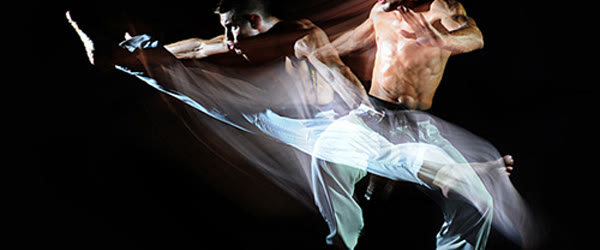
Table of Contents A great motion photo prompt freezes the subject while the world rushes past.
How to Use This Motion Photo Prompt
- Upload an action photo to ChatGPT or Gemini and paste the prompt exactly as written.
- If the subject also blurs, ask the tool to keep the person tack sharp and blur only the background.
- Download the best version and share it as a sports or action post.

The motion photo prompt works best when the subject moves in one clear direction.
Copy-Paste Prompt
Transform this photo into a dynamic motion shot with beautiful motion blur on the background, the subject frozen sharp mid-action, and a strong sense of speed and energy. Add vibrant colors, dramatic light trails, and an exciting athletic mood. Ultra-realistic detail, 4K, cinematic lighting.
Pro Tips
- Use a photo with a clear action pose. Mid-jump, mid-run, and mid-turn poses show motion best.
- Ask for blur direction that matches the movement. Sideways blur suits running, while radial blur suits spins.
- Keep the colors vibrant but natural. Over-saturated light trails can look cartoonish instead of cinematic.
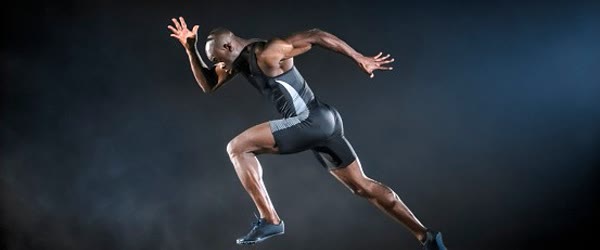
With this motion photo prompt, a standing portrait gains the energy of a race.
The motion photo prompt rewards patience, since the cleanest streaks often come on the second try.
Keep the motion photo prompt saved, because any still photo might need energy one day.
More Prompts to Try
Motion belongs everywhere: on the track, on the dance floor, on the road, and in the air. The variations below put the same freeze-and-blur technique into different sports and movements, so you can build an action portfolio from any photo with energy in it.
Sprinter Exploding Off the Blocks
The purest speed image in sport. A sprinter leaving the blocks, background streaking, body frozen in perfect drive phase.
Transform this photo into a dynamic sprint motion shot with the runner frozen sharp exploding off the starting blocks, the track and stadium blurred in streaks behind, and a strong sense of explosive speed. Add vibrant colors, dramatic light trails, and an exciting athletic mood. Ultra-realistic detail, 4K, cinematic lighting.
Dancer Mid-Leap
Dance is motion made beautiful. A leap frozen at its peak, costume flowing, background blurred into color, is the most artistic motion shot of all.
Create a dynamic dance motion shot with the dancer frozen sharp mid-leap, costume flowing, the stage background blurred in beautiful streaks, and a strong sense of grace and energy. Add vibrant colors, dramatic light trails, and an inspiring artistic mood. Ultra-realistic detail, 4K, cinematic lighting.
Cyclist Descending Fast
Cycling speed is all about the lean and the blur. A rider low over the bars, road streaking beneath, makes the viewer feel the wind.
Transform this photo into a dynamic cycling motion shot with the rider frozen sharp leaning low over the handlebars on a descent, the road and landscape blurred in streaks, and a strong sense of speed. Add vibrant colors, dramatic light trails, and an exciting athletic mood. Ultra-realistic detail, 4K, cinematic lighting.
Basketball Drive to the Hoop
Basketball motion is explosive and vertical. A drive frozen mid-air, defenders blurred, hoop above, is pure highlight energy.
Create a dynamic basketball motion shot with the player frozen sharp mid-air driving to the hoop, defenders and crowd blurred in streaks, and a strong sense of power and speed. Add vibrant colors, dramatic arena light trails, and an exciting athletic mood. Ultra-realistic detail, 4K, cinematic lighting.
Skateboarder Mid-Trick
Skateboarding is motion with style. A trick frozen at its peak, board and rider sharp, park blurred, is the definitive action shot.
Transform this photo into a dynamic skateboarding motion shot with the skater frozen sharp mid-trick above a ramp, the skatepark blurred in streaks below, and a strong sense of style and speed. Add vibrant colors, dramatic light trails, and an exciting youthful mood. Ultra-realistic detail, 4K, cinematic lighting.
Horse Galloping Free
Animal motion is the most powerful of all. A galloping horse, mane flying, ground blurred beneath, is speed in its purest form. Many creators use the motion photo prompt for runners, dancers, cyclists, and speeding cars.
Create a dynamic horse motion shot with the horse frozen sharp mid-gallop, mane and tail flying, the field blurred in streaks behind, and a strong sense of wild freedom and power. Add vibrant colors, dramatic light trails, and an inspiring natural mood. Ultra-realistic detail, 4K, cinematic lighting.
In short, the motion photo prompt turns still images into moments that move.
How to Customize This Prompt
Motion edits are built from three decisions: what moves, what stays sharp, and which way the blur runs. Start with what moves. The subject must be frozen sharp while the world blurs past, because that contrast is the entire illusion of speed. If the subject blurs too, the image just looks out of focus. Always include “subject frozen sharp, background blurred” in the prompt, and check the subject’s sharpness first in every result.
The blur direction is the second lever, and it must match the movement. Sideways streaks suit running, cycling, and driving, because the motion is horizontal. Radial blur suits spins, dances, and jumps, because the motion radiates outward. Vertical streaks suit falls and dives. A mismatch, like vertical blur on a runner, looks wrong instantly, even if the viewer cannot name why. Name the blur direction to match the action: “horizontal motion blur” for runners, “radial blur” for spinners.
The action pose is the third lever. Motion needs a pose caught mid-movement: mid-stride, mid-jump, mid-turn, mid-throw. A standing pose with blur added looks like a mistake, because nothing in the body explains the speed. Choose a base photo with a genuine action pose, or ask the tool to place the subject in one. The pose is the story; the blur is only the punctuation.
Light trails are the fourth lever. Trails add drama and night-time energy, but they must follow the movement’s path. Trails behind a runner suggest speed. Trails swirling around a dancer suggest grace. Random trails with no relation to the movement look like decoration. Ask for trails that follow the action, and keep them subtle enough that the subject stays the hero.
Finally, color sets the energy. Vibrant colors amplify speed and excitement. Muted tones make motion feel elegant and editorial. Night neon makes it feel urban and electric. Match the palette to the sport and the mood: vibrant for athletics, elegant for dance, neon for street sports. The motion photo prompt suits city streets, stadiums, and busy stations alike.
Share a motion photo prompt result and viewers feel the speed before they read the caption.
Step-by-Step Guide
Follow these steps to create a motion shot that feels fast, sharp, and cinematic, instead of merely blurry. If the blur covers the face, run the motion photo prompt again with a sharper center.
- Start with a genuine action photo. Mid-jump, mid-run, mid-turn, or mid-throw. The pose must already contain movement, because the prompt enhances motion, it does not invent it from a standing pose.
- Open ChatGPT or Gemini. Both render motion blur well. Gemini’s blur is smoother and more photographic, while ChatGPT’s light trails are more dramatic. Try Gemini first for realism.
- Paste the full prompt. Include the frozen subject, the blurred background, the speed, and the light trails. The contrast between sharp and blurred is the whole technique, so both halves must be named.
- Check the subject first. The person or animal must be tack sharp, especially the face and the leading edge of the body. If the subject blurs, ask for “subject perfectly sharp and frozen, blur only the background” in a follow-up message.
- Check the blur direction second. The streaks must follow the movement. If a runner’s blur runs vertically, regenerate with “horizontal motion blur matching the running direction.” Direction is the detail that sells the illusion.
- Refine the trails. If the light trails look cartoonish, ask for “subtler, more realistic light trails.” If they are invisible, ask for “more visible dramatic light trails.” One sentence tunes them.
- Generate one sport variation. Try the dancer or cyclist version with a different action photo. A pair of motion shots in different sports shows range and builds an action portfolio from one session.
- Post with an action caption. Motion shots need verbs in the caption: “Frozen at full speed.” The caption should move as fast as the image, so keep it short, punchy, and active.
Because it needs only one photo, the motion photo prompt is perfect for quick experiments.
Common Mistakes to Avoid
Blurring the subject. The most common motion-edit failure is everything blurred, which reads as a bad photo, not speed. The subject must be sharp. Always verify sharpness first, and regenerate until the subject is frozen.
Wrong blur direction. Blur that fights the movement breaks the illusion instantly. Match the streaks to the action’s direction, and check them in every generation. Direction is destiny in motion edits.
Standing poses with blur. A person standing still with a blurred background looks like a mistake, not speed. The pose must contain movement. If you lack an action photo, choose a different prompt style rather than forcing motion onto stillness.
Cartoonish light trails. Over-saturated, thick, neon trails turn a cinematic motion shot into a comic panel. Keep trails subtle, realistic, and following the movement. Less trail is usually more speed.
Over-saturation. Vibrant is good, neon is not. When every color screams, the motion gets lost in the noise. Keep colors vibrant but natural, so the speed, not the palette, is the star. This motion photo prompt pairs well with light trails and a slightly low camera angle.
Try the motion photo prompt on a night street shot when you want glowing light trails.
Best Tools for This Edit
Gemini is the best motion-blur tool because its blur is smooth, directional, and photographic. The streaks fall off naturally, the subject stays convincingly frozen, and the overall result looks like a real panning shot from a sports photographer. Start with Gemini for motion.
ChatGPT is the better choice for dramatic, trail-heavy motion shots. Its light trails are bolder, its colors are richer, and its night and neon motion scenes are spectacular. Use ChatGPT when the motion should feel like an action movie poster.
CapCut is the natural finisher for motion content, because motion stills want to move. A slow zoom following the blur direction, a speed-ramp effect, and a whoosh sound turn the frozen action shot into a three-second clip that feels alive. Post the clip, not just the still, for maximum impact.
That instant energy is why the motion photo prompt keeps trending in photography groups.
Frequently Asked Questions
Can I add motion to a completely still photo?
Partially. The tool can add blur and trails, but without an action pose the result often looks wrong. A standing photo with blur reads as a mistake. For the best results, start with a photo that already contains movement.
What is panning, and why does it matter?
Panning is the photographic technique this prompt imitates: the camera follows a moving subject, keeping it sharp while the background streaks. Real panning shots are hard to capture, which is why AI motion edits are so popular: they give you the panning look without the panning skill.
Can I use this for vehicles?
Beautifully. Cars, bikes, and trains all suit the freeze-and-blur technique perfectly, because their motion is fast, linear, and directional. A car frozen sharp with the road streaking past is one of the most striking motion images possible.
Why does my subject keep blurring?
Because the prompt’s blur instruction is being applied globally. Add the explicit separation: “subject perfectly sharp and frozen, motion blur ONLY on the background, never on the subject.” Repeating that separation in follow-ups usually fixes it. Every motion photo prompt result improves when the background has lines the blur can stretch.
Can motion shots work for portraits? The motion photo prompt also works for pets, sports, and playful jump shots.
Yes, with hair and fabric doing the moving. A portrait with hair blowing and the background streaking softly feels alive and cinematic. Keep the face perfectly sharp, let the hair and the world move, and the portrait gains energy without losing identity. Save the still version first, because the motion photo prompt changes the whole feeling.
Creative Ideas to Try
Motion shots become a portfolio when you collect them across disciplines. One striking idea is the speed grid: six motion shots, sprinter, dancer, cyclist, basketball player, skater, and horse, posted as a single grid with the same blur language. The grid proves the technique across every kind of movement, and it looks like a professional sports photography exhibition. Another idea is the before-and-after motion pair: post the original still photo beside the motion version, and let viewers see the exact moment speed was added.
The comparison is satisfying and educational, and it shows followers precisely what the prompt does. You can also try the motion reel: import three motion shots into CapCut, add a whoosh sound and a quick zoom on each, and the stills become a three-second action sequence.
Finally, try the long-exposure night version: ask for the same subject with extended light trails at night, turning the motion shot into a light painting. The night version is the most artistic of all, and it suits a profile grid that wants to feel premium. Each idea starts from an action photo and the same freeze-and-blur formula, but each one turns speed into a different kind of art. For a stronger speed effect, the motion photo prompt benefits from streaks that follow the movement.
Final Words
Speed is a feeling. Freeze the athlete, blur the world, and let this prompt make your photo move. Build the sprinter for power, the dancer for grace, and the cyclist for pure velocity, and let each one prove that a still image can hold motion. The world blurs, the subject holds, and in that contrast the viewer feels the speed in their own body. That feeling is the whole art of the motion shot, and it is yours with a single prompt. The motion photo prompt is a quick way to rescue a photo that felt too static. Used on dance photos, the motion photo prompt turns a pose into pure rhythm.
Once you master it, the motion photo prompt becomes your go-to for action content.
Leave a Reply